Quick answer
For Facebook page hacked recovery, log in and submit Meta's Facebook Page recovery form, or use facebook.com/hacked on a device you used before if you cannot log in. Then remove unknown admins in Meta Business Suite, turn on two-factor authentication, and request a review of any disabled ad account in Business Support Home.
Key takeaways
- Most Page takeovers start with a fake Meta message (copyright violation, Page deletion, ad credit invite) or with malware that steals your logged-in browser session.
- Meta says the Facebook Page recovery form is the fastest route back, even for Meta Verified subscribers, and it aims to reply within a day.
- Disabled ad accounts are appealed in Business Support Home; reviews typically take 48 hours, and an account still ineligible after six months cannot be reinstated.
- Meta removed 159 million scam ads in 2025, so legitimate accounts with odd activity can get caught in reviews.
- Two-factor authentication with an authenticator app or passkey, two trusted backup admins and full-control access kept to a minimum prevent most repeat attacks.
Why are so many Facebook Pages getting hacked and ad accounts disabled?
Facebook page hacked recovery has become a common job for Pakistani businesses because attackers target Page admins with convincing fake Meta messages and with malware that steals logged-in sessions, while Meta's crackdown on scam ads is disabling more accounts that show unusual activity. Often both happen at once: the hacker runs ads, and Meta then disables the account.
The most common ways in, as of November 2026:
- Fake "copyright violation" or "your Page will be deleted" messages. These arrive by email, Messenger or as comments on your posts, and link to a fake Meta page that asks for your password and login code. In February 2025, Check Point reported one such campaign sent to more than 12,279 email addresses at hundreds of companies (Check Point). Because AI now writes these messages, the old clue of bad grammar is less reliable.
- Fake invitations that come from a real Meta address. In November 2025, Check Point described a campaign in which attackers created fake Business pages and used Meta's own invitation feature, so the emails came from the genuine facebookmail.com domain. Over 40,000 phishing emails reached more than 5,000 organisations, with subjects such as "Meta Agency Partner Invitation" (Check Point).
- Session-cookie theft. A session cookie is the small file that keeps you logged in. Malware such as NodeStealer, disrupted by Meta in 2023, stole these cookies from browsers so attackers could enter accounts without the password and without passing two-factor checks (BleepingComputer). It typically arrives through cracked software, fake "AI tool" downloads or untrusted browser extensions.
- A compromised co-admin. Your account may be safe, but a freelancer or former employee with full control was hacked, and the attacker removed everyone else.
At the same time, Meta is tightening ad enforcement. It said it removed 159 million scam ads in 2025, 92% before anyone reported them, took down 10.9 million Facebook and Instagram accounts linked to criminal scam centres, and wants verified advertisers to make up 90% of its ad revenue by the end of 2026 (The Record). A hacked account that suddenly runs crypto or fake-giveaway ads looks exactly like what these systems hunt for.
Why does a hacked Page hurt Pakistani businesses so much?
For many Pakistani businesses, the Facebook Page and its linked Instagram and WhatsApp are the shop, the order book and the ad engine. Losing them stops sales on the same day, and getting them back can take days or weeks.
- Your saved card gets used. Attackers often run ads on your ad account using your card. Charges continue until you or your bank stop them.
- Your customers get scammed in your name. Fake "70% off" posts or messages asking for advance payment by JazzCash or Easypaisa damage trust you spent years building.
- Your ad account can be disabled. Ads the hacker ran can break Meta's policies, and the account is disabled even though you did nothing.
- The clock is ticking. Meta's help centre says that if an ad account is disabled for a policy violation and stays ineligible for reinstatement for six months, it cannot be reinstated after that (Meta Business Help Centre).
Facebook page hacked: what to do in the first hour?
In the first hour, protect your money and your customers before you start recovery: block the card, change passwords from a clean device, and warn customers on channels you still control.
- Call your bank and block the card saved on the ad account, and ask for any recent charges from Meta or Facebook to be reviewed. Order a replacement card.
- Use a clean device. If you suspect malware, do not log in from the infected laptop. Use a phone or a computer you trust.
- Change your Facebook password and your email password if you can still log in, and sign out of all other sessions (see the steps below).
- Warn customers on Instagram, WhatsApp status, your website and with a message to regular buyers: "Our Facebook Page was hacked. Do not pay anyone who messages from it until we confirm."
- Take screenshots of fake posts, unknown admins, suspicious emails and bank charges, with dates. You will need them for Meta and for any complaint.
- If money was stolen from you or your customers, you can also file a complaint with the National Cyber Crime Investigation Agency (NCCIA), which handles hacking and online fraud complaints in Pakistan, on its 1799 helpline or online portal (our AI scams guide covers what evidence to save first). Recovery of the Page itself still happens through Meta.
Facebook page hacked recovery: how do you get your Page back step by step?
If you can still log in to your personal account, submit the Facebook Page recovery form. If you cannot log in, start at facebook.com/hacked on a device you have used before. Then clean up admins and settings.
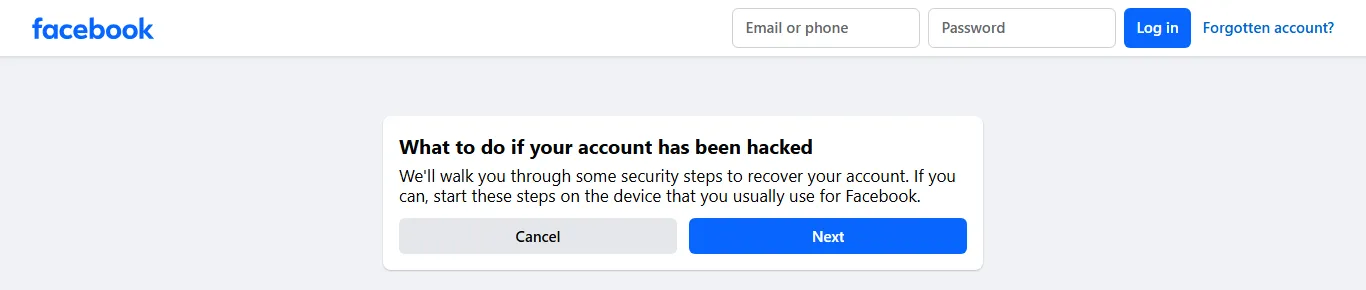
- Recover your personal account first if you are locked out. Go to facebook.com/hacked on the phone or computer you normally use for Facebook and follow the prompts. Meta can more easily recognise you on a familiar device and network. Done looks like: you can log in again and have set a new password. Common mistake: trying from a new phone or a cyber cafe, which makes recognition harder.
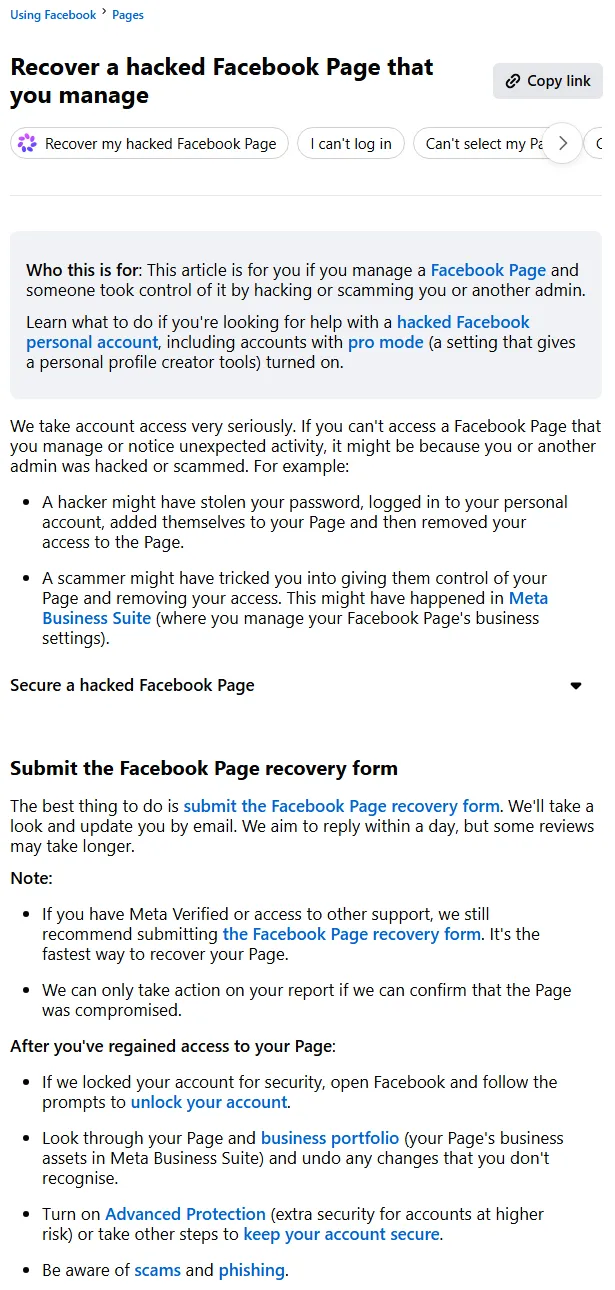
- Submit the Facebook Page recovery form. While logged in, open Meta's help article Recover a hacked Facebook Page that you manage and use the recovery form link. Meta says it aims to reply by email within a day, and that it can act only if it can confirm the Page was compromised. The form only lets you pick a Page you recently lost access to. Common mistake: paying "Facebook recovery agents" on WhatsApp or Telegram; they cannot do anything Meta's form cannot, and many are scammers.
- If another admin was hacked, they must do it. Meta's article says the person whose account was compromised should log in and submit the form themselves, or use facebook.com/hacked on their usual device.
- Remove unknown people from the Page and business portfolio. Once back in, go to Meta Business Suite → Settings → People and remove anyone you do not recognise. Check Settings → Business assets for Pages, ad accounts, Instagram accounts or WhatsApp numbers that were added or removed. Done looks like: only known people have access, and every asset is back in your portfolio. Common mistake: removing the hacker's personal profile but leaving a partner business they added.
- Secure your account in Accounts Center. On Facebook, go to Settings and privacy → Settings → Accounts Center → Password and security. Change your password, open Where you're logged in and log out of every session you do not recognise, and check your email addresses and phone numbers. Meta also suggests turning on Advanced Protection, its extra security for accounts at higher risk.
- Undo the damage. Delete posts and ads the attacker created, check Page name and username changes, review ad charges in Billing and payments, and remove any payment methods you did not add.
- Tell customers you are back. Post a short update and pin it for a week.
Facebook page hacked, admin removed by someone you know?
If no one hacked you but a former employee or agency removed you, Meta treats that as an access dispute. Its article says to check whether another admin removed you and ask them to add you back. This is why your business, not a staff member, should own the business portfolio.
How do you appeal a disabled Facebook ad account?
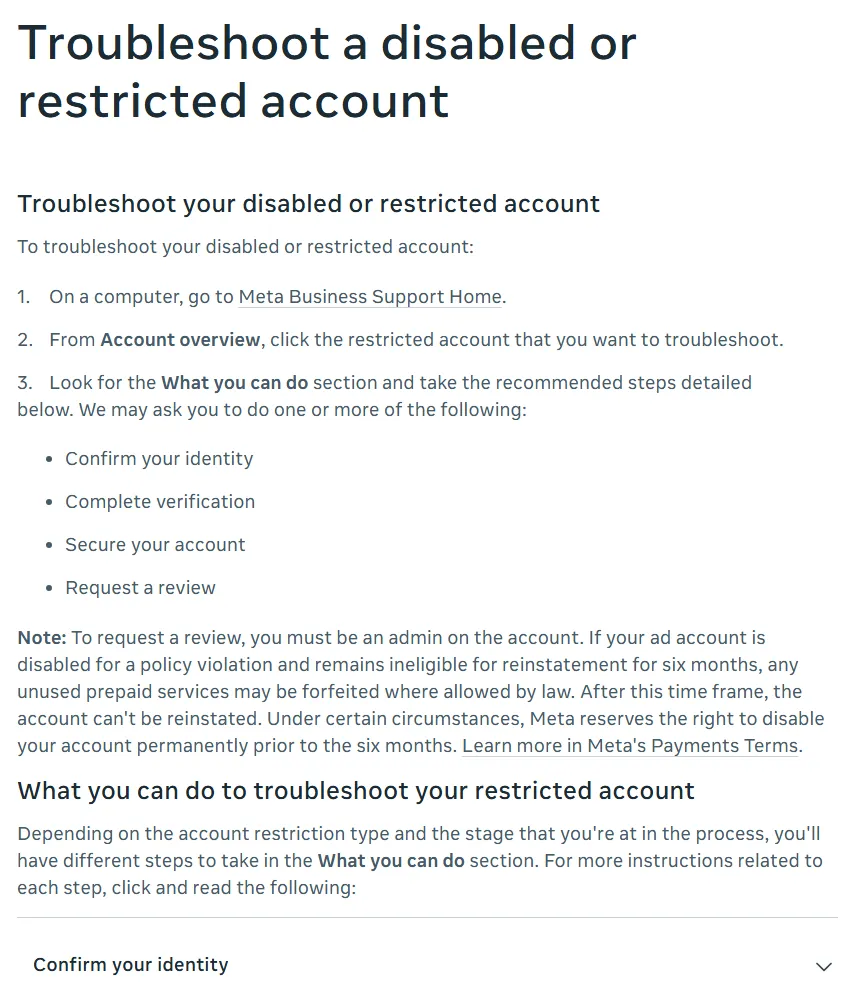
Appeal through Meta Business Support Home: open the restricted account, follow the steps in What you can do, and request a review if it is offered. Only an admin on the account can request a review.
- Open Business Support Home on a computer. Go to Meta Business Support Home → Account status overview and click the restricted ad account, Page or profile.
- Complete what Meta asks first. Meta may ask you to confirm your identity (email, phone, a photo of your ID such as your CNIC or passport, or the payment method on the account), complete verification, or secure your account. Meta's help centre says users of a business portfolio older than 90 days may need two-factor authentication on to keep access.
- Request a review. In What you can do, select Request review and explain briefly and factually what happened: "Our account was hacked on 3 November; the ads in question were created by the attacker; we have removed unknown admins and turned on two-factor authentication." Attach screenshots if asked.
- Wait for the decision. Meta says reviews are typically completed in 48 hours but can take longer, that there is a limited number of review requests, and that after a review the decision is final (Meta Business Help Centre).
- Restart ads manually if reinstated. Ads that were running before the restriction do not restart automatically.
- If the cause was a failed payment, fix billing instead. A payment failure disables the ad account until the balance is paid; see our guide to Facebook ads payment methods in Pakistan.
Facebook ad account disabled for no reason?
It almost always has a reason, even if Meta's message does not spell it out. Common triggers: a new account spending heavily on day one, a card used on many ad accounts, logins from new countries (often from a VPN or a hacker), ads with before-and-after claims, unrealistic discounts or financial promises, or ads the attacker ran. Check Account Quality for the policy named, fix the cause, then request a review once.
Does Meta Verified help, and what is the Meta Verified price in Pakistan?
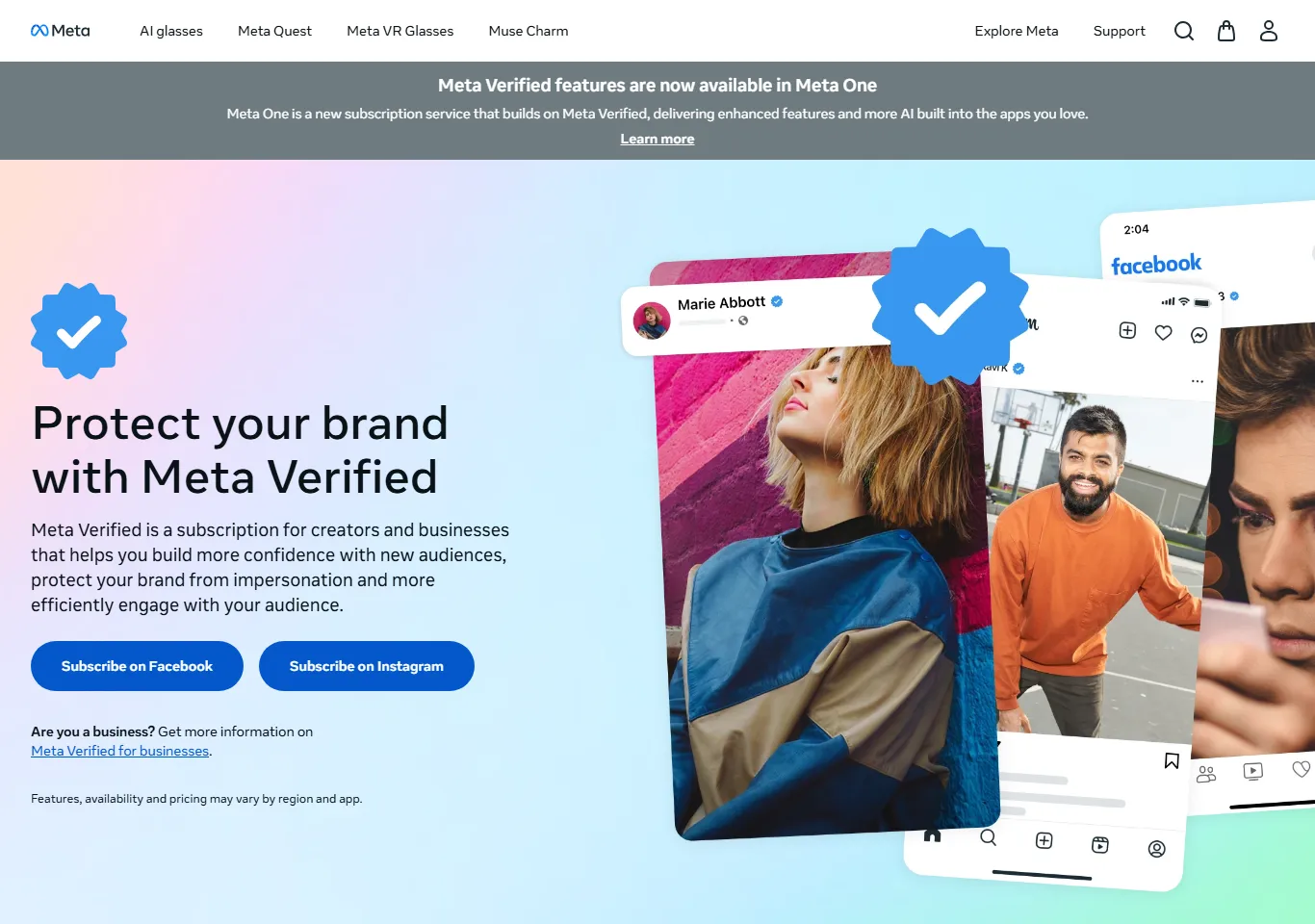
Meta Verified can add a verified badge, impersonation monitoring and access to support, but it is not a shortcut for hacked Pages: Meta still says the recovery form is the fastest route. We could not confirm a Pakistan rupee price as of November 2026; Meta shows prices and availability only on the sign-up screen for your account.
Meta's Meta Verified page describes it as "a subscription for creators and businesses" and lists a verified badge, impersonation protection, enhanced support and upgraded profile features. It adds that features, availability and pricing "may vary by region and app", and that 24/7 agent support "may not be available to all subscribers". In November 2026 the page also announced that Meta Verified features are now part of Meta One, a newer subscription.
In markets where it is sold, prices reported from Meta's page are in US dollars, with the Standard plan at about $11.99 a month on the web and $14.99 in the app, and higher business tiers above that (Pakera). To check for your Page, open the Meta Verified option in your Facebook or Instagram professional settings. If you see no subscribe option, it is not open for that account yet. If you do subscribe with a Pakistani card, your bank's international fees and Section 236Y advance tax apply on top.
How do you stop your Facebook Page being hacked again?
Use strong two-factor authentication for every admin, keep two trusted backup admins, give everyone else only the access they need, and stop installing software and extensions you do not trust. Set it up once using this table.
| Setting | Where | What good looks like |
|---|---|---|
| Two-factor authentication | Accounts Center → Password and security → Two-factor authentication | Authenticator app or security key for every admin, not SMS alone |
| Passkey | Accounts Center → Password and security → Passkey (Facebook app on iOS and Android) | Turned on where available; Meta began rolling out passkeys on Facebook in June 2025 |
| Require 2FA for the portfolio | Meta Business Suite → Settings → Security Center | Two-factor required for everyone in the business portfolio |
| Admins with full control | Meta Business Suite → Settings → People | Two owners from the business (for example, owner and a trusted partner), both with 2FA |
| Everyone else | Same screen, assign assets | Basic or task access only to the Pages and ad accounts they work on |
| Agencies | Settings → Partners | Added as a partner business, not as people with full control of your portfolio |
| Login alerts | Accounts Center → Password and security → Login alerts | Alerts on for unrecognised logins, sent to email and app |
| Recovery details | Accounts Center → Personal details | Current email and phone, both secured with 2FA |
A passkey is a login that uses your phone's fingerprint, face or PIN instead of a password, so there is nothing for a fake page to steal. Meta announced passkeys for Facebook on iOS and Android in June 2025 (Meta Newsroom).
Three habits matter as much as settings:
- Never log in from a link. Meta will not ask for your password in a comment, Messenger chat or email about copyright. Open the Facebook app or type facebook.com yourself and check Settings → Accounts Center → Password and security → Recent emails if you are unsure a message is real.
- Keep the admin computer clean. No cracked software, no "free AI" downloads, and only browser extensions you need from known publishers. Remove the rest today.
- Review access every quarter. Remove former staff, freelancers and agencies you no longer work with.
For the wider picture of AI-written scams and deepfakes, read our guide on AI scams and cyber security for Pakistani businesses.
What mistakes make Page recovery harder?
- Paying "recovery services". Meta's own form is free and is the route Meta recommends.
- Creating a new Page straight away. You split your audience and can look like an impersonator. Recover first.
- Submitting many appeals at once. Meta limits review requests; one clear, factual request is better.
- Keeping one admin. If that person is hacked or leaves, nobody can fix anything.
- Sharing login codes. No genuine Meta employee will ask for your two-factor code.
- Ignoring the six-month window for disabled ad accounts.
What is a recovery and prevention checklist you can copy?
- Card on the ad account blocked and replaced if the account was hacked.
- Personal account recovered via facebook.com/hacked on a familiar device.
- Facebook Page recovery form submitted while logged in.
- Unknown people, partners and assets removed in Meta Business Suite.
- Unknown sessions logged out; passwords for Facebook and email changed.
- Disabled ad account reviewed in Business Support Home within days, not months.
- Two-factor authentication (authenticator app or passkey) on for every admin, and required for the business portfolio.
- Two trusted owners with full control; everyone else on limited access.
- Login alerts on; untrusted extensions removed.
- Access reviewed every three months.
How can Digitt Hype help secure your Pages and ad accounts?
Our digital media team manages Pages for businesses and sets up business portfolios with the right owners, roles and two-factor rules, and our paid ads team helps prepare factual reviews for disabled ad accounts. We work with online stores and startups. We cannot bypass Meta's process, but we can make sure you follow it correctly. Contact us for a security setup.
Frequently asked questions
How long does Facebook Page hacked recovery take?
Meta says it aims to reply to the Facebook Page recovery form within a day, but some reviews take longer. Recovering a locked personal account first through facebook.com/hacked can add time. Ad account reviews in Business Support Home typically take 48 hours. Having two-factor authentication and a second admin set up beforehand makes recovery much faster.
My Facebook Page was hacked and the admin removed me. What do I do?
If you can still log in to your personal account, submit the Facebook Page recovery form linked from Meta's hacked Page help article. If you cannot log in, use facebook.com/hacked on a device you used before. If a co-admin's account was hacked, that person must submit the form. Then remove unknown people in Meta Business Suite.
How do I appeal a disabled Facebook ad account?
On a computer, open Meta Business Support Home, go to Account status overview, select the account and follow the steps in What you can do. Confirm your identity if asked, then select Request review. Only an admin can request a review, the number of requests is limited, and the decision after review is final.
Can a disabled ad account be restored after six months?
No, according to Meta's help centre. If an ad account is disabled for a policy violation and remains ineligible for reinstatement for six months, it cannot be reinstated after that, and unused prepaid funds may be forfeited where the law allows. Request a review as soon as you find the restriction.
What is the Meta Verified price in Pakistan?
We could not confirm a rupee price as of November 2026. Meta says pricing and availability vary by region and app, and shows them only on the sign-up screen for each account. Reported prices in other markets start around $11.99 a month on the web for the Standard plan. If you pay with a Pakistani card, bank fees and Section 236Y tax apply.
Does two-factor authentication stop all Facebook hacks?
It stops most password-only attacks but not all. Malware that steals your browser's session cookie can bypass it, and you can still be tricked into typing a code on a fake page. Use an authenticator app or passkey, never share codes, keep untrusted software and extensions off admin computers, and keep a second trusted admin.
Sources 10
- Facebook Help Centre: Recover a hacked Facebook Page that you manage
- Facebook: Recover a hacked account (facebook.com/hacked)
- Meta Business Help Centre: Troubleshoot a disabled or restricted account
- Meta Business Help Centre: Request a review if you are restricted from advertising
- Meta: Meta Verified
- Meta Newsroom: Introducing passkeys on Facebook (June 2025)
- The Record: Meta scam advertising crackdown (March 2026)
- Check Point: Phishing campaign exploits Meta Business Suite to target SMBs (November 2025)
- BleepingComputer: Facebook disrupts NodeStealer information-stealing malware
- Pakera: Meta Verified price in Pakistan
Numbers not matching your dashboard?
That gap is worth an hour of someone’s time. Tell us what you see and we will look at it with you.