Quick answer
WhatsApp Business API Pakistan pricing is per delivered message. From 1 October 2026 Meta's rate card lists Pakistan at $0.0473 per marketing message and $0.015 per utility, authentication or service message, with 1,000 free service messages per number each month. Replies inside the window opened by a Click-to-WhatsApp ad are free for up to 7 days.
Key takeaways
- Since 1 July 2025 Meta charges per delivered message, and the price depends on the message category and the customer's country code.
- From 1 October 2026 a Pakistan marketing message costs $0.0473 (about Rs 13) and a utility, authentication or service message $0.015 (about Rs 4.15), roughly 10.7 times India's utility rate.
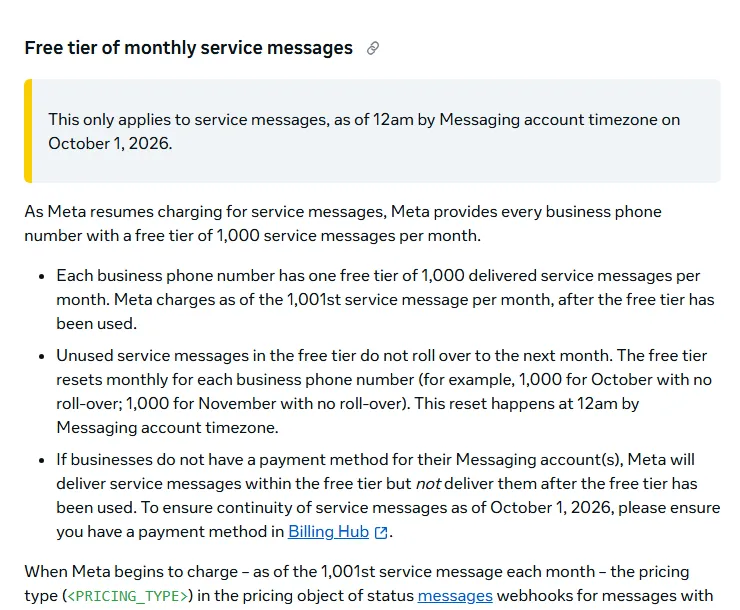
- Service replies are no longer fully free: each phone number gets 1,000 free service messages a month, then every reply is charged.
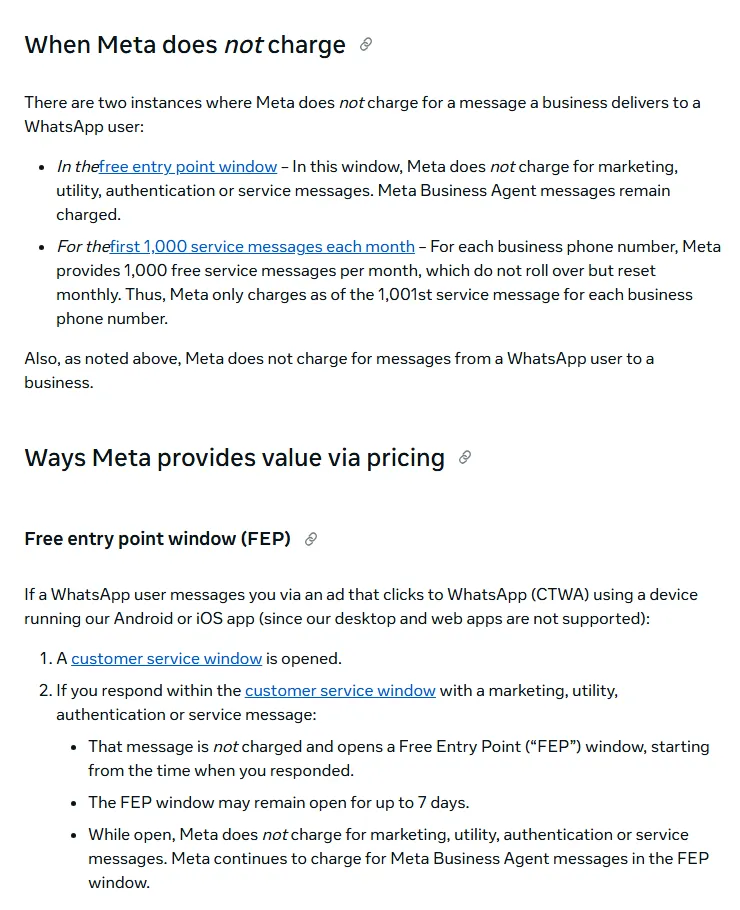
- Click-to-WhatsApp ads open a free entry point window of up to 7 days in which all your replies and templates to that person cost nothing.
- Sending bulk messages from a personal number to people who never opted in breaks WhatsApp policy and is the fastest way to get a number blocked.
What changed in WhatsApp Business API Pakistan pricing?
WhatsApp Business API Pakistan pricing is now per delivered message, and as of 1 October 2026 Pakistan pays some of the highest rates in the region. If you send order updates, broadcast offers or answer customer questions through the API, your monthly bill depends on three things: the message category, the customer's country code, and whether the chat started from a Click-to-WhatsApp ad.
The WhatsApp Business API (Meta now calls it the WhatsApp Business Platform) is the paid, programmable version of WhatsApp. Unlike the free WhatsApp Business app on your phone, it lets software send messages, connect a chatbot or CRM, and let several agents answer from one number. Here is the timeline that matters for Pakistani businesses, taken from Meta's WhatsApp pricing documentation:
- 1 July 2025: Meta moved from charging per 24-hour "conversation" to charging per delivered message. You pay only when a message reaches the customer. Messages customers send you are always free.
- 1 April 2026: Meta raised Pakistan's utility and authentication rates.
- 1 October 2026: Meta raised Pakistan's utility and authentication rates again, started charging for service messages after a free tier of 1,000 per phone number per month, and started charging for utility templates sent inside the 24-hour customer service window (these had been free since July 2025).
According to the official USD rate card effective 1 October 2026 (downloadable from the same Meta page), Pakistan's rates are $0.0473 per marketing message and $0.015 per utility, authentication or service message. India's are $0.0118 and $0.0014. ProPakistani reported the gap in September 2026: Pakistan's utility, authentication and service rate is about 10.7 times India's, and its marketing rate is about four times higher.
Two things did not change, and they are now your best tools for controlling cost. First, customers can still message you for free. Second, a chat that starts from a Click-to-WhatsApp ad opens a free entry point window, explained below.
How much does a WhatsApp marketing message cost in Pakistan?
A marketing message to a Pakistani number costs $0.0473, which is about Rs 13.09 at the interbank rate of Rs 276.66 per dollar on 6 November 2026 (reported by Investify/Business Recorder). A utility, authentication or service message costs $0.015, about Rs 4.15. All PKR figures in this article are approximate: Meta bills Pakistani accounts in US dollars, so your bank's card exchange rate, its markup and any tax on foreign card payments will push the real cost higher.
First, know the four categories Meta charges for:
- Marketing: a template (a pre-approved message format) that promotes something, such as a sale, a new arrival or an abandoned-cart reminder.
- Utility: a template about an existing order or account, such as an order confirmation, delivery update or appointment reminder.
- Authentication: a template that sends a one-time password (OTP).
- Service: any free-form reply your team or a third-party chatbot sends inside the 24-hour customer service window. That window opens, and resets, every time the customer messages you.
The formula is simple. Monthly cost = (number of delivered messages in each category - free messages) x rate for that category x exchange rate. Messages delivered inside a free entry point window count as free, and the first 1,000 service messages per number each month are free.
| Category (Pakistan, from 1 Oct 2026) | Rate per message (USD) | Approx. PKR at Rs 276.66 | India rate (USD) |
|---|---|---|---|
| Marketing | $0.0473 | Rs 13.09 | $0.0118 |
| Utility | $0.015 | Rs 4.15 | $0.0014 |
| Authentication | $0.015 | Rs 4.15 | $0.0014 |
| Authentication-international | $0.075 | Rs 20.75 | $0.0304 |
| Service (after 1,000 free per number) | $0.015 | Rs 4.15 | $0.0014 |
A worked example in PKR
Say an online clothing store sends these messages to Pakistani customers in one month, with none of them inside a free entry point window:
| Messages | Count | Free | Charged x rate | Approx. cost |
|---|---|---|---|---|
| Sale broadcast (marketing) | 5,000 | 0 | 5,000 x $0.0473 = $236.50 | Rs 65,430 |
| Order confirmations (utility) | 3,000 | 0 | 3,000 x $0.015 = $45.00 | Rs 12,450 |
| Agent replies (service) | 4,000 | 1,000 | 3,000 x $0.015 = $45.00 | Rs 12,450 |
| Replies to chats from Click-to-WhatsApp ads | 2,000 | 2,000 | $0 | Rs 0 |
| Total | 14,000 | 3,000 | $326.50 | about Rs 90,330 |
The lesson is clear: in this example the broadcast is 72% of the bill. Cutting the broadcast list to customers who actually bought or replied in the last 90 days usually saves more money than any other change. A business solution provider (BSP) may also add its own platform or per-message fee on top of Meta's rates, so ask for that in writing.
Meta also offers volume tiers, where the per-message rate drops after a monthly volume threshold, but only for utility and authentication messages. Most small Pakistani businesses will not reach them.
Why does this hurt Pakistani businesses?
It hurts because most Pakistani businesses sell inside WhatsApp, and the two common habits, spamming from a personal number and over-sending marketing templates, now cost either your number or your margin.
Habit 1: broadcast lists from a personal or Business app number. Many shops buy number lists or export customers from a courier sheet and blast them from a phone. WhatsApp's Business Messaging Policy says you may only contact people who gave you their number and opt-in permission, and that negative feedback (blocks and reports) can restrict or end your access. When the number is blocked, you lose every chat with your customers. The WhatsApp broadcast FAQ also notes that broadcasts in the app only reach contacts who saved your number, so a big part of a bought list never sees the message anyway.
Habit 2: treating marketing templates as free reach. At about Rs 13 a message, a 20,000-number blast costs about Rs 2.6 lakh before bank charges. If only 1% of people reply, you paid about Rs 1,300 per conversation. Many businesses also send order updates as marketing templates by mistake, paying three times the utility rate.
Habit 3: assuming service replies are free. Until 30 September 2026 they were. Now a busy clinic or school admissions desk that answers 5,000 messages a month pays for 4,000 of them. Meta's page also warns that if no payment method is on file, service messages stop being delivered once the free 1,000 are used.
For COD sellers, WhatsApp is also where you confirm orders before dispatch. A broken or banned number means more fake orders slip through. Our guide on fake COD orders and the Conversions API explains how confirmed orders also improve your Meta ads.
How do you check what WhatsApp is costing you now?
Open your WhatsApp Manager insights and your last two invoices, and sort every message you sent last month into the four categories. That one-hour audit tells you where the money goes.
- Find your setup. If you only use the green Business app on a phone, you pay Meta nothing for messages, but you are limited to one number, manual broadcasts and no proper automation. If you use a provider dashboard (a BSP), you are on the API.
- Check spend by category. In WhatsApp Manager, open the insights or analytics view for your account and filter by pricing category. Your BSP dashboard usually shows the same data.
- Check template categories. In WhatsApp Manager → Account tools → Message templates, list every approved template and its category. Any order or delivery update marked "Marketing" should be rebuilt as a utility template with no promotional wording.
- Count chats from ads. If you run Click-to-WhatsApp ads, check what share of new chats came from them. Those chats should cost close to nothing in message fees if your team replies within 24 hours.
- Check your quality and limit. In WhatsApp Manager → Account tools → Phone numbers, look at the quality rating and messaging limit. A falling quality rating is the early sign of a coming block.
How to get WhatsApp Business API in Pakistan: step by step
You can get the WhatsApp Business API in Pakistan directly from Meta through the Cloud API, or through a business solution provider (BSP) that sets it up for you. Either way, the steps below take you from a personal number to a verified, low-cost setup.
- Choose the Business app or the API. Stay on the free WhatsApp Business app if one or two people answer chats and you send fewer than a few hundred messages a day. Move to the API when you need several agents on one number, a chatbot, automatic order updates from your website, or CRM integration. Done looks like: a written decision with the reason. Common mistake: moving to the API only to send bigger blasts, which just makes spam more expensive.
- Choose Cloud API direct or a BSP. The Cloud API is hosted by Meta and has no Meta platform fee; you pay only per-message rates. Going direct needs a developer who can build webhooks (the link that passes incoming messages to your system). A BSP gives you a ready inbox, chatbot builder and support, but charges a monthly or per-message fee on top. Meta also lets approved partners onboard an existing Business app number in "coexistence" mode, so you keep using the app for one-to-one chats while the API sends automated messages; per Meta's coexistence documentation, broadcast lists in the app become read-only after onboarding. Done looks like: a signed quote showing Meta fees and provider fees separately.
- Prepare your Meta business portfolio. In Meta Business Suite, make sure the business portfolio uses your legal business name and has at least two admins. Add a business website and email on your own domain. Common mistake: building on a portfolio owned by a freelancer or former employee.
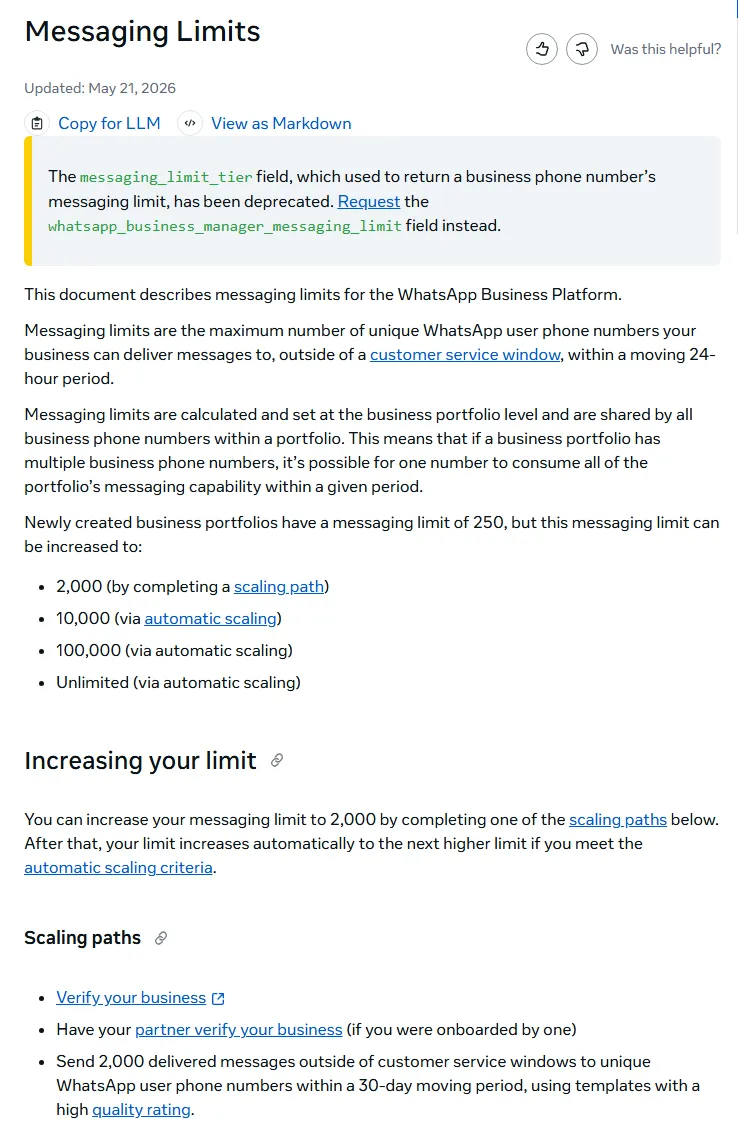
- Complete Meta business verification. In Meta Business Suite, open Settings and start Business verification. Upload official documents that show your legal name and address, such as a registration or tax certificate or a utility bill in the business name. Meta's messaging limits page says new portfolios can message 250 unique customers in 24 hours outside the service window, and verification is one way to lift that to 2,000. Done looks like: "Verified" on the portfolio. Common mistake: a name on documents that does not match the portfolio name.
- Register the phone number and display name. Use a number that is not active on any WhatsApp app (or use coexistence). The display name must match your brand as it appears on your website and documents. Meta reviews the name when your messaging limit increases; you can check status in WhatsApp Manager → Account tools → Phone numbers. Done looks like: the name shows "Approved". Common mistake: generic names like "Best Deals PK" that do not match any real brand.
- Create templates in the right category. Write separate templates for marketing, utility and authentication. Keep utility templates free of offers, discount codes or "shop now" buttons, or Meta may reclassify them as marketing. Use variables for name and order number, and write Urdu, Roman Urdu or English versions for different customers. Done looks like: each template approved with the category you intended.
- Collect opt-in properly. Add a WhatsApp opt-in checkbox at checkout and on lead forms, and record the date and source. Give a clear way to stop messages, and honour it. Done looks like: a contact list where every number has an opt-in record.
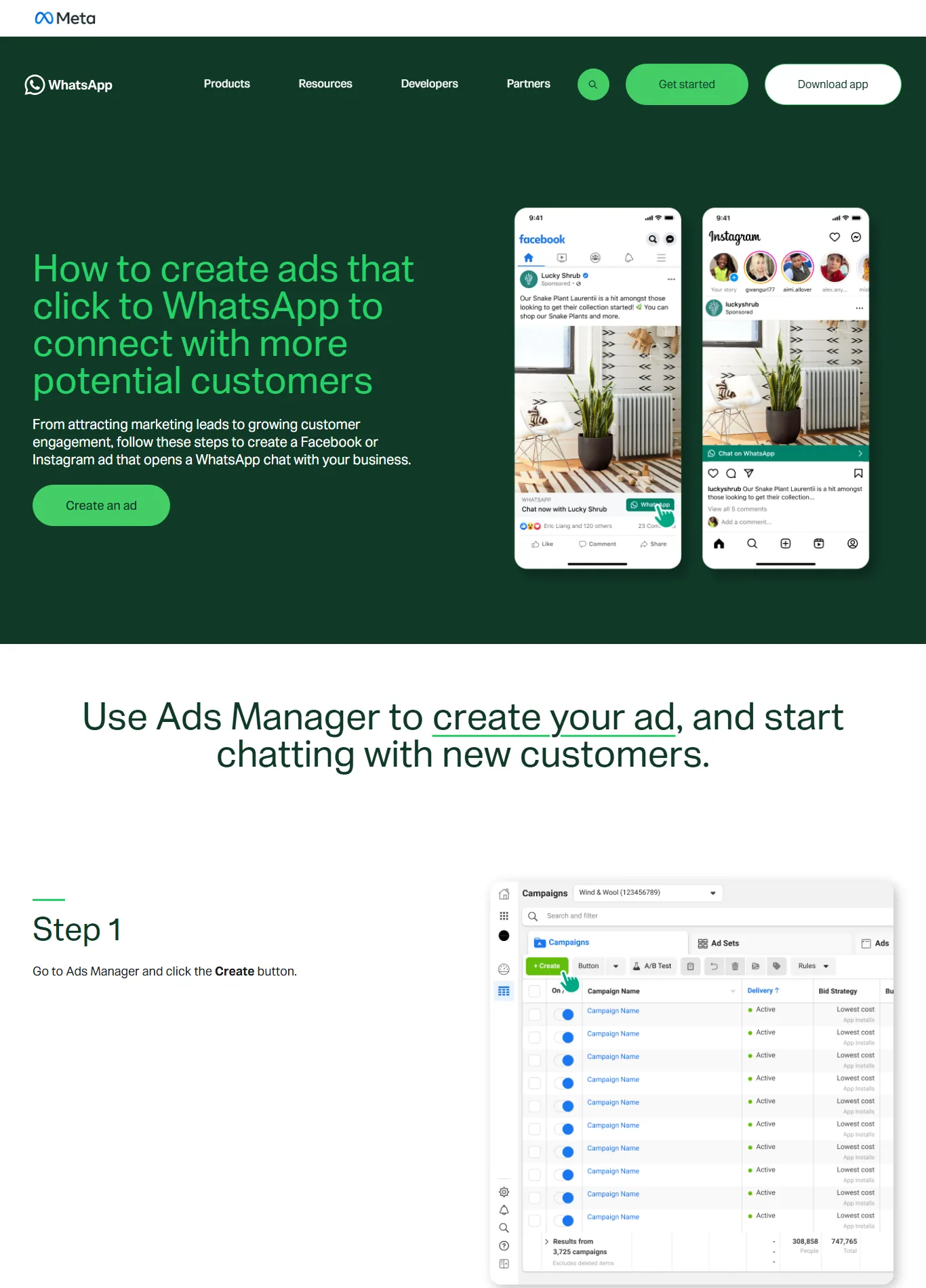
- Set up Click-to-WhatsApp ads. In Meta Ads Manager click Create, pick an objective such as Engagement or Sales, set the conversion location to Messaging apps → WhatsApp, choose your number, set budget and audience, then write a greeting and a few quick-reply questions (the steps are shown on WhatsApp's ad guide). Done looks like: a test click from your own phone opens the chat with the greeting.
- Reply inside 24 hours to open the free window. When someone messages you from a Click-to-WhatsApp ad on Android or iOS, a customer service window opens. If you reply within it, your reply is free and opens a free entry point window that may last up to 7 days, during which marketing, utility, authentication and service messages to that person are free. Meta Business Agent (Meta's own AI agent) messages are still charged. Common mistake: replying on day two, after the window closed, and paying for templates.
- Add a payment method and budget alerts. In Billing Hub, add a card that works for international payments, set a monthly spend estimate using the formula above, and review the invoice every month. Done looks like: no failed payments and no surprise bills.
Are Click-to-WhatsApp ads worth it in Pakistan?
For most Pakistani sellers, clinics, schools and property dealers, yes, because the customer starts the chat, you get a free messaging window, and the sale or booking happens where people already talk. You still pay for the ad itself, so judge them on cost per qualified chat and cost per sale, not on clicks.
Click-to-WhatsApp ads (CTWA) are Facebook or Instagram ads whose button opens a WhatsApp chat with your business instead of a website. Since 2025 Meta has also been selling Status ads in WhatsApp's Updates tab; PhoneWorld reported in February 2026 that Status ads and promoted Channels were rolling out worldwide, kept out of personal chats. Check in Ads Manager whether the WhatsApp Status placement is offered for your account before planning around it.
Three rules make CTWA pay off:
- Pre-fill the first question. Use quick replies such as "Price and delivery charges?", "Book a visit" or "Admission fee 2027?". This sorts serious buyers from browsers.
- Answer fast. A chatbot can greet, collect city and product, and hand over to a person. Our guide to an AI chatbot or WhatsApp agent covers how to do that without sounding robotic.
- Use the free window well. Within the window, send the catalogue, the order confirmation and a delivery update without paying message fees. Do not spam: blocks still hurt your quality rating.
WhatsApp Business app vs API: which one fits your business?
Use the free app until one person cannot keep up or you need automation; then move to the API. This table summarises the trade-offs as of November 2026.
| Need | WhatsApp Business app | WhatsApp Business API (Cloud API or BSP) |
|---|---|---|
| Cost per message | Free | Per delivered message (Pakistan rates above), plus any BSP fee |
| Multiple agents on one number | Limited (linked devices) | Yes, through an inbox or CRM |
| Chatbot and automation | Basic greeting and away messages | Full chatbot, website and CRM integration |
| Bulk messages | Broadcast lists, only to contacts who saved your number | Approved templates to opted-in customers, within messaging limits |
| Click-to-WhatsApp ads | Yes | Yes, plus the free entry point window on replies |
| Best for | Home businesses, single shops | Stores with order volume, clinics, schools, real estate teams |
What mistakes push up WhatsApp marketing message costs?
The costly mistakes are almost all about sending the wrong message, to the wrong people, at the wrong time.
- Blasting the full list. Send marketing templates only to customers who bought or replied recently. Smaller lists also protect your quality rating.
- Promotional words in utility templates. A discount line in an order confirmation can turn a Rs 4 message into a Rs 13 one.
- Slow replies to ad chats. Missing the 24-hour window throws away the free entry point window.
- Using a bought or scraped list. It breaks the opt-in rule and invites reports and blocks.
- No payment method. From October 2026, service messages beyond the free 1,000 are not delivered without one.
- Comparing BSPs only on monthly price. Ask for Meta fees and provider fees separately, data export, and who owns the business portfolio.
- Forgetting the exchange rate. Budget in dollars, then add a margin for your bank's rate and charges.
Your 30-day WhatsApp API plan
Copy this plan to move from a personal number to a verified, cost-controlled WhatsApp setup in one month.
- Week 1: Audit last month's messages by category. Decide app or API, and Cloud API direct or BSP. Fix business portfolio ownership and admins.
- Week 2: Submit business verification. Register the number and display name. Add opt-in checkboxes to checkout and lead forms.
- Week 3: Build and submit templates: one order confirmation, one delivery update, one COD confirmation, one OTP if needed, and one or two marketing offers. Set up the chatbot greeting and hand-over to agents.
- Week 4: Launch a small Click-to-WhatsApp campaign with quick-reply questions. Track cost per chat, cost per order and message spend by category. Cut any broadcast that costs more than it earns.
How Digitt Hype can help
Digitt Hype sets up the WhatsApp Business API, chatbots and CRM hand-over as part of our AI integrations service, and plans and runs Click-to-WhatsApp campaigns through our paid ads team. We work with online stores, clinics, schools and property businesses, and we show you Meta's fees and our fees separately. If you want a cost estimate based on your own message volumes, contact us.
Frequently asked questions
How much does the WhatsApp Business API cost in Pakistan?
From 1 October 2026 Meta charges $0.0473 per marketing message and $0.015 per utility, authentication or service message delivered to a Pakistani number. That is roughly Rs 13 and Rs 4.15 at early November 2026 exchange rates. Each phone number gets 1,000 free service messages a month, and a provider may add its own fee.
How do I get the WhatsApp Business API in Pakistan?
Create a Meta business portfolio, complete business verification, then either set up the Cloud API yourself through Meta for Developers or sign up through a business solution provider. Register a phone number and display name, add a payment method, and get message templates approved before sending to customers who opted in.
Are WhatsApp service messages still free?
Not fully. Since 1 October 2026 Meta gives each business phone number 1,000 free service messages per month. From the 1,001st, each reply is charged at the market rate, which is $0.015 for Pakistan. Replies inside a free entry point window opened by a Click-to-WhatsApp ad remain free.
How long is the free window from Click-to-WhatsApp ads?
If a customer messages you from a Click-to-WhatsApp ad on the Android or iOS app and you reply within the 24-hour customer service window, Meta opens a free entry point window that may stay open for up to 7 days. Marketing, utility, authentication and service messages to that customer are free during it.
Why is WhatsApp more expensive in Pakistan than India?
Meta sets rates per market. On the October 2026 rate card Pakistan pays $0.015 for a utility, authentication or service message against $0.0014 in India, about 10.7 times more, and $0.0473 for marketing against $0.0118. Meta has not published a reason for the gap, so budget for the Pakistan rates rather than the lower ones quoted in Indian guides.
Can my number be banned for sending broadcasts?
Yes. WhatsApp's Business Messaging Policy requires opt-in permission before you message people, and says heavy negative feedback such as blocks and reports can restrict or remove your access. Message only customers who agreed to hear from you and make it easy for them to opt out.
Sources 9
- Meta for Developers: Pricing on the WhatsApp Business Platform (rate cards effective 1 October 2026)
- ProPakistani: Meta charges Pakistan 11x more than India for WhatsApp business messages (15 Sep 2026)
- Meta for Developers: WhatsApp messaging limits
- Meta for Developers: Onboarding WhatsApp Business app users (coexistence)
- WhatsApp Business Messaging Policy
- WhatsApp Business: How to create ads that click to WhatsApp
- WhatsApp Help Center: How to use broadcast lists
- PhoneWorld: WhatsApp expands Promoted Channels and Status Ads worldwide (Feb 2026)
- Investify: Rupee closes at 276.66 per dollar (6 Nov 2026)
Numbers not matching your dashboard?
That gap is worth an hour of someone’s time. Tell us what you see and we will look at it with you.