Quick answer
In the conversion API vs Meta Pixel question, you need both. The Pixel tracks actions in the shopper's browser; the Conversions API sends events from your server or CRM. For COD stores in Pakistan, the API matters most because it can tell Meta which orders were confirmed or delivered, so ads stop learning from fake buyers.
Key takeaways
- The Meta Pixel fires Purchase when a shopper places an order, even if that cash on delivery order is later cancelled or refused.
- In one Pakistani retailer's 2026 data, 94.5% of orders were COD and 19.4% of shipped parcels came back, so Purchase counts can overstate real sales by a wide margin.
- Meta recommends running the Pixel and the Conversions API together, with a shared event_id so the same order is not counted twice.
- Send a confirmed-order event from your store or CRM after WhatsApp confirmation, turn it into a custom conversion, and optimise for it once it has enough volume.
- Tag every ad with UTM parameters so you can measure return-to-origin rates by ad and stop funding the ads that attract refusers.
Conversion API vs Meta Pixel: what is the difference?
In the conversion API vs Meta Pixel debate, the short answer is that you need both, and that the Conversions API is the one that can fix fake COD orders. The Pixel watches what happens in the shopper's browser. The Conversions API lets your own system tell Meta what happened later, such as "this order was confirmed" or "this parcel was delivered".
Two definitions in plain words:
- The Meta Pixel is a piece of code on your website that sends events (page view, add to cart, purchase) from the visitor's browser to Meta. Ad blockers, slow 4G connections and closed tabs can stop it.
- The Conversions API (CAPI) is a server-to-server connection. Meta describes it as a way to connect "an advertiser's marketing data" to the systems that optimise targeting and measure results (Meta for Developers). Because it runs from your server, Shopify, WooCommerce or CRM, it can send events the browser never sees.
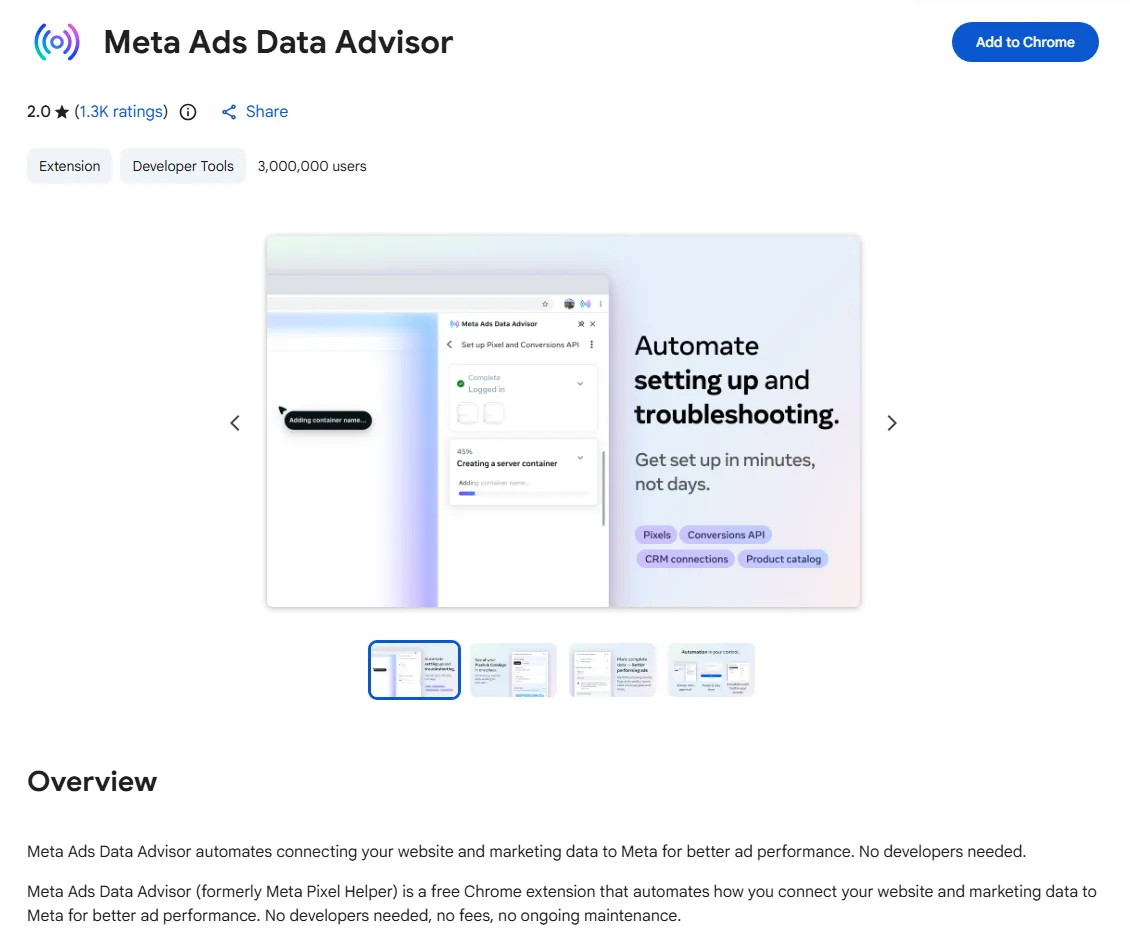
Meta's own documentation recommends running the Conversions API "alongside" the Pixel and calls this a redundant setup. It also says that if you already have a Pixel, you can switch on the Conversions API for website events from Events Manager "in one click", with no code or setup fee. Meta also renamed its old Chrome extension: the Meta Pixel Helper is now called Meta Ads Data Advisor on the Chrome Web Store, and it now helps set up both the Pixel and the Conversions API.
The table shows which tool does what for a cash on delivery store.
| Question | Meta Pixel | Conversions API |
|---|---|---|
| Where does the event come from? | Shopper's browser | Your server, store platform or CRM |
| Blocked by ad blockers or closed tabs? | Often | No |
| Can it send "order confirmed on WhatsApp"? | No, it happens after the visit | Yes |
| Can it send "parcel delivered" or "refused"? | No | Yes, within Meta's time limit |
| Setup effort | Low, usually via a plugin or app | One click for basics; custom events need a developer or a connector |
| Best use for COD stores | Browsing signals: views, add to cart, checkout | Real outcomes: confirmed and delivered orders |
Why do fake COD orders hurt your Facebook ads in Pakistan?
Fake and refused COD orders hurt because Meta learns from the Purchase events you send. If Purchase fires the moment someone taps "Place order", Meta counts every prank, duplicate and change-of-mind order as a sale and goes looking for more people like them.
Cash on delivery (COD) is the main way Pakistanis pay online. In June 2026, OrderNation published first-party data from about 170,000 orders on its own Pakistani store (mostly low-priced mobile accessories). It found that 94.5% of orders were COD, 37.3% of COD orders were cancelled before dispatch compared with 2.8% of prepaid orders, and 19.4% of shipped parcels came back to the seller (OrderNation, State of Online Shopping in Pakistan 2026). Its rough funnel: of 100 orders placed, about 63 shipped and roughly 49 to 57 were paid for. This is one retailer, not a national census, but it shows the scale of the gap.
The same study found that return-to-origin (RTO), meaning parcels that come back undelivered, was higher for orders from social discovery traffic (22.7%) than from search traffic (14.2%). That matters for Meta advertisers: social ads reach people who were not looking for you, so impulse orders and refusals are more common.
Here is what goes wrong, step by step:
- A shopper taps your ad, fills in the COD form and places an order. The Pixel fires Purchase.
- Meta records a sale and gives the ad credit. Your reported cost per purchase looks good.
- You call or message to confirm. No answer, or "I did not order this". The order is cancelled, but Meta never hears about it.
- Meta's system shows the ad to more people who behave like that shopper: people who order easily and do not pay.
Since Meta's delivery system now leans heavily on your conversion data rather than your targeting choices (see our guide to the Meta Andromeda update), bad Purchase data does more damage than it used to.
How do you check which Facebook pixel events your store sends?
Audit in three places: the browser extension on your live site, the Test events tab in Events Manager, and a simple count of Meta's purchases against your real orders. This takes about an hour and needs no developer.
- Install Meta Ads Data Advisor. Add the free extension from the Chrome Web Store on a desktop browser. Open your store, go through a product page, add to cart and checkout. The extension lists each Facebook pixel event it sees (PageView, ViewContent, AddToCart, InitiateCheckout, Purchase) and flags errors such as missing parameters. Done looks like: every step fires the event you expect, once. Common mistake: testing on a page where you are logged in as admin and the plugin skips tracking.
- Use Test events in Events Manager. Go to Events Manager → Data sources → your dataset → Test events, enter your site URL and place a test order. Browser events and server events appear separately, so you can see whether the Conversions API is sending anything at all.
- Check for double counting. On the dataset Overview, open the Purchase event. If the same order shows as two events (one from the browser, one from the server) without being deduplicated, your reported sales are inflated.
- Compare with real orders. For last month, write down Meta's Purchase count, your store's order count, your confirmed orders and your delivered orders. The gap between Meta's number and delivered orders is the problem you are solving.
How do you set up the Conversions API on Shopify, WooCommerce or a custom site?
Use your platform's official Meta integration first, because it handles the basic Conversions API and deduplication for you. Only build custom code for the events your platform cannot send, such as confirmed and delivered COD orders.
Shopify
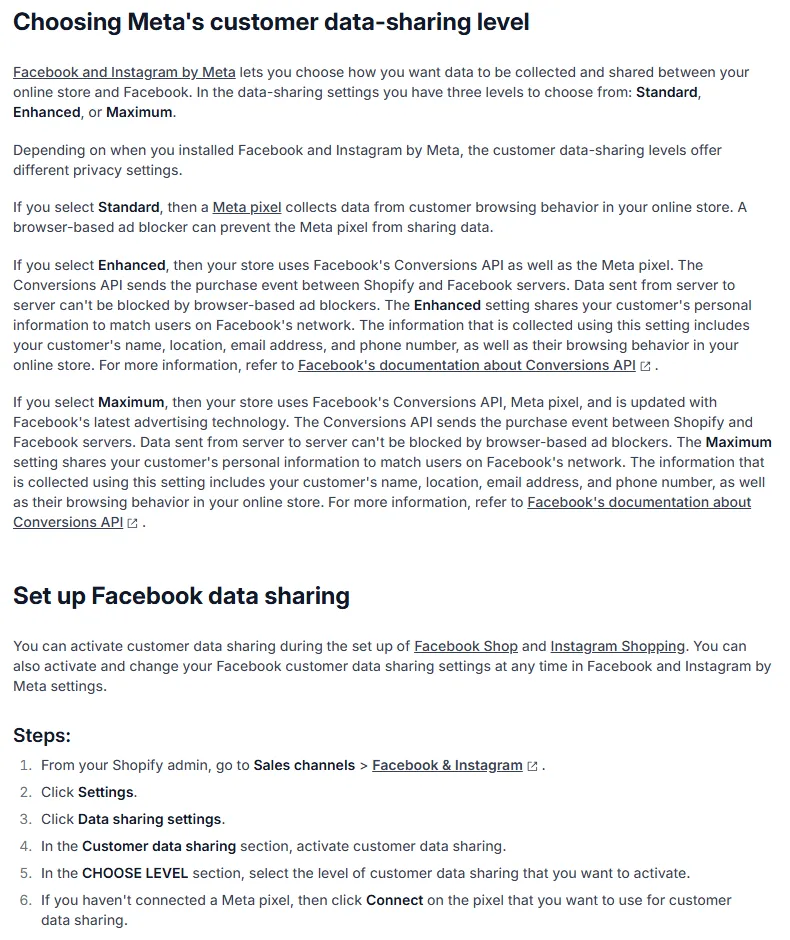
In the Facebook and Instagram app, Shopify offers three customer data-sharing levels. Standard uses only the Pixel. Enhanced and Maximum add the Conversions API, which sends the purchase event from Shopify's servers to Meta's (Shopify Help Center). The path is Shopify admin → Sales channels → Facebook & Instagram → Settings → Data sharing settings, then choose a level. Update your privacy policy to say you share customer data with Meta.
WooCommerce
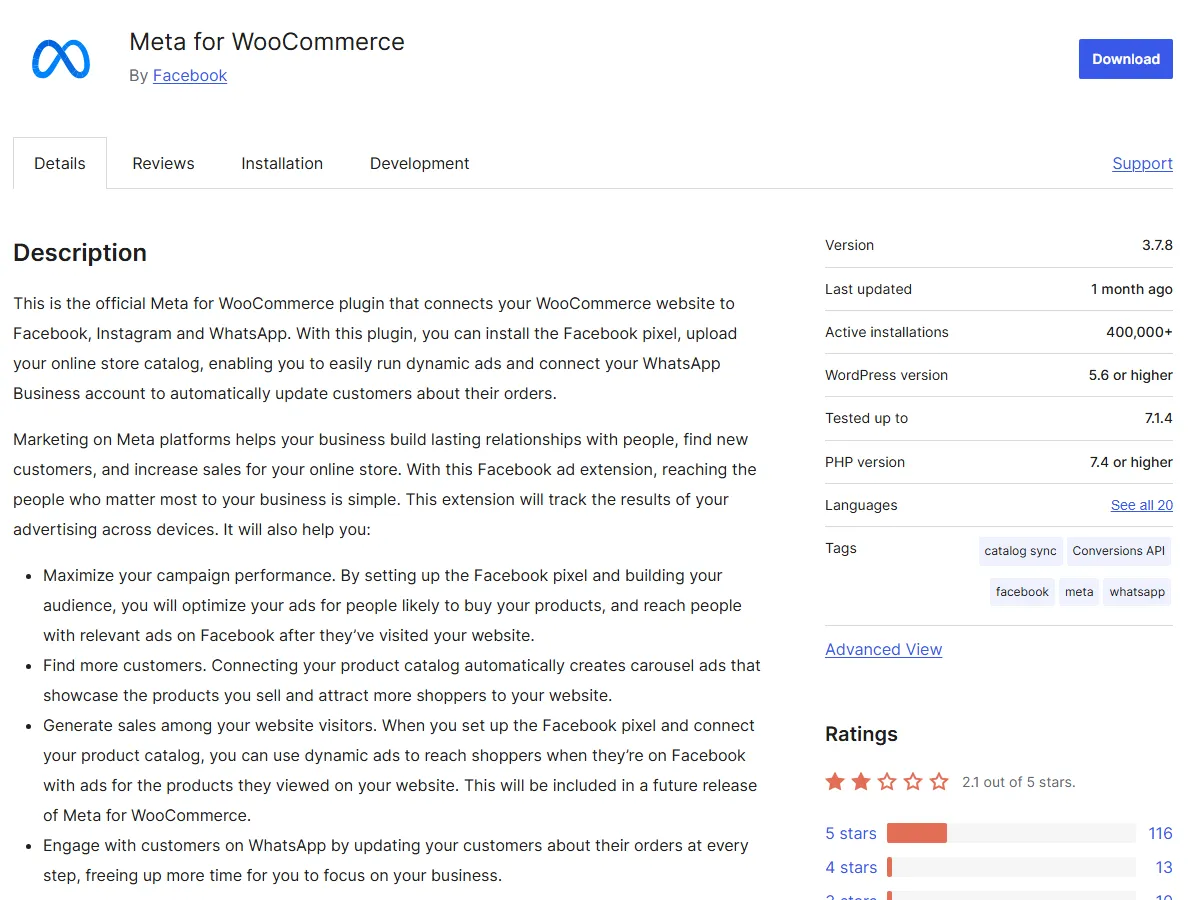
Install Meta for WooCommerce, the official plugin published by Facebook on WordPress.org (version 3.7.8 and 400,000+ active installs when we checked in November 2026). Connect it to your business portfolio, pixel and catalogue in WooCommerce → Marketing → Facebook (menu names can differ slightly between versions). Then place a test order and confirm in Test events that Purchase arrives from both browser and server.
Custom-built sites and CRMs
You have three routes. The one-click setup in Events Manager covers standard website events. The Conversions API Gateway is a self-hosted or partner-hosted service you start from Events Manager → Settings; it suits sites without a big development team. A direct integration means your developer sends events from your backend to Meta's API endpoint, which is the route you need for confirmed and delivered events from an order management system. Our web development team builds these for custom stores.
How do you stop the Pixel and Conversions API counting the same order twice?
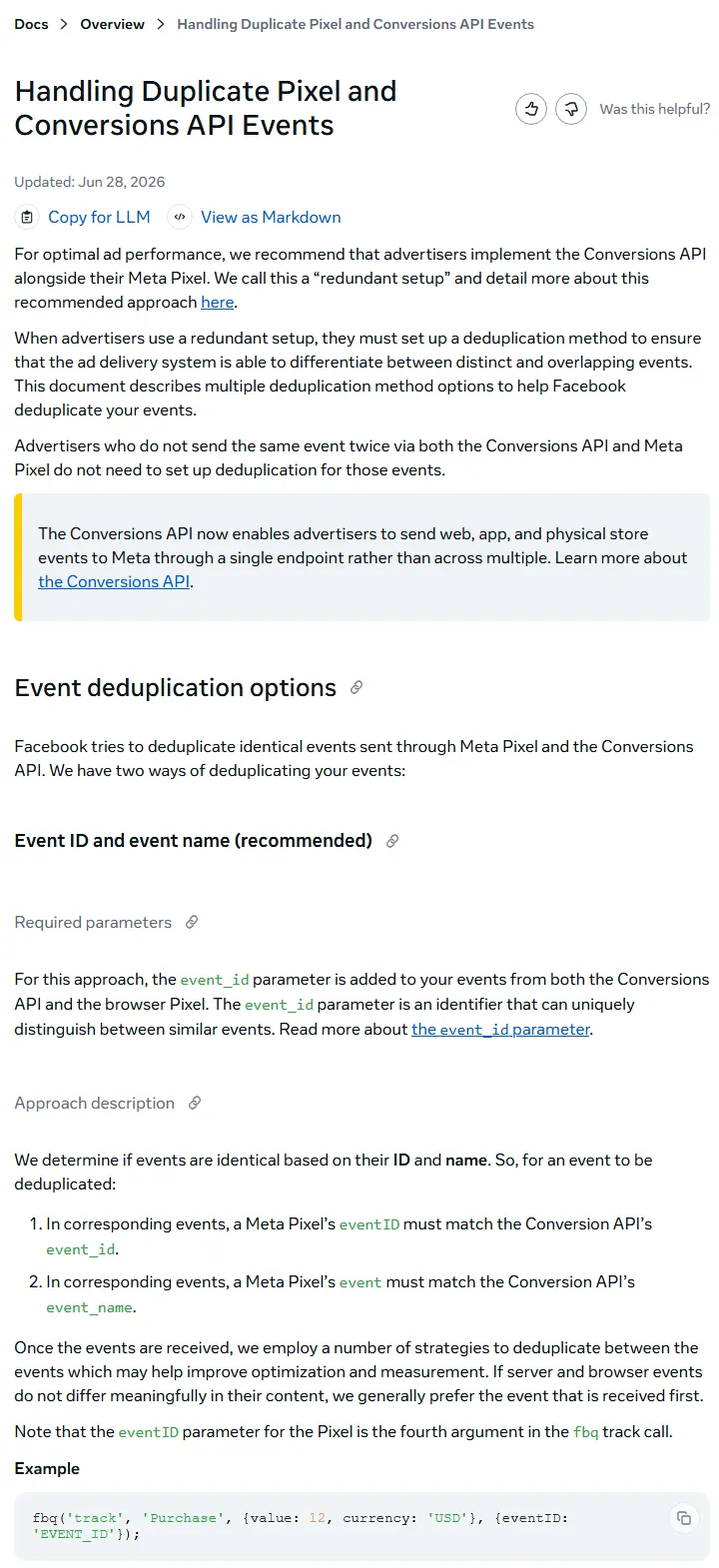
Give each order one shared ID and send it with both events. Meta treats a browser event and a server event as the same if the Pixel's eventID matches the API's event_id and the event names match, and it deduplicates events received within 48 hours of the first one with that ID (Meta for Developers).
In practice, use your order number as the ID. On the thank-you page, the browser call looks like fbq('track', 'Purchase', {value: 4990, currency: 'PKR'}, {eventID: 'ORD-10452'}); and your server sends the same event_name "Purchase" with event_id "ORD-10452". Official Shopify and WooCommerce integrations do this for you; check it rather than assume it.
How do you send confirmed COD orders to Meta step by step?
Confirm every COD order on WhatsApp or by phone, send a server event to Meta only when the customer confirms, and optimise your campaigns for that event once it has enough volume. This is the core fix.
- Confirm every order within a few hours. Send a WhatsApp message with the order summary and ask the customer to reply "Confirm" or tap a button. Call if there is no reply. Mark each order Confirmed, Cancelled or No response in your store or CRM. Done looks like: every order has a status before dispatch. Common mistake: dispatching unconfirmed orders to hit daily volume. If you plan to automate this with the WhatsApp Business Platform, read our guide to WhatsApp Business API pricing in Pakistan first.
- Send a confirmed-order event through the Conversions API. When the status changes to Confirmed, your system sends a server event, for example a custom event named
ConfirmedOrder, with the order value in PKR, the order ID asevent_id, and the customer's phone and email (Meta requires these to be hashed before sending; official connectors do this). Use the confirmation time asevent_time. Common mistake: sending the phone number in local format; include the country code 92. - Send it within Meta's time limit. Meta's documentation says an event's
event_timecan be at most 7 days before you send it; if any event in a request is older, the whole request fails. Send confirmations the same day, not in a weekly batch. - Turn it into a custom conversion. In Events Manager → Custom conversions → Create, choose your ConfirmedOrder event as the source. Meta's help page says custom conversions can be used as performance goals once Meta has received them enough times.
- Optimise for the confirmed event. In your Sales campaign, set the conversion event to the ConfirmedOrder custom conversion. Keep the store's Purchase event for reporting. Done looks like: Meta's reported results are close to your confirmed order count. Common mistake: switching optimisation on a campaign with only a handful of confirmed orders a week; start with your highest-volume campaign.
- Add a delivered event for value and reporting. When the courier marks a parcel delivered, send a
Deliveredevent with the collected amount. If the parcel is refused, send nothing. Because of the 7-day rule, send it as soon as the courier status updates.
| Event | Sent by | When | Use it for |
|---|---|---|---|
| ViewContent, AddToCart, InitiateCheckout | Pixel and CAPI (platform) | During the visit | Retargeting and early signals |
| Purchase (order placed) | Pixel and CAPI, deduplicated | Thank-you page | Reporting only, once you switch optimisation |
| ConfirmedOrder | CAPI from store or CRM | Customer confirms on WhatsApp or call | Main optimisation event |
| Delivered | CAPI from courier status | Courier marks delivered | True revenue and value reporting |
| Refused or cancelled | Not sent to Meta | Any time | Your own RTO reports and exclusion lists |
Value rules that keep Meta honest
Send the product value in PKR without delivery charges, use the same currency every time, and never send a value for cancelled orders. If you offer COD and prepaid, you can add a parameter such as payment_type so you can compare them later in your own reports.
How do you measure return-to-origin by ad and exclude refusers?
Tag every ad link with UTM parameters, save them on each order, and join that with your courier's delivery status. Then you can see which ads bring buyers who pay and which bring buyers who refuse.
- Add URL parameters to every ad. In the ad's Tracking → URL parameters field, add
utm_source=meta&utm_campaign={{campaign.name}}&utm_content={{ad.name}}. Meta fills in the names automatically. - Save UTMs on the order. Shopify records the landing page and referrer; on WooCommerce, an attribution plugin or a small custom field can store UTMs with each order.
- Export and join weekly. Export orders with UTMs and the courier's status report (Delivered, Returned) and match them on order number in a spreadsheet.
- Calculate RTO per ad. RTO rate = returned parcels divided by shipped parcels for that ad. Rank ads by cost per delivered order, not cost per purchase.
- Exclude repeat refusers. Build a customer list of phone numbers that refused two or more parcels and, where your campaign allows audience exclusions, exclude it from retargeting. Only upload data your privacy policy covers.
Ads with a high RTO rate often share a pattern: a price that looks too good, a vague product photo or a "free" hook. Fix the creative rather than the targeting.
What mistakes should COD stores avoid with Facebook pixel setup?
- Two pixels on one site. An old theme pixel plus a plugin pixel doubles every event.
- Purchase on the button click. Fire it on the thank-you page after the order is saved, not when the button is tapped.
- Server events without customer details. Events without phone, email or browser IDs match poorly to Meta users and help less.
- Confirming in bulk once a week. Events older than 7 days are rejected, and late confirmation raises refusals.
- Judging ads on reported purchases alone. Use cost per confirmed and per delivered order.
- Turning off COD entirely. In a market where most buyers expect COD, a partial advance or open-parcel policy may protect sales better. Test before you switch.
What is a 30-day checklist for fixing COD tracking?
- Week 1: Install Meta Ads Data Advisor, run Test events, remove duplicate pixels, turn on the Conversions API through your platform, confirm deduplication.
- Week 1: Write down last month's placed, confirmed and delivered orders and Meta's Purchase count.
- Week 2: Start WhatsApp or call confirmation for every order with a status field in your store.
- Week 2: Build the ConfirmedOrder server event and check it in Test events. Add UTM parameters to all ads.
- Week 3: Create the custom conversion. Once it is receiving events steadily, switch your highest-volume campaign to optimise for it.
- Week 4: Add the Delivered event, calculate RTO per ad, pause the worst ads and build a refuser exclusion list.
For the bigger picture on margins and returns, see our e-commerce survival plan for 2026.
How can Digitt Hype help with Pixel and Conversions API tracking?
Our paid ads team audits Pixel and Conversions API setups and rebuilds campaigns around confirmed-order events, and our web developers build the server-side events, WhatsApp confirmation flows and courier status links for Shopify, WooCommerce and custom stores. See how we work with e-commerce brands, or contact us for a tracking audit.
Frequently asked questions
Do I need the Conversions API if I already have the Meta Pixel?
Yes, in most cases. Meta recommends running both together as a redundant setup. The Pixel misses events when browsers block it or connections drop, and it cannot report anything that happens after the visit. For COD stores, the Conversions API is the only way to tell Meta which orders were confirmed or delivered.
Is the Conversions API free?
Meta does not charge for it. Its developer documentation says you can set up the Conversions API for website events from Events Manager in one click with no setup fees. Costs come from hosting a Conversions API Gateway, paying for a connector app, or developer time to build custom events such as confirmed orders.
Can I optimise Facebook ads for confirmed COD orders instead of purchases?
Yes. Send a confirmed-order event through the Conversions API, create a custom conversion from it in Events Manager, and choose that custom conversion as the conversion event in your campaign. Meta says custom conversions can be used as performance goals once enough of them have been received, so start with your highest-volume campaign.
How late can I send a delivered event to Meta?
Meta's Conversions API documentation says event_time can be at most 7 days before the moment you send the event, and a request with any older event fails. Use the delivery time as event_time and send it as soon as your courier marks the parcel delivered, ideally the same day.
What happened to the Meta Pixel Helper extension?
It has been renamed. On the Chrome Web Store the extension now appears as Meta Ads Data Advisor, described as formerly Meta Pixel Helper. It still checks which pixel events a page fires and now also helps connect the Conversions API, catalogues and CRM data.
What is a normal return-to-origin rate for COD in Pakistan?
There is no official national figure. One Pakistani retailer's first-party study of about 170,000 orders, published in June 2026, found 19.4% of shipped parcels returned and 37.3% of COD orders cancelled before dispatch. Rates vary by category, city, courier and traffic source, so measure your own.
Sources 8
- Meta for Developers: Conversions API overview
- Meta for Developers: Handling duplicate Pixel and Conversions API events
- Meta for Developers: Server event parameters (event_time, action_source)
- Meta Business Help Centre: About custom conversions for web
- OrderNation: State of Online Shopping in Pakistan 2026
- Shopify Help Center: Facebook data sharing
- WordPress.org: Meta for WooCommerce plugin
- Chrome Web Store: Meta Ads Data Advisor (formerly Meta Pixel Helper)
Numbers not matching your dashboard?
That gap is worth an hour of someone’s time. Tell us what you see and we will look at it with you.