Quick answer
The Google Play Console 12 testers rule means a personal developer account created after 13 November 2023 must run a closed test with at least 12 testers who stay opted in for 14 days in a row. Only then can you apply for production access. Organisation accounts, which need a D-U-N-S number, do not face this rule.
Key takeaways
- New personal Play Console accounts need 12 testers opted in to a closed test for 14 consecutive days before production access opens.
- Organisation accounts skip the testing rule but need a free D-U-N-S number, which can take up to 30 days to arrive.
- Android developer verification started on 30 September 2026 in four countries; Google says it goes global in 2027, so Pakistani APK distributors should register now.
- Since 31 August 2026, new apps and updates on Google Play must target Android 16 (API level 36).
- Recruit real testers from your own customers, staff and community; tester swaps give you installs but not the feedback Google asks about.
What is the Google Play Console 12 testers rule?
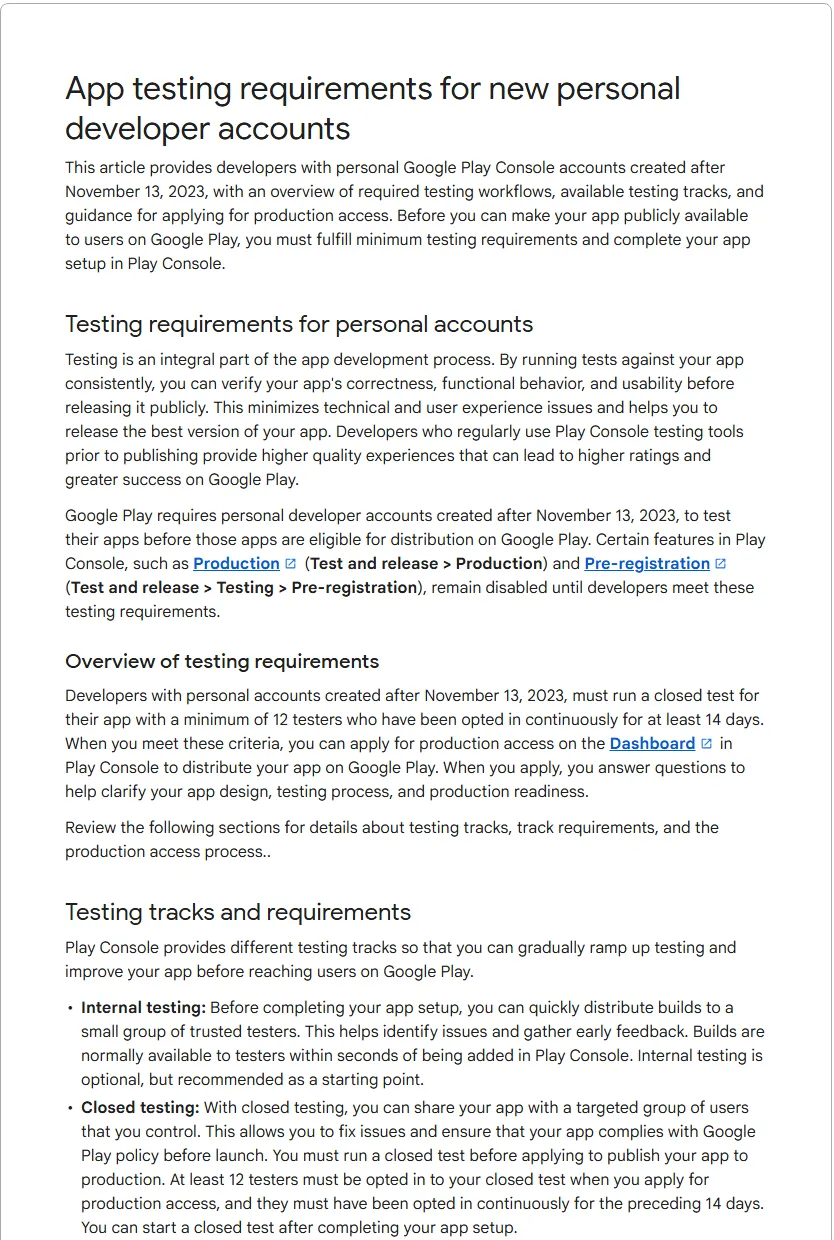
The Google Play Console 12 testers rule says that if you open a personal developer account, you cannot publish your app to everyone straight away. You must first run a closed test with at least 12 people who stay opted in for 14 days in a row. Only after that can you apply for production access.
Google's Play Console Help page on app testing requirements for new personal developer accounts sets out the details:
- It applies to personal accounts created after 13 November 2023.
- The test must run on the closed testing track. A closed test is a private release that only people you invite can install.
- At least 12 testers must be opted in when you apply, and they must have stayed opted in for the previous 14 days without a break. If someone opts out and back in, their 14 days start again.
- Until you meet the rule, the Production and Pre-registration pages in Play Console stay locked.
- When you apply, Google asks questions about your test, your app and your readiness. Review "usually takes seven days or less", the page says.
Personal accounts also have to prove they own a real Android phone. Google's Get started with Play Console page says personal account owners must verify access to an Android device using the Play Console mobile app before publishing.
What is Android developer verification in 2026, and does it apply in Pakistan?
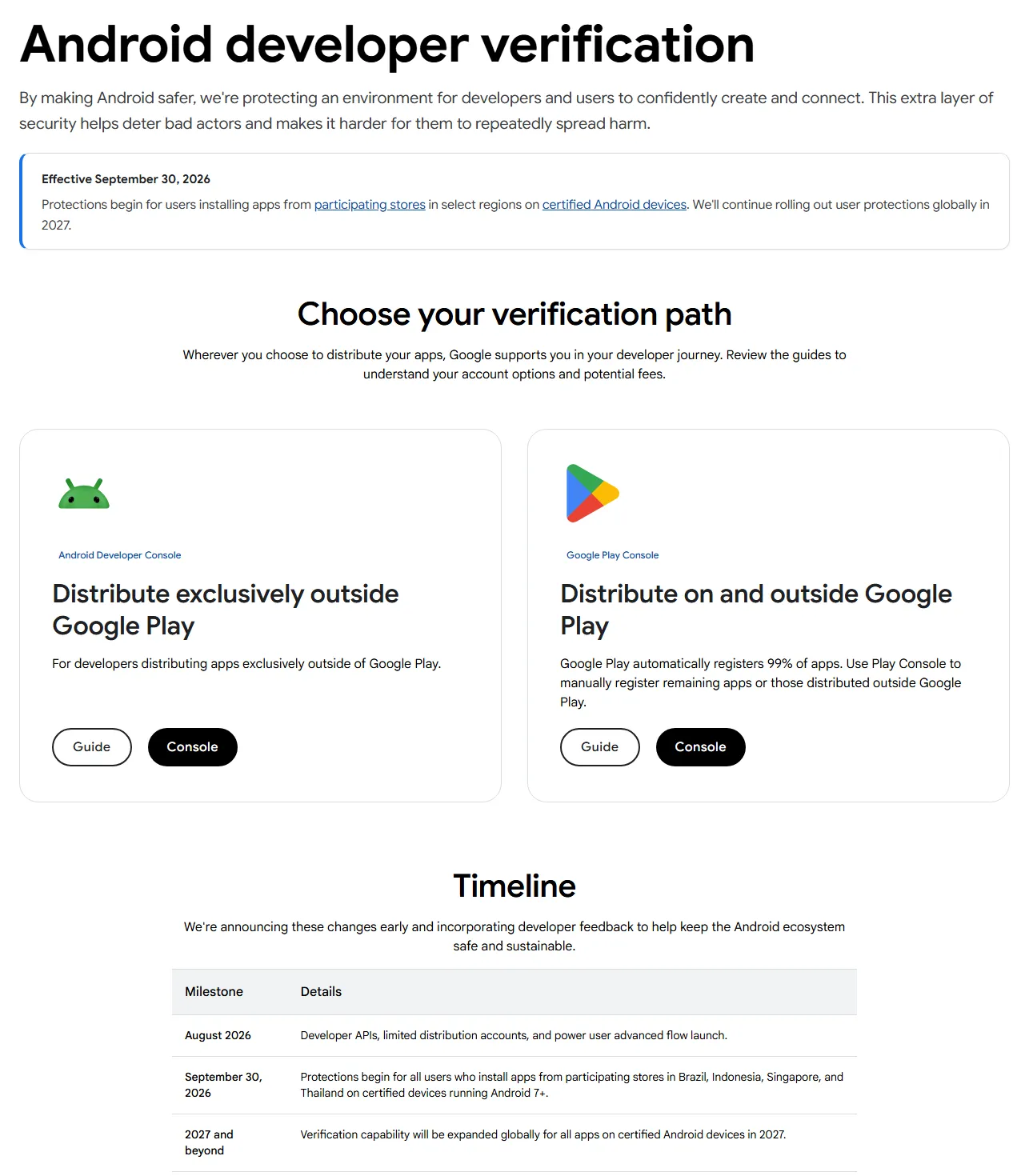
Android developer verification is a second, separate change. It links every Android app to a verified person or company, even if the app is never on Google Play. It started on 30 September 2026 in Brazil, Indonesia, Singapore and Thailand. Google says it will expand to all certified Android devices worldwide in 2027. As of November 2026, Google has not published a Pakistan-specific date.
Here is what Google's developer verification guide and its June 2026 blog post say:
- Who is checked: apps installed on certified Android devices running Android 7 or newer. A certified device is a phone or tablet that ships with Google Play services.
- Which stores, for now: Google Play, HONOR App Market, OPPO App Market, Samsung Galaxy Store, Transsion Palm Store, vivo V-Appstore and Xiaomi GetApps, for users in the four first-wave countries.
- Play developers: Google says Play automatically registered 99% of Play apps. You use Play Console to register the rest, and any apps you also distribute outside Play.
- Developers outside Play: you create an account in the new Android Developer Console, verify your identity, and register each package name by uploading an APK signed with your private key. The verification FAQ says the full distribution account costs US$25.
- Students and hobbyists: a free limited distribution account lets you share an app with up to 20 devices without a government ID.
- Unregistered apps: users can still install them through ADB (a developer tool on a computer) or through a new "advanced flow". That flow needs developer mode, a restart, a one-day waiting period and a fingerprint or PIN check before installs are allowed.
Why do these rules hurt Pakistani developers and businesses?
Both rules add weeks and paperwork to a launch. Businesses that plan for them lose little. Businesses that find out the week before launch lose a month or more.
- Launch dates slip. A shop that wants its app live before Eid or a sale season now needs at least 14 days of closed testing, then up to a week of review, on top of development. Organisation accounts avoid the test but must wait for a D-U-N-S number, which Google says can take up to 30 days.
- Agencies publish on the wrong account. Many Pakistani businesses still let a freelancer publish the app on the freelancer's personal account. You do not own that listing, its reviews or its signing key. When the relationship ends, moving the app is slow, and in some cases not possible at all.
- APK-on-WhatsApp distribution will need registration. Pharmacies, schools, distributors and field-sales teams often share APK files through WhatsApp or a website. Today that works. Once verification reaches Pakistan, unregistered apps will need the advanced flow, which your customers and staff are unlikely to set up.
- Identity mismatches block accounts. Google may ask for a government ID and a card in your legal name, and says the US$25 fee is not refunded if the information is judged invalid. A CNIC name that does not match the card or payments profile is a common cause of trouble.
- Cards fail. Google Play does not accept prepaid cards. Some Pakistani debit cards also have international online payments switched off by default.
The good news: Pakistan is a supported location for both developer and merchant registration on Google Play, and Pakistani developers are paid in USD or EUR, according to Google's supported locations list.
Should you open a personal or an organisation developer account?
Open an organisation account if the app belongs to a registered business. Open a personal account only if you are a student, hobbyist or solo developer publishing your own app. Google's account type guide also says you must use an organisation account for financial services, health, VPN and government apps.
| Question | Personal account | Organisation account |
|---|---|---|
| Who it suits | Students, hobbyists, solo developers | Registered businesses, clinics, schools, agencies |
| 12 testers for 14 days | Required (accounts created after 13 Nov 2023) | Not required |
| D-U-N-S number | Not needed | Required; free from Dun & Bradstreet; can take up to 30 days |
| Name shown on Google Play | Your developer name; legal name and address come from your payments profile | Organisation name, phone and website |
| Health, finance, VPN or government apps | Not allowed | Required |
| One-time registration fee | US$25 | US$25 |
A D-U-N-S number is a free nine-digit company ID issued by Dun & Bradstreet. Google warns that some third-party services charge high fees for it, so apply directly. Apple asks for the same number if you also plan an iPhone app, so one application covers both stores.
How to publish an app on the Play Store with a new personal account: step by step
Follow these steps in order. Each one ends with what "done" looks like, so you know when to move on.
- Create the account in the business owner's name. Sign in to Play Console with a Google Account the business controls (not a freelancer's Gmail), accept the Developer Distribution Agreement, and pay the US$25 fee with a card in your legal name. Pick the account type using the table above. Done when: you see the Play Console home page. Common mistake: using a prepaid or virtual card that Google Play does not accept.
- Verify your identity and contact details. Enter your legal name and address exactly as they appear on your CNIC and payments profile, then verify the contact email and phone with the one-time codes Google sends. Google's identity requirements page says these contacts must keep working for the life of the account. Done when: the verification banner disappears. Common mistake: using a phone number you will not have next year.
- Verify your Android device. Install the Play Console app on an Android phone you own, sign in with the same account, and complete the device check. Done when: the requirement shows as complete on the dashboard.
- Create the app and fill in App content. In Play Console, go to Home → Create app. Then open App content and complete the privacy policy, ads, content rating, target audience and Data safety sections. Google's Data safety guide says apps on closed, open or production tracks need the form, and that you need a privacy policy even if you collect no data. Done when: every App content item shows a green tick.
- Build for the current target API level. Google's target API requirement says that from 31 August 2026, new apps and app updates must target Android 16 (API level 36). The target API level is the Android version your app declares it was built and tested for. Done when: your upload passes without a target API error. Common mistake: reusing an old template that targets API 34.
- Turn on Play App Signing and protect your upload key. Accept Play App Signing when you upload your first app bundle, and store the upload key in a password manager with a backup. The verification FAQ notes that if you lose a signing key, you cannot register that package. Done when: the App signing page shows Google manages your app signing key.
- Create the closed testing release. Go to Test and release → Testing → Closed testing, open Manage track, and on the Testers tab choose an email list or a Google Group. Add a feedback email or URL, upload your build, and send the release for review. Google's setup guide says the opt-in link only appears once the release status is "Published". Done when: you can copy a working opt-in link.
- Get 12 or more testers to opt in, then keep them for 14 days. Send each tester the opt-in link and the Play Store link. Each person must tap Become a tester while signed in to the Google Account you listed. Aim for 15 to 20 so that one or two dropouts do not reset your count. The next section covers where to find them. Done when: 12 or more testers have been opted in for 14 straight days.
- Apply for production. On the Dashboard, click Apply for production. Answer three groups of questions: your closed test (how you recruited testers, what they used, what feedback they gave), your app (audience, value, expected installs in year one), and your readiness (what you changed after testing). Done when: Google approves, usually within seven days. Common mistake: vague answers such as "testers liked it". Give specific feedback and the fixes you shipped.
Google Play Console: how to get 12 testers without breaking the rules
Recruit testers who would really use the app, and give them a reason to open it during the 14 days. Real testers produce the feedback that Google's production questions ask about. Strangers swapping installs do not.
Where Pakistani businesses can find real testers
- Your best customers. A clothing brand can invite 20 repeat buyers on WhatsApp with a small thank-you, such as free delivery on their next order.
- Staff, riders and branch managers. They know the real workflow and will spot problems quickly.
- A school's teachers and parent representatives for an education app, or front-desk staff for a clinic booking app.
- University or developer communities in Lahore, Karachi or Islamabad, for startups without customers yet.
How to keep them engaged for 14 days
- Send a short WhatsApp message on day 1, 4, 8 and 12 with one task each time ("Place a test order using JazzCash", "Book an appointment for Friday").
- Put a feedback button or a link to a two-question form inside the app.
- Ship at least one update during the test and tell testers what you fixed. That gives you a solid answer for the production form.
Be careful with paid tester groups
Groups that trade or sell "12 testers in 14 days" can get you opted-in numbers, but they cannot tell you how your real users behave, which is what Google asks about. Google's help page says it may ask for more closed testing if engagement is insufficient. You also hand your unreleased app to people you do not know.
What are the Android developer verification requirements for apps outside Google Play?
If you share an APK through your website, WhatsApp or a third-party store, you need a verified identity and a registered package name before verification reaches your users. Pakistan is not in the first wave, but Google says it goes global in 2027, so registering now avoids a rush later.
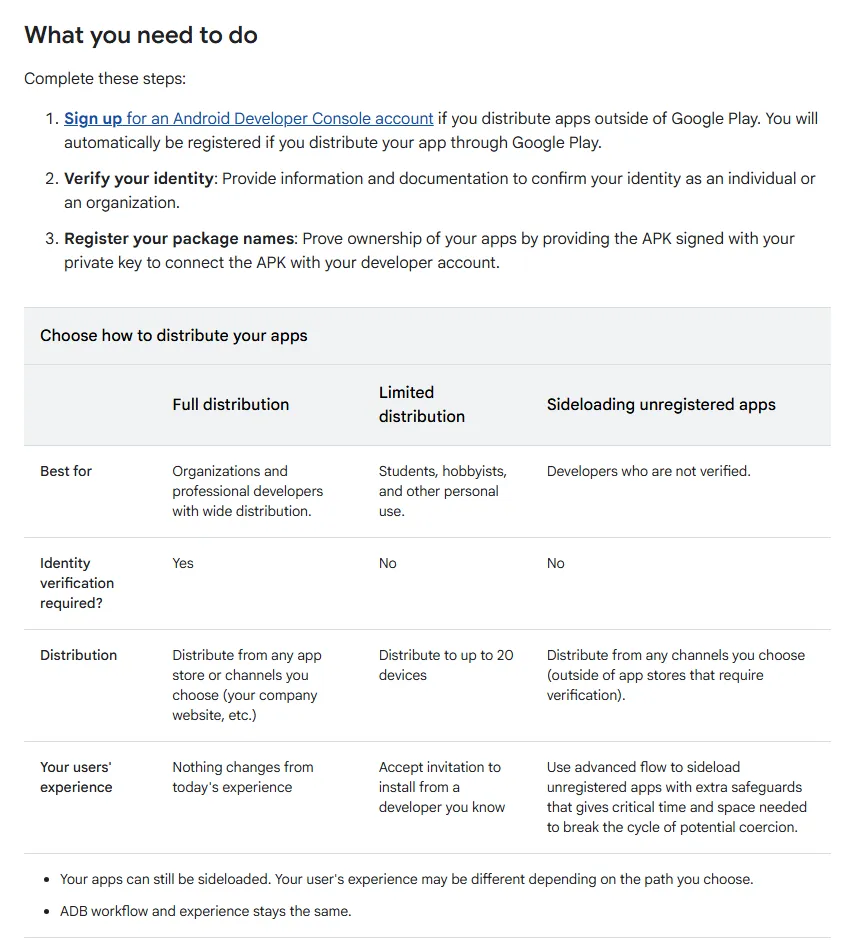
- Pick the right console. If the app is also on Google Play, use your Play Console account; Google says it can handle apps distributed outside Play too. If the app is only outside Play, sign up for the Android Developer Console. Done when: you know which single account will own each app.
- Verify the identity. Individuals provide government ID details. Organisations need a D-U-N-S number and a website, which Google verifies through Google Search Console. Common mistake: registering a client's app under the agency's identity.
- Register every package name. Upload an APK signed with your private key so Google can link the package to your account. The FAQ says apps using Play App Signing are claimed automatically. Done when: the package shows "Registered" in the console. Android Studio also shows the status when you build a signed APK.
- Check enterprise devices. The FAQ says apps distributed through an organisation's managed store to managed devices do not need verification, but Google still recommends registering them.
- Tell your users what to expect. Registered apps install as they do today. If you decide not to register, users will need the advanced flow, which includes a one-day wait.
What mistakes should you avoid?
- Publishing under a freelancer's account. Insist that the app is published under your business's own developer account, with you as owner and the developer added as a user.
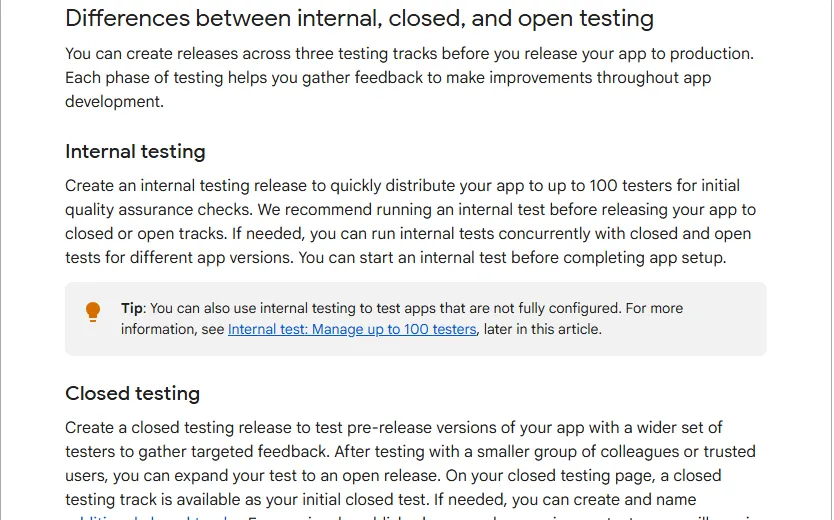
- Counting internal testers. Internal testing is not the closed testing track, so those testers do not count toward the 12.
- Removing testers during the 14 days. If someone opts out, their clock resets. Keep a few spare testers.
- Leaving App content half done. A missing privacy policy or Data safety form blocks the closed test review, which delays the start of your 14 days.
- Losing the signing key. Without it you cannot update the app outside Play or register the package.
- Ignoring the APK question. If your sales team or customers install your app from a link, plan registration before the 2027 global rollout.
Scammers also abuse APK files sent over WhatsApp. Our guide to AI scams and cyber security for Pakistani businesses explains why you should teach customers to install your app only from the Play Store or your official site.
A 30-day launch checklist you can copy
- Days 1 to 3: decide personal or organisation account. If organisation, request the D-U-N-S number today. Create the Google Account the business will own.
- Days 3 to 7: register in Play Console, verify identity, phone, email and device. Publish a privacy policy page on your website.
- Days 7 to 10: finish App content and Data safety. Confirm the build targets API level 36. Turn on Play App Signing.
- Days 10 to 12: send the closed test release for review. Line up 15 to 20 named testers with their Gmail addresses.
- Days 12 to 26: run the 14-day test. Send four task messages, collect feedback, ship one update.
- Days 26 to 30: apply for production with specific answers. Prepare your store listing screenshots and launch message.
- Before 2027: register any app you distribute outside Google Play.
How Digitt Hype can help
Our app development team builds Android and iOS apps and handles Play Console setup in your business's name, including App content, target API updates, closed testing plans and production access answers. We work with startups, e-commerce brands and schools. If you are still budgeting, read our guide to app development cost in Pakistan, or contact us to review your launch plan.
Frequently asked questions
Do organisation accounts need 12 testers on Google Play?
No. Google's testing rule applies to personal developer accounts created after 13 November 2023. Organisation accounts are not covered by it, but they must provide a D-U-N-S number, a free company ID from Dun & Bradstreet that Google says can take up to 30 days to arrive. Plan that wait into your launch date.
Can I use internal testing to meet the 12 testers rule?
No. The rule needs a closed test. Internal testing is useful for quick checks with up to 100 people, but Google's help page specifies a closed test with at least 12 testers opted in continuously for 14 days. Set up the closed testing track early, because its first release needs review before testers can opt in.
What happens if a tester leaves during the 14 days?
That tester stops counting. Google says testers who opt out before 14 days do not count, and if someone opts out and back in, their 14 days must start again. Recruit 15 to 20 testers so that one or two dropouts do not push you below 12 when you apply for production.
Is Android developer verification required in Pakistan yet?
Not yet, as of November 2026. Enforcement started on 30 September 2026 for users in Brazil, Indonesia, Singapore and Thailand. Google says it will expand to all certified Android devices globally in 2027 but has not given a Pakistan-specific date, so register apps you distribute outside Google Play before then.
How much does it cost to publish an app on Google Play from Pakistan?
Google charges a one-time registration fee of US$25 for a Play Console account. The Android Developer Console full distribution account, for apps outside Play, also costs US$25. Limited distribution accounts for up to 20 devices are free. Your bank may add its own foreign transaction charges, so check with your bank.
Can I still share an APK on WhatsApp after verification?
Yes, if the app is registered by a verified developer, users will install it as they do today. Unregistered apps will need the advanced flow, which asks the user to enable developer mode, restart, wait a day and confirm with a fingerprint or PIN. Developers can still install any app with ADB.
Sources 10
- Play Console Help: App testing requirements for new personal developer accounts
- Play Console Help: Set up an open, closed, or internal test
- Play Console Help: Get started with Play Console
- Play Console Help: Choose a developer account type
- Play Console Help: Required information to create a Play Console developer account
- Play Console Help: Data safety section
- Play Console Help: Supported locations for developer and merchant registration
- Android Developers: Meet Google Play's target API level requirement
- Android Developers: Android developer verification guide and FAQ
- Android Developers Blog: Android developer verification (June 2026)
Numbers not matching your dashboard?
That gap is worth an hour of someone’s time. Tell us what you see and we will look at it with you.