Quick answer
FBR digital invoicing requires sales-tax-registered businesses to send each sale invoice to FBR in real time through PRAL's Digital Invoicing system and print the FBR invoice number and QR code. You enable it in IRIS, connect your ERP through PRAL (free) or another licensed integrator, pass the sandbox scenarios for your sector, then switch to the production token.
Key takeaways
- All sales-tax-registered persons were given staggered deadlines that ended on 31 December 2025 under S.R.O. 1852(I)/2025, so most businesses should already be live.
- You can integrate through PRAL free of cost, through another licensed integrator whose fees FBR caps, or use manual invoice generation if you have no ERP.
- Before you get a production token you must pass at least one sandbox invoice for every scenario linked to your business activity and sector.
- Since March 2026 you can fix a genuine mistake by cancelling or editing an e-invoice within 72 hours; after that you need the Commissioner's approval.
- The Finance Act 2026 penalty for failing to integrate is up to Rs 1 million, rising to up to Rs 5 million if the failure continues, plus possible sealing.
What is FBR digital invoicing and what changed in 2025-2026?
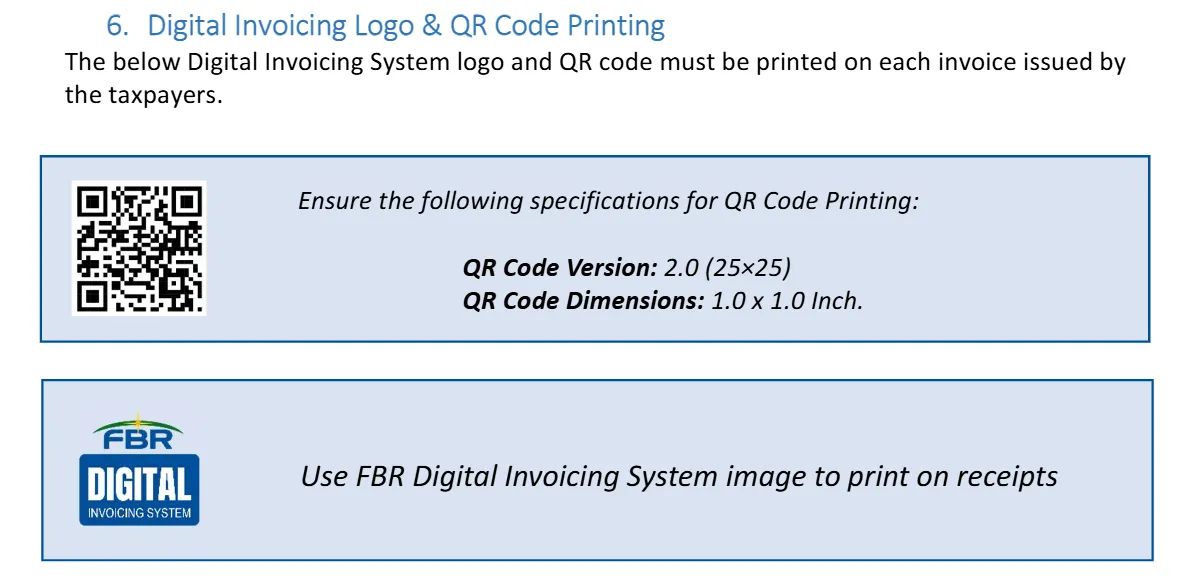
FBR digital invoicing is the Federal Board of Revenue's e-invoicing system: your billing software sends every sales tax invoice to FBR the moment you issue it, FBR returns a unique invoice number, and you print that number with a QR code and the "FBR Digital Invoicing System" logo. PRAL (Pakistan Revenue Automation Limited, FBR's IT company) runs the system and its API, which is a connection your ERP or billing software calls over the internet.
The legal base is Chapter XIV of the Sales Tax Rules, 2006, which FBR rewrote through S.R.O. 69(I)/2025. FBR then set dates for all corporate and non-corporate registered persons in S.R.O. 709(I)/2025, as Business Recorder reported, replaced them with S.R.O. 1413(I)/2025 on 1 August 2025, and finally extended them through S.R.O. 1852(I)/2025, with staggered dates running to 31 December 2025.
In 2026 the system kept growing:
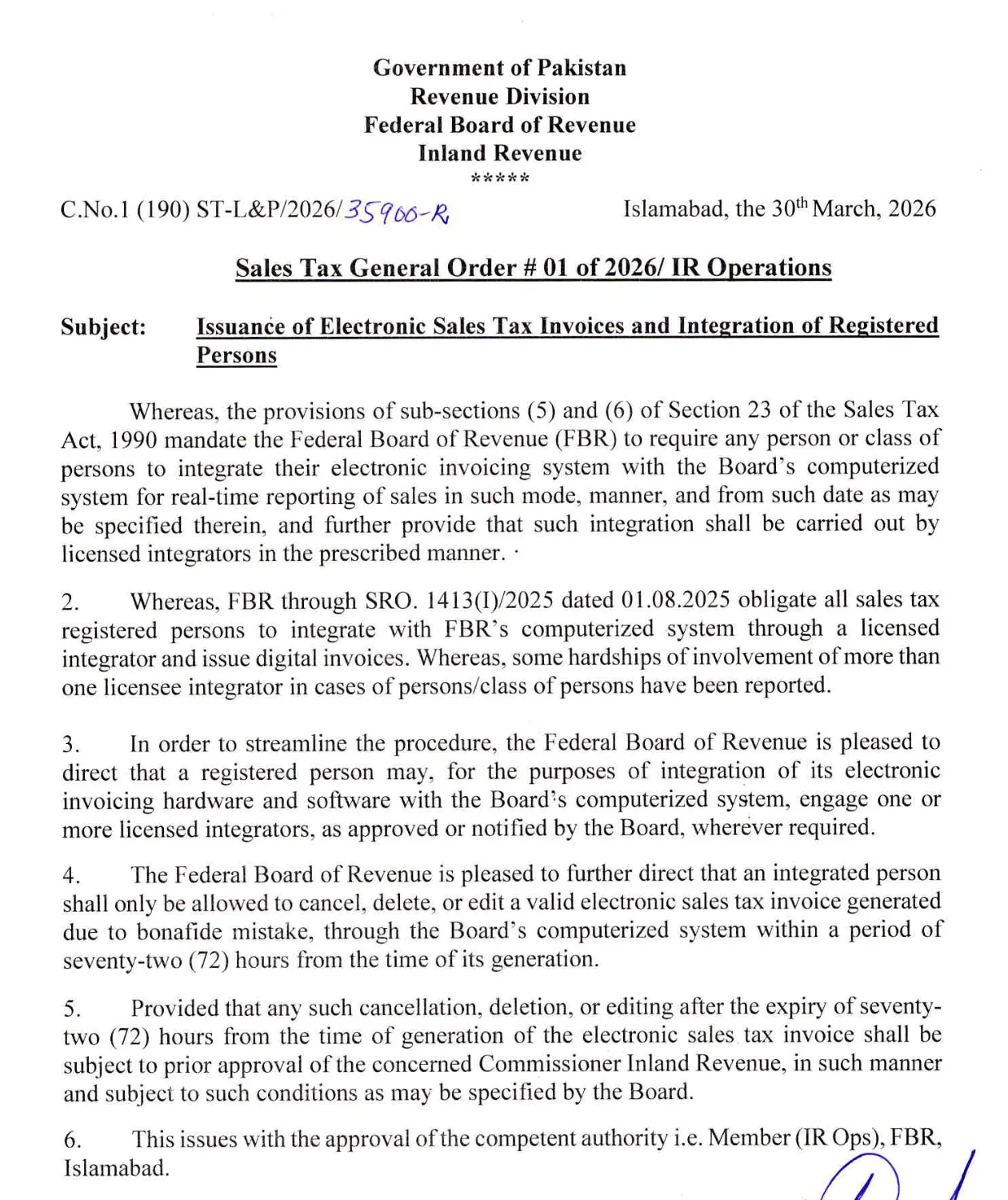
- 30 March 2026: Sales Tax General Order 01 of 2026 let a business use more than one licensed integrator and set a 72-hour window to cancel, delete or edit an e-invoice issued by genuine mistake.
- 1 July 2026: the Finance Act 2026 replaced the penalty for not integrating. FBR's Sales Tax Circular No. 1 of 2026 describes a penalty of up to Rs 1 million, then up to Rs 5 million if the failure continues a month later, plus possible sealing, as PkRevenue reported.
- 29 September 2026: S.R.O. 1666(I)/2026 extended the Chapter XIV e-invoicing rules to federal excise duty and Islamabad services tax. One e-invoice can show all the taxes, and businesses already integrated do not need a second integration, according to LookupTax's summary.
Who must use it, and what is the Pakistan e-invoicing deadline?
Every sales tax registered person was covered by the 2025 notifications, and the last deadline was 31 December 2025. As of November 2026 we could not find any notification that sets fresh dates, so if you are registered for sales tax and not yet live, you are late, not early.
This is the final timetable under S.R.O. 1852(I)/2025, as Dawn reported on 26 September 2025:
| Category | Register by | Testing by | E-invoices from |
|---|---|---|---|
| Public companies and all importers | 15 Oct 2025 | 25 Oct 2025 | 1 Nov 2025 |
| Companies with turnover above Rs 1 billion | 15 Oct 2025 | 25 Oct 2025 | 1 Nov 2025 |
| Companies with turnover Rs 100 million to Rs 1 billion | 25 Oct 2025 | 31 Oct 2025 | 15 Nov 2025 |
| Companies with turnover up to Rs 100 million | 15 Nov 2025 | 25 Nov 2025 | 1 Dec 2025 |
| Individuals and AOPs with turnover above Rs 100 million | 10 Oct 2025 | 25 Oct 2025 | 1 Nov 2025 |
| All other registered persons | 10 Dec 2025 | 25 Dec 2025 | 31 Dec 2025 |
Turnover here means sales declared in your sales tax returns for the previous 12 months. Retailers who sell to the public through a POS have their own regime, covered in our FBR POS integration guide. If you sell online, note that the rules also require websites, apps and marketplace sales to issue electronic invoices automatically. Dates and scope change by notification, so confirm your position with FBR or your tax adviser.
Why does getting e-invoicing wrong hurt your business?
Because FBR now sees your sales the moment you bill, every gap shows up fast, and your buyers feel it too.
- Penalties and sealing. Not integrating can now cost up to Rs 1 million, then up to Rs 5 million, and Dawn reported a bookshop in Islamabad sealed for failing to integrate.
- Your buyers' input tax. Annex-C of your sales tax return is filled from your e-invoices, and that data feeds your buyers' claims. A distributor whose invoices do not reach FBR soon hears about it from customers.
- Messy master data. The API needs an HS code, unit of measure, sale type and rate for every line. Businesses whose item lists live in Excel with names like "Blue shirt big" have to clean them first.
- Connection failures. PRAL's manual says the system does not retry failed uploads automatically. If your internet drops mid-invoice, someone must resubmit it.
- Cost surprises. PRAL integration is free, but you still pay for ERP changes, a static IP or hosting, and staff time.
API, licensed integrator or portal: which route fits you?
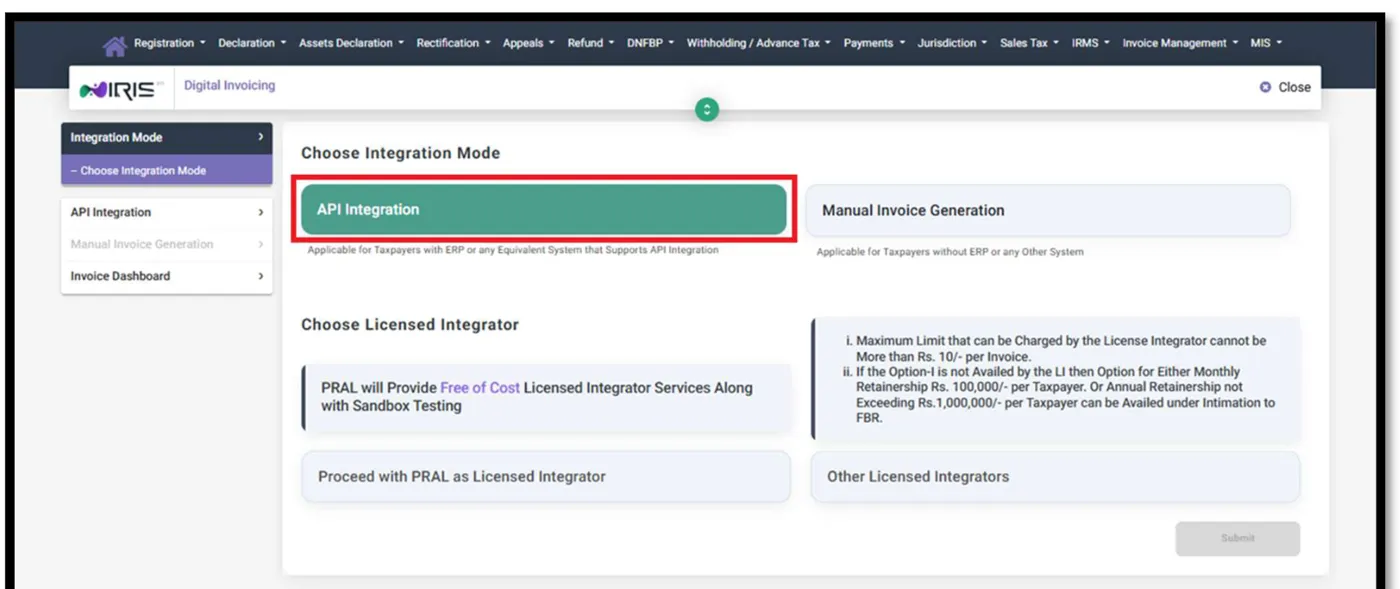
Choose based on whether you already have billing software that can call an API. In IRIS (FBR's online portal), the Digital Invoicing screen offers two modes, API Integration and Manual Invoice Generation, and, for API, a choice of integrator.
| Route | Best for | Cost (as shown by PRAL) | Watch out for |
|---|---|---|---|
| API through PRAL as licensed integrator | Businesses with an ERP or developer who can call a REST API | Free integration services and sandbox testing | You do the IP whitelisting, coding and testing yourself |
| API through another licensed integrator | Businesses that want a vendor to handle the work, or whose ERP vendor is licensed | Capped at Rs 10 per invoice, or a retainer up to Rs 100,000 a month or Rs 1,000,000 a year | Check the integrator is on FBR's list in the IRIS dropdown |
| Manual Invoice Generation | Low-volume sellers "without ERP or any other system" | No integration fee | PRAL calls it "limited functionality"; typing each invoice does not scale |
Many SMEs buy FBR digital invoicing software, an ERP or billing app that already connects to the API through a licensed integrator. Ask any vendor for a live client in your sector, a sandbox demo and the integrator's name before you pay.
Step-by-step: how to go live on FBR digital invoicing
This is the PRAL route described in the DI User Manual. If you use another integrator, the steps are the same, but the integrator handles whitelisting and testing.
- Confirm you are covered. Check your sales tax registration status and category with your adviser. Done looks like: you know which taxes (sales tax, federal excise, Islamabad services) your invoices must carry.
- Open Digital Invoicing in IRIS. Log in to IRIS with your registration number and password, then open Digital Invoicing from the dashboard and go to Integration Mode. Choose API Integration, then Proceed with PRAL as Licensed Integrator (or pick another integrator from the dropdown).
- Enter technical details. Add the technical contact's name, mobile and email, your ERP or system provider, software type (cloud or on-premises) and version, and a CRM user ID and password for PRAL support. Then pick your Business Nature (one or more) and Sector (one only). Common mistake: choosing the wrong sector, which assigns you the wrong test scenarios.
- Whitelist your server IPs. Enter the hosting company, country and one to three IP addresses (or upload PRAL's .xls template for more). PRAL's data centre accepts or rejects them, typically within two working hours, and that starts sandbox access. Common mistake: whitelisting an office IP that changes every time the router restarts.
- Build against the sandbox. Under Sandbox Environment you can view the API details, sample JSON and sample code. Send each request with the security token in the header in the form "Bearer" plus the token. The technical document says tokens are valid for five years.
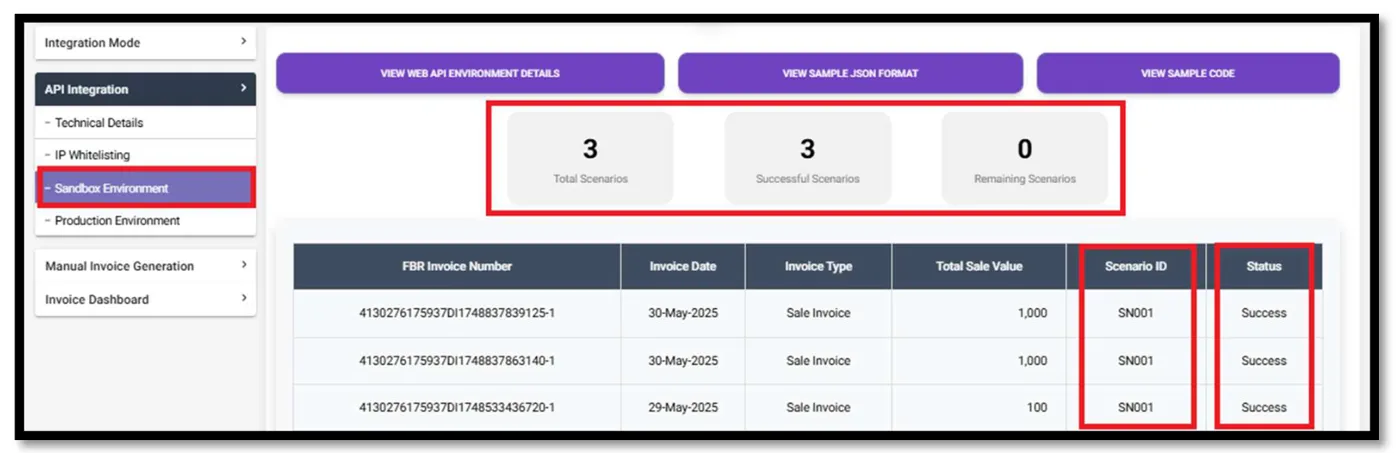
- Pass your scenarios. Post at least one successful invoice for every scenario assigned to you. The dashboard shows total, successful and remaining scenarios. Use the error codes in the technical document to fix failures.
- Switch to production. When all scenarios pass, the system generates your production token. Open Production Environment, copy the production API details and token, and switch your endpoints. PRAL's FAQ sums up going live as: use the production token, switch endpoints, start real-time posting.
- Print correctly and train staff. Print the FBR invoice number, QR code and Digital Invoicing logo on every invoice, and teach staff what to do when an invoice is rejected.
For help, PRAL runs a support desk for taxpayers and integrators at dicrm.pral.com.pk, where you raise a case marked "Integration" or "Post Integration".
Which FBR digital invoicing scenarios must you pass?
FBR digital invoicing scenarios are standard test cases, numbered SN001 to SN028, such as a standard-rate sale to a registered buyer (SN001) or to an unregistered buyer (SN002), a reduced-rate sale (SN005) or an exempt sale (SN006). The system assigns you a set based on the business nature and sector you chose.
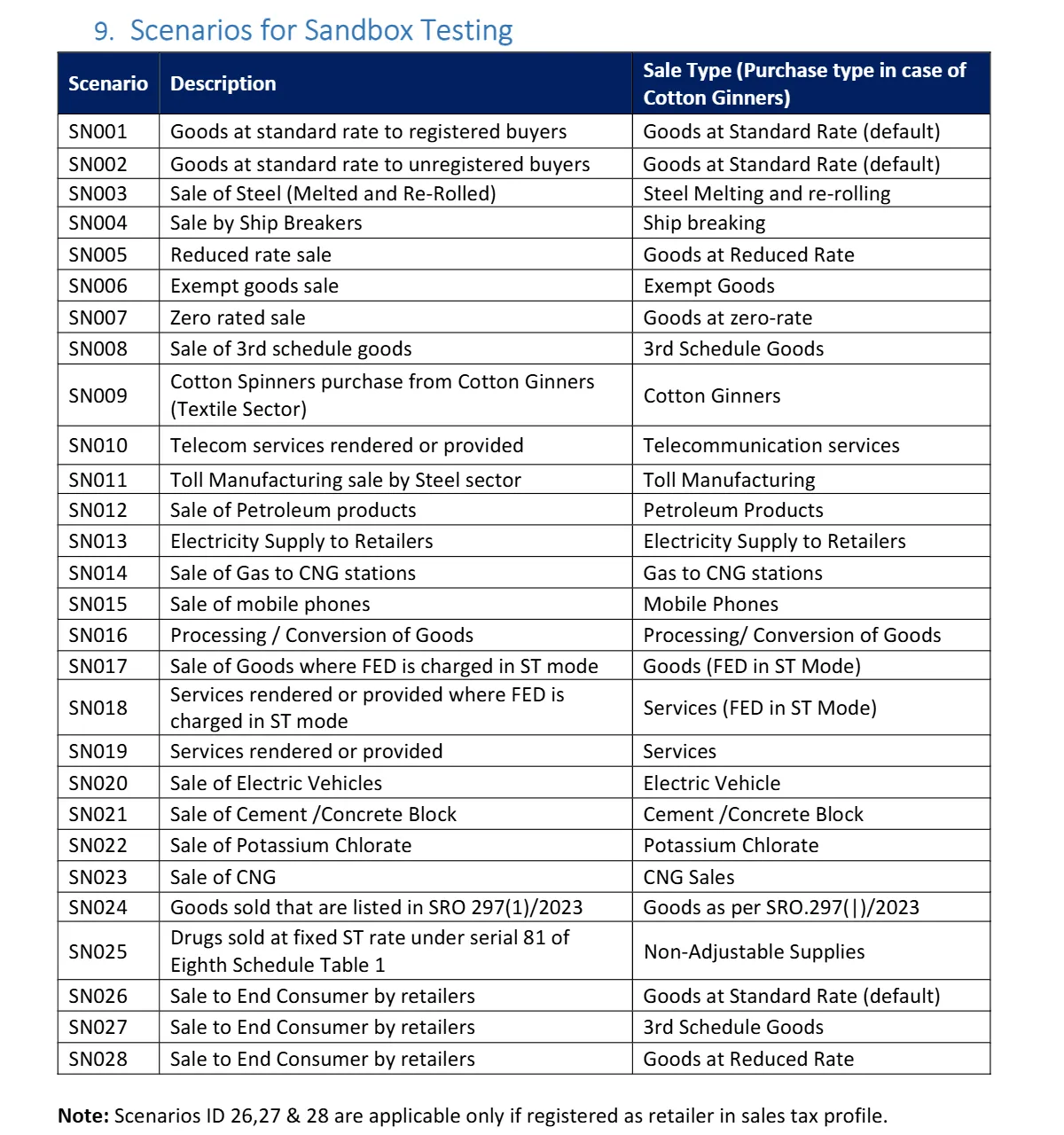
The technical document's "Applicable Scenarios based on Business Activity" table gives examples. A manufacturer in "All Other Sectors" gets SN001, SN002, SN005, SN006, SN007, SN015, SN016, SN017, SN021, SN022 and SN024. A textile manufacturer gets the same plus SN009, and a wholesaler or retailer gets SN026, SN027, SN028 and SN008 as well. PRAL's FAQ says at least one invoice per scenario must succeed.
Tip: build each scenario as a saved test case in your ERP, not a one-off JSON file. You will need them again every time you update your software.
How do you map invoice fields to the FBR digital invoicing API?
Most of the work is data, not code. The FBR digital invoicing API documentation (PRAL's technical specification, version 1.12) defines two main methods: one to post an invoice and one to validate it first, with a separate sandbox URL for each.
Invoice header
- Invoice type (sale invoice or debit note) and date.
- Seller NTN or CNIC (7 or 13 digits), business name, province and address.
- Buyer NTN or CNIC, name, province, address and registration type (registered or unregistered). The buyer's NTN/CNIC is optional for unregistered buyers.
- Invoice reference number, needed only for a debit note against an earlier invoice.
Each line item
- HS code (the international product code used by customs) and product description.
- Rate, unit of measure and quantity.
- Value excluding sales tax, total value, and any fixed notified value or retail price.
- Sales tax, tax withheld at source, extra tax, further tax and FED payable.
- Discount, sale type, and the SRO schedule and item serial number where a concession applies.
Do not type these lists by hand. The document provides reference APIs for provinces, document types, item (HS) codes, units of measure, transaction types, rates by sale type, SRO schedules and SRO items, plus checks on whether a buyer's registration is active. Pull them into your ERP and let staff pick from lists.
Clean the item master first
Give every product one SKU, one HS code, one unit and one tax treatment before you write any API code. If you are still on spreadsheets, our Excel to ERP guide walks through the clean-up.
After go-live: corrections, outages and reconciliation
Going live is the start. Three routines keep you out of trouble.
Correct mistakes within 72 hours
Under STGO 01 of 2026, you may cancel, delete or edit a valid e-invoice generated by genuine mistake through FBR's system within 72 hours of creating it. After 72 hours you need prior approval from your Commissioner Inland Revenue. Returns and price changes later on should go through debit and credit notes, which the rules also require to be issued electronically.
Handle connection loss
PRAL's manual says failed uploads are not retried automatically: check the Invoice Dashboard and resubmit. The rules add that invoices issued during an internet or power failure must be marked as offline and uploaded within 24 hours of restoration. Build a "pending" queue and an alert in your software.
Reconcile every month
Before you file, compare three numbers: sales in your ERP, invoices in the IRIS Invoice Dashboard (which shows daily, monthly, quarterly and yearly values), and Annex-C of your sales tax return. Any gap means an invoice failed, was duplicated or was edited outside the system. Fix it before you file, not after FBR writes to you.
Mistakes to avoid and a 30-day plan
Common mistakes
- Testing only SN001 and assuming the rest will work in production.
- Hard-coding a tax rate instead of reading it from the reference API.
- Sharing one production token across test and live systems.
- Whitelisting a dynamic office IP.
- Issuing a manual paper invoice "just this once" when the system is slow.
- Forgetting online store and marketplace sales.
Your 30-day plan
- Week 1: Confirm coverage with your adviser. Export your item list and customers. Add HS codes, units and buyer NTN/CNIC.
- Week 2: Choose PRAL or a licensed integrator. Submit technical details and IPs in IRIS.
- Week 3: Build and pass every assigned scenario in the sandbox. Add the QR code and logo to your invoice template.
- Week 4: Switch to production, issue live invoices, set up the pending-upload alert, and reconcile your first month against Annex-C.
Rules change by SRO and general order. Use this guide as a map and confirm the details with FBR or your tax adviser before you file.
How Digitt Hype can help
Digitt Hype connects ERPs, billing apps and online stores to outside systems through APIs. We can clean your item master, map your invoice fields, build and test the sandbox scenarios with PRAL or your licensed integrator, and add offline queues and reconciliation reports. See our POS and ERP service and web development service for online stores, or contact us with your ERP name and monthly invoice volume.
Frequently asked questions
Is FBR digital invoicing mandatory for all sales tax registered businesses?
Under S.R.O. 1852(I)/2025, all sales tax registered persons had staggered deadlines that ended on 31 December 2025, so most registered businesses should now be issuing e-invoices through FBR's system. Retailers selling to the public follow the POS regime. Confirm your own category and any exemptions with FBR or your tax adviser.
Is PRAL digital invoicing integration free?
Yes. PRAL acts as a licensed integrator and provides integration services and sandbox testing free of cost. You still pay for your own software changes, hosting and staff time. Other licensed integrators may charge, within limits shown in IRIS of Rs 10 per invoice or a capped monthly or annual retainer.
Can I issue FBR digital invoices without an ERP?
Yes. The Digital Invoicing screen in IRIS offers a Manual Invoice Generation mode for taxpayers without an ERP or other system. PRAL describes it as having limited functionality, so it suits low invoice volumes. If you issue many invoices a day, an ERP or billing app connected through the API is far more practical.
What are FBR digital invoicing scenarios?
They are predefined sandbox test cases numbered SN001 to SN028, such as a standard-rate sale to a registered buyer or an exempt sale. IRIS assigns scenarios based on the business nature and sector you select, and you must pass at least one invoice per assigned scenario before a production token is issued.
Can I cancel or edit an e-invoice after issuing it?
Under Sales Tax General Order 01 of 2026, you may cancel, delete or edit a valid e-invoice issued by genuine mistake within 72 hours of generating it, through FBR's system. After 72 hours you need prior approval from your Commissioner Inland Revenue. Later returns and adjustments should use electronic debit or credit notes.
What is the penalty for not integrating with FBR e-invoicing?
FBR's Sales Tax Circular No. 1 of 2026 explains that, after the Finance Act 2026, a person who fails to integrate faces a penalty of up to Rs 1 million, then up to Rs 5 million if the failure continues one month later, and the premises may be sealed. Check the current law with your adviser.
Sources 8
- PRAL: Technical Specification for DI API v1.12
- PRAL: Digital Invoicing User Manual v1.5
- FBR: Sales Tax General Order 01 of 2026
- FBR: POS Booklet with Chapter XIV of the Sales Tax Rules (May 2025)
- Dawn: FBR extends e-invoicing deadline for sales tax registrants (S.R.O. 1852)
- Business Recorder: FBR extends new set of rules for e-invoicing (S.R.O. 709)
- LookupTax: S.R.O. 1666(I)/2026 e-invoicing for FED and ICT services
- PkRevenue: Sales Tax Circular No. 1 of 2026 penalties
Numbers not matching your dashboard?
That gap is worth an hour of someone’s time. Tell us what you see and we will look at it with you.