Quick answer
ERP software in Pakistan ranges from free open-source tools such as ERPNext and Odoo Community to cloud plans billed per user or per organisation and fully custom builds. Pick by your processes, not brand: clean your item list, count opening stock, set up accounts and roles, pilot one branch, run Excel in parallel for a month, then go live.
Key takeaways
- Excel and WhatsApp work until you have a second branch, a second cashier or an FBR integration requirement; then stock and cost numbers stop matching.
- Published prices on 9 November 2026 ranged from free (ERPNext self-hosted, Odoo One App Free, Zoho Inventory Free) to US$249 per organisation a month for Zoho Inventory Enterprise.
- The licence is rarely the biggest cost; data clean-up, setup, barcode hardware and training usually take more time and money.
- A clean item master (one SKU, one unit, one barcode, one tax treatment per product) is the single most important step in any Excel-to-ERP move.
- Pilot one branch and run Excel in parallel for one full month-end before you switch everyone over.
What is ERP software, and why are Pakistani businesses leaving Excel?
ERP software in Pakistan (enterprise resource planning: one system that records sales, purchases, stock, accounts and staff in a single database) is moving from big factories to shops, distributors, restaurants and pharmacies. The reason is simple. When every sale, purchase and transfer goes into one system, you know your stock and profit without waiting for someone to update a spreadsheet.
Three pressures push owners to switch in 2026:
- FBR integration. Tier-1 retailers must report each sale through an integrated POS, and sales tax registered businesses must send e-invoices with HS codes, units and tax details for every line. That is hard to do from Excel. See our guides to FBR POS integration and FBR digital invoicing.
- More branches and channels. A shop with a second branch, a Daraz store and a website now has stock in three places and orders arriving on WhatsApp.
- Tighter margins. When costs rise, you need the real landed cost of each product, not last year's estimate.
An ERP is not the same as a POS (the billing screen at the counter). A POS records the sale; an ERP also handles purchasing, stock between branches and accounts. If you are unsure which you need, read POS vs ERP first.
What goes wrong when stock lives in Excel and WhatsApp?
The short answer: numbers drift apart, and nobody can prove which one is right. These are the problems we see most often in Pakistani SMEs:
- Stock never matches. The sheet says 40 pieces, the shelf has 31, and nobody knows whether the 9 were sold, returned, transferred to the other branch or stolen.
- No real cost per product. Freight, customs, loading charges and supplier discounts sit in separate sheets, so gross profit by item is a guess.
- Branch transfers on WhatsApp. "Bhai 10 carton bhej do" is not a stock transfer. Without a transfer note, one branch's stock rises and the other's does not fall.
- Shrinkage hides. Shrinkage (stock lost to theft, damage, expiry or errors) only shows up when you count, and if counts happen once a year, losses are already a year old.
- No audit trail. Anyone can edit a cell. You cannot see who changed a price or deleted a sale.
- Tax data is missing. FBR's digital invoicing API asks for an HS code, unit of measure, sale type and rate on every line, according to PRAL's technical specification. Most Excel item lists have none of these.
How do you know it is time to move to ERP?
Answer these eight questions honestly. If you say "no" to three or more, you have outgrown spreadsheets.
- Can you tell, right now, how many units of your top 10 products are in each branch?
- Do you know the gross margin of each product after freight and discounts?
- Does every branch transfer have a document both branches sign off?
- Do you count stock at least monthly for fast movers?
- Can you see who changed a price or deleted a sale, and when?
- Do your items have SKUs (stock keeping units: one unique code per product) and barcodes?
- Can you produce an FBR-ready invoice with HS code and tax breakdown?
- Does month-end close take less than three working days?
Then put a rough number on the problem. Say your yearly stock purchases are Rs 2 crore and unexplained differences run at just 2%; that is Rs 4 lakh a year. Our ROI calculator can help you compare that with the cost of a system.
What is the best ERP software in Pakistan for a small business?
There is no single best ERP software in Pakistan; the right one depends on your size, budget, and how much setup help you can get locally. Below are options commonly used here, with prices as published on each vendor's page when we checked on 9 November 2026. Foreign plans bill in US dollars, so your PKR cost moves with the exchange rate and your bank's card charges.
| Option | Type | Published price (9 Nov 2026) | Good fit |
|---|---|---|---|
| ERPNext | Open source (GPL-3.0); self-host or Frappe Cloud | Software free; Frappe Cloud hosting from US$5 a month (sites) or US$40 a month (servers), 14-day trial | Traders, distributors and light manufacturers with an implementation partner |
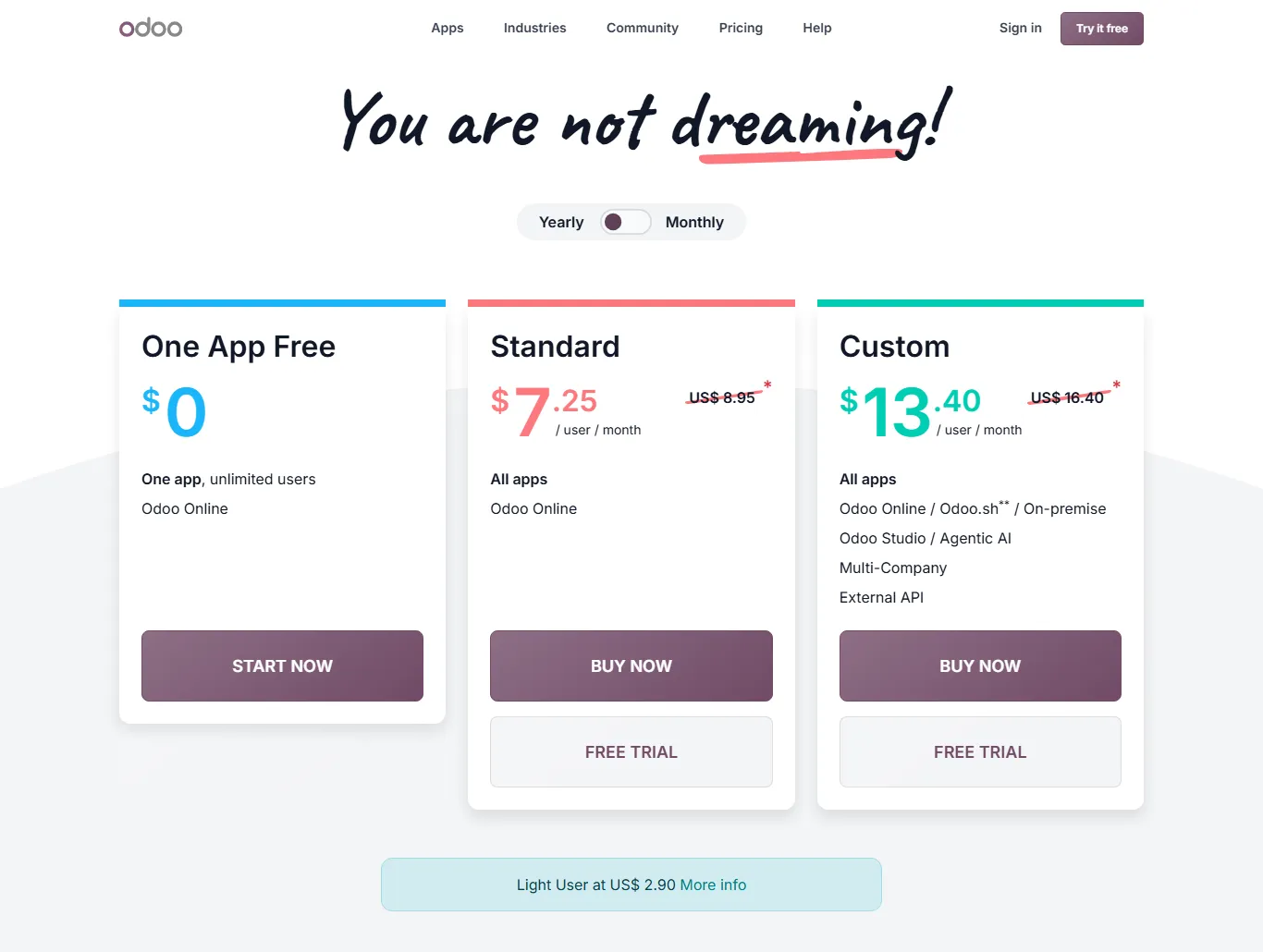
| Odoo | Open-source Community edition plus paid cloud plans | One App Free: US$0 for one app; Standard: US$8.95 per user a month on yearly billing (US$11.20 monthly); Custom: US$16.40 (US$20.90 monthly). First-year discounts were shown. | Growing businesses that want POS, inventory, accounting and e-commerce in one suite |
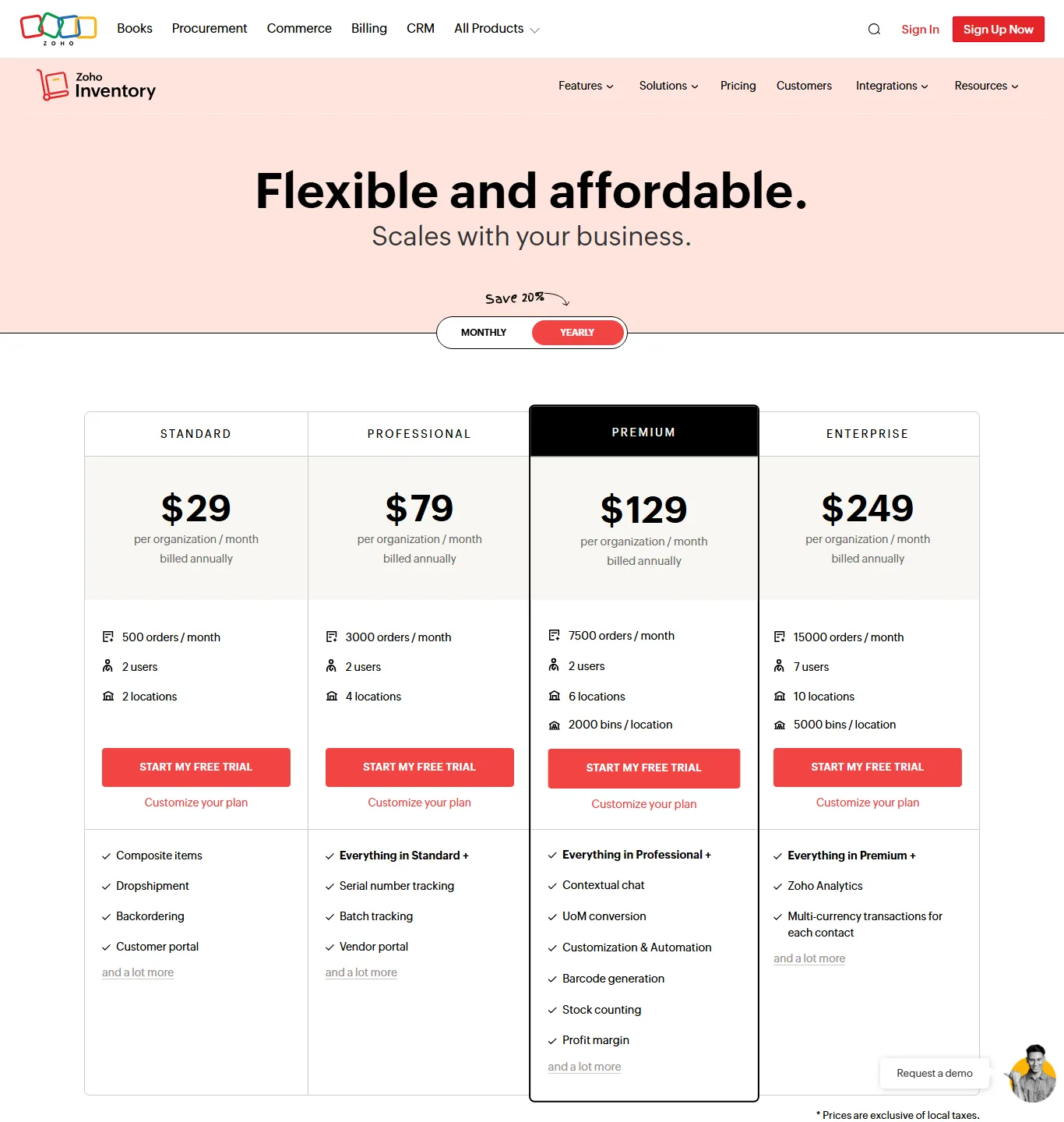
| Zoho Inventory | Cloud, per organisation | Free (50 orders, 1 user); Standard US$29, Professional US$79, Premium US$129, Enterprise US$249 a month, billed yearly | Online sellers and small wholesalers |
| Splendid Accounts | Cloud accounting and inventory | Basic US$13, Standard (sales and inventory) US$18, Premium (complete ERP) US$22 a month, one user included; branch add-on US$10 | Small traders who need accounting software in Pakistan with stock |
| HysabOne | Local cloud accounting, inventory and POS | From PKR 3,499 a month (accounts), PKR 7,000 (accounts plus inventory), PKR 6,563 (POS), billed yearly | Shops that want PKR pricing and local support |
| Custom build | Built for you | Quoted per project | Unusual processes that packages cannot handle |
Sources: Odoo pricing, Zoho Inventory pricing, Frappe Cloud pricing, Splendid Accounts pricing and HysabOne. Prices change often; confirm before you buy. FBR integration claims also vary by vendor, so ask each one to show a live, verified invoice.
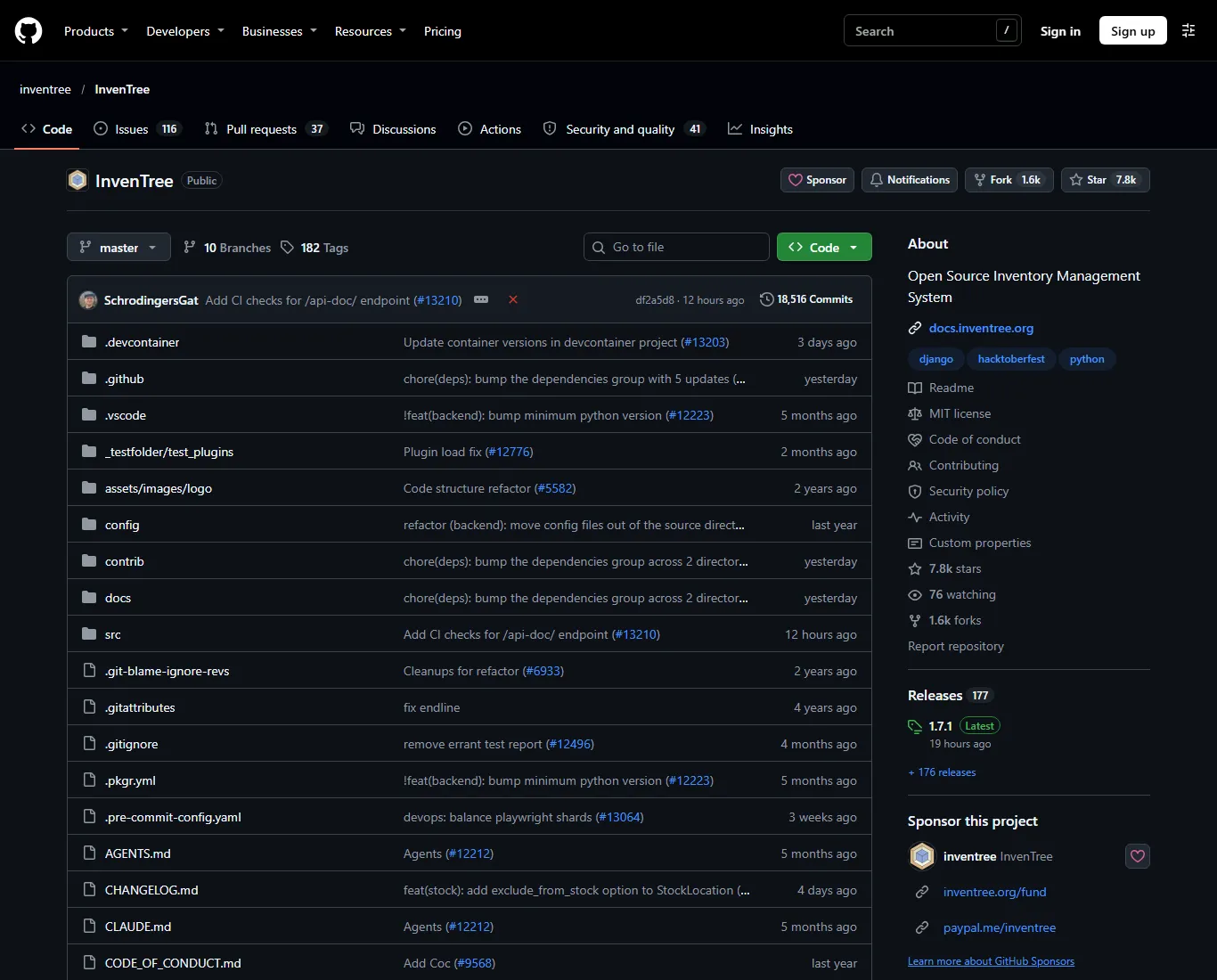
If you want an open-source stock system only, without accounting, InvenTree is a Python/Django inventory system released under the MIT licence. It suits workshops and parts-heavy businesses more than retail counters.
What does ERP software price in Pakistan really include?
The subscription is only one line in the budget. When you compare ERP software price in Pakistan, ask for these six costs in writing:
- Licence or subscription: per user, per organisation or free (open source).
- Hosting: included in most cloud plans; extra if you self-host ERPNext or Odoo Community.
- Implementation: process mapping, configuration, data import and testing, usually charged by a partner.
- Integrations: FBR POS or digital invoicing, your website, Daraz, couriers and payment gateways.
- Hardware: barcode scanners, label printers, receipt printers, a UPS and a reliable internet line.
- Training and support: who answers when the cashier is stuck at 9 pm on a Saturday?
Free software is not free to run. A self-hosted open-source ERP saves licence fees but needs someone to maintain the server, apply updates and take backups. Budget for that person or partner.
Step-by-step: how to move from Excel to ERP
This plan works for most traders, shops and distributors with one to ten locations. Allow six to twelve weeks; rushing the data steps is where most projects fail.
- Map your processes. Write down, on one page each, how you buy, receive, sell, return, transfer between branches and pay suppliers. Note who does each step. Done looks like: a list of the documents your ERP must produce (purchase order, goods receipt, sales invoice, transfer note, credit note). Common mistake: copying your Excel layout instead of fixing the process.
- Clean the item master. Export every product to one sheet. Give each one a unique SKU, a clear name, a category, a stock unit (piece, carton, kg), purchase and sale units with conversion factors, a barcode, a tax treatment and, if you issue e-invoices, an HS code. Merge duplicates. Done looks like: no two rows describe the same product. Common mistake: keeping "Shirt Blue L" and "Blue shirt large" as two items.
- Set up barcodes. Use the manufacturer's barcode (EAN or UPC) where it exists and print your own labels for the rest. ERPNext's item documentation says barcodes can be recorded on items "to quickly scan and add them in transactions", with EAN (13 digits) and UPC (12 digits) supported.
- Build the chart of accounts. With your accountant, set up the chart of accounts (the list of ledger heads such as cash, bank, sales, cost of goods and each tax), bank accounts, and opening balances for customers and suppliers as of your go-live date.
- Count opening stock. Close the shop or warehouse for a few hours, count every location item by item (two people per count), and record the cost of each item. This count becomes your opening stock entry. Done looks like: a signed count sheet per location that matches what you import.
- Create users and roles. Give each person their own login. Cashiers sell, store keepers receive and transfer, managers approve discounts and returns, and only the owner or accountant edits prices and costs. Common mistake: one shared "admin" login for everyone.
- Pilot one branch. Go live in your simplest branch or warehouse first. Fix item errors, receipt layouts and workflows there for two to four weeks.
- Run in parallel through one month-end. Keep the old sheet going alongside the ERP for one full month and compare sales, stock and cash every day. Stop the parallel run only when the numbers match.
- Go live everywhere and train. Roll out branch by branch. Give every role a short checklist in Urdu or English, and record five-minute screen videos for common tasks.
- Connect the outside world. Once the core runs, add FBR POS or digital invoicing, your online store and courier tracking.

How do you set up inventory management software with a barcode scanner?
Barcodes remove typing, and typing is where most stock errors start. Good inventory management software with a barcode scanner should let you scan at every step, not only at the till.
- Receiving: scan each item against the purchase order so short or wrong deliveries show immediately.
- Selling: scan at the POS; never let cashiers pick items from a list by name.
- Transfers: scan out at one branch and scan in at the other, so items in transit are visible.
- Counting: use a handheld or phone app to count one shelf at a time (cycle counting) instead of one big yearly count.
Most USB and Bluetooth scanners act like a keyboard, so they work with any ERP that has a barcode field. Test your actual scanner, label printer and label size with the software during the pilot. For a small business, start with one scanner per counter and one for the store room.
Pharmacies and food businesses
If you sell medicines or food, choose software that tracks batch numbers and expiry dates, and set it to sell the earliest expiry first. Restaurants need the same discipline for perishable ingredients.
Which KPIs should you watch after go-live?
Track a few numbers every week for the first three months. They tell you whether the ERP is being used properly, not only whether it is switched on.
| KPI | What it means | What to do if it is bad |
|---|---|---|
| Stock accuracy | Counted quantity matches system quantity for sampled items | Check receiving and transfer discipline; retrain staff |
| Shrinkage value | Value of stock written off after counts | Look for patterns by branch, shift or category |
| Gross margin by item | Sale price minus landed cost | Fix purchase costs and freight allocation in the system |
| Stock days | How many days of sales your stock covers | Reorder slow movers less; push dead stock |
| Manual overrides | Price changes, deletions and discounts by user | Tighten roles and approval limits |
| Month-end close time | Working days to close the books | Reconcile banks and stock weekly, not monthly |
Mistakes to avoid and a 90-day plan
Mistakes to avoid
- Importing a dirty Excel item list "to clean later". It never gets cleaned.
- Skipping the opening stock count and importing last month's sheet figures.
- Choosing software from a demo without testing your own invoice, returns and transfer flows.
- Customising heavily before you have run the standard version for a month.
- Giving everyone admin rights.
- Forgetting backups and an exit plan: make sure you can export your data.
Your 90-day plan
- Days 1-15: Map processes, list required documents and reports, shortlist two or three systems, and test them with your own data.
- Days 16-35: Clean the item master, assign SKUs and barcodes, build the chart of accounts, and set up users and roles.
- Days 36-45: Count opening stock and go live in the pilot branch.
- Days 46-75: Run in parallel through one month-end; fix gaps; train the next branches.
- Days 76-90: Roll out to all branches, switch off Excel for stock, and add FBR, website and courier integrations.
How Digitt Hype can help
Digitt Hype sets up and connects POS and ERP systems for Pakistani businesses, from item-master clean-up and barcode setup to FBR integration and links with online stores. We can help you shortlist options against your own processes and run the pilot with you. See our POS and ERP service or contact us with your branch count and current tools.
Frequently asked questions
What is the best ERP software in Pakistan for a small business?
There is no single best choice. Odoo and ERPNext suit businesses that want a full suite and have an implementation partner, Zoho Inventory suits online sellers, and local tools such as HysabOne offer PKR pricing. Test two or three with your own items, invoices and returns before deciding, and check FBR integration support.
How much does ERP software cost in Pakistan?
Published prices on 9 November 2026 ranged from free open-source software and free tiers to about US$249 a month for Zoho Inventory Enterprise, while local tools started from PKR 3,499 a month. Implementation, integrations, hardware and training are extra and often cost more than the licence. Confirm current prices with each vendor.
Is ERPNext really free?
ERPNext is open-source software released under the GPL-3.0 licence, so the software itself has no licence fee. You still pay for hosting, either your own server or a managed service such as Frappe Cloud, plus setup, customisation and support from a partner or your own team.
Can I use a barcode scanner with inventory software?
Yes. Most USB and Bluetooth barcode scanners act like a keyboard, so they work with any inventory or ERP system that stores barcodes on items. ERPNext, for example, supports EAN and UPC barcodes on items. Test your scanner and label printer with the software during your pilot.
How long does it take to move from Excel to ERP?
For a small business with a few locations, plan six to twelve weeks: two to three weeks to map processes and clean data, a pilot branch for two to four weeks, a parallel run through one month-end, then a branch-by-branch rollout. Messy item lists are the most common cause of delays.
Does ERP software help with FBR integration?
It can. An ERP that stores HS codes, units and tax details for every item makes FBR digital invoicing and POS integration much easier, because the invoice data is already structured. Ask the vendor whether it connects through PRAL or a licensed integrator and to show a live verified invoice.
Sources 9
Numbers not matching your dashboard?
That gap is worth an hour of someone’s time. Tell us what you see and we will look at it with you.