Quick answer
FBR POS integration connects every billing counter of a Tier-1 retailer to FBR's computerised system, so each sale gets an FBR invoice number and QR code in real time. You register each POS with FBR, connect your software through PRAL or a licensed integrator, test it, go live, and upload any offline invoices within 24 hours.
Key takeaways
- Tier-1 retailers (chain stores, shops in air-conditioned malls, large electricity users, bulk importers and other notified classes) must report every sale to FBR in real time.
- Every receipt must carry a unique FBR invoice number and a QR code that customers can check in the Tax Asaan app or by SMS to 9966.
- A branch that stays disconnected for more than 48 hours can be sealed, and the Finance Act 2026 raised the penalty for not integrating.
- Invoices issued while the internet or power is down must be marked as offline and uploaded within 24 hours of the connection coming back.
- Restaurants and service businesses may also answer to PRA, SRB, KPRA or BRA, each with its own POS or e-invoicing system.
What is FBR POS integration and who must do it?
FBR POS integration means linking every point of sale (POS: the till, billing computer or tablet where you print a receipt) in your shop to the Federal Board of Revenue's computer system, so each sale is reported the moment it happens. FBR sends back a unique invoice number, and your software prints it on the receipt with a QR code the customer can scan to check the sale was reported.
The rule applies to "Tier-1 retailers" under section 2(43A) of the Sales Tax Act, 1990. The version printed in FBR's own POS booklet (May 2025) covers a retailer who:
- operates as a unit of a national or international chain of stores;
- operates in an air-conditioned shopping mall, plaza or centre (kiosks excluded);
- paid electricity bills of more than Rs 1.2 million in the last 12 months;
- is a wholesaler-cum-retailer that imports consumer goods in bulk and sells both to shops and to the public;
- accepts debit or credit cards through a bank or SBP-authorised payment provider, or whose withholding tax under sections 236G/236H crosses a threshold FBR notifies;
- falls in any other class FBR prescribes.
The Finance Act 2026 rewrote this definition again. According to a PkRevenue summary, the new text keeps the chain, mall and electricity tests and adds retailers (and wholesaler-cum-retailers) with annual turnover above Rs 200 million. Treat the list above as a starting point and confirm your own status with your tax adviser or Regional Tax Office.
The drive is large. By 1 April 2026 FBR had 35,953 integrated branches, including 23,784 branches of 11,376 Tier-I retailers, 1,543 restaurant branches and 10,626 textile and leather branches, Profit reported. In June 2026 an FBR member told the Senate finance committee that 10,000 to 12,000 of about 37,000 integrated branches were disconnected, as Business Recorder reported. That gap is exactly what FBR's enforcement now targets.
What changed for big retailers in 2025 and 2026?
In short: faster sealing, bigger fines and more sectors. If you integrated years ago and stopped checking, your risk has gone up.
- Sealing after 48 hours offline (2025). Under S.R.O. 164(I)/2025, FBR can seal a Tier-1 outlet that issues unverified invoices or stays disconnected from FBR's database for more than 48 hours, Customs Today reported. De-sealing needs the penalty paid and the technical fault fixed, followed by a software audit of all POS machines by an integrator.
- Higher penalty for not integrating (2026). FBR's Sales Tax Circular No. 1 of 2026 explains that the Finance Act 2026 replaced the old penalty ladder. A person who fails to integrate now faces a penalty of up to Rs 1 million, then up to Rs 5 million if the failure continues a month later, plus possible sealing, as PkRevenue reported. One newspaper report quoted much higher figures, so read the Act itself or ask your adviser before you rely on any number.
- Income tax integration for more sectors (draft). On 18 February 2026 FBR published draft S.R.O. 288(I)/2026 under the Income Tax Rules. It lists restaurants, air-conditioned hotels and marriage halls, couriers, clinics and labs, private hospitals, gyms, event photographers, accountants, exchange companies, private schools and larger retailers. Provincial revenue authorities objected because many of these services already integrate with them, Business Recorder reported. We found no final notification as of November 2026, so watch for one.
Older consequences still apply. Under section 8B(6), a non-integrated Tier-1 retailer loses 60% of its adjustable input tax for that period, and section 14AB lets FBR order its gas and electricity cut. An integrated retailer who sells "around" the system or prints a receipt without a valid FBR number or QR code faces Rs 500,000 or 200% of the tax involved, whichever is higher. A software vendor who builds a "skimming" feature can be prosecuted too.
How do I check if my shop is covered and compliant?
Spend one hour on these checks before you spend any money. Most problems we see are not missing software but a branch or a counter that quietly dropped off.
- Test yourself against the Tier-1 list. Pull the last 12 electricity bills for each branch and add them up. Check whether any branch is in an air-conditioned mall or part of a chain, and what your annual turnover is.
- Count every billing point. List each till, tablet, handheld and your online store. The rules say no supply may be made except through integrated outlets or machines, and online sales must be registered too.
- Verify one of your own receipts. Buy something small at each branch and check the receipt in the Tax Asaan app or by SMS (steps below). If it shows "unverified", you have a live problem.
- Compare sales with Annex-C. Annex-C of your monthly sales tax return is filled from the invoices FBR receives. If Annex-C is lower than your POS sales report, some invoices are not reaching FBR.
- Look at the shop floor. Rule 150R(11) requires a signboard with FBR's logo, the words "Integrated with FBR" and the registration number of your POS software at each notified outlet or counter.
Step-by-step FBR POS integration for a retailer
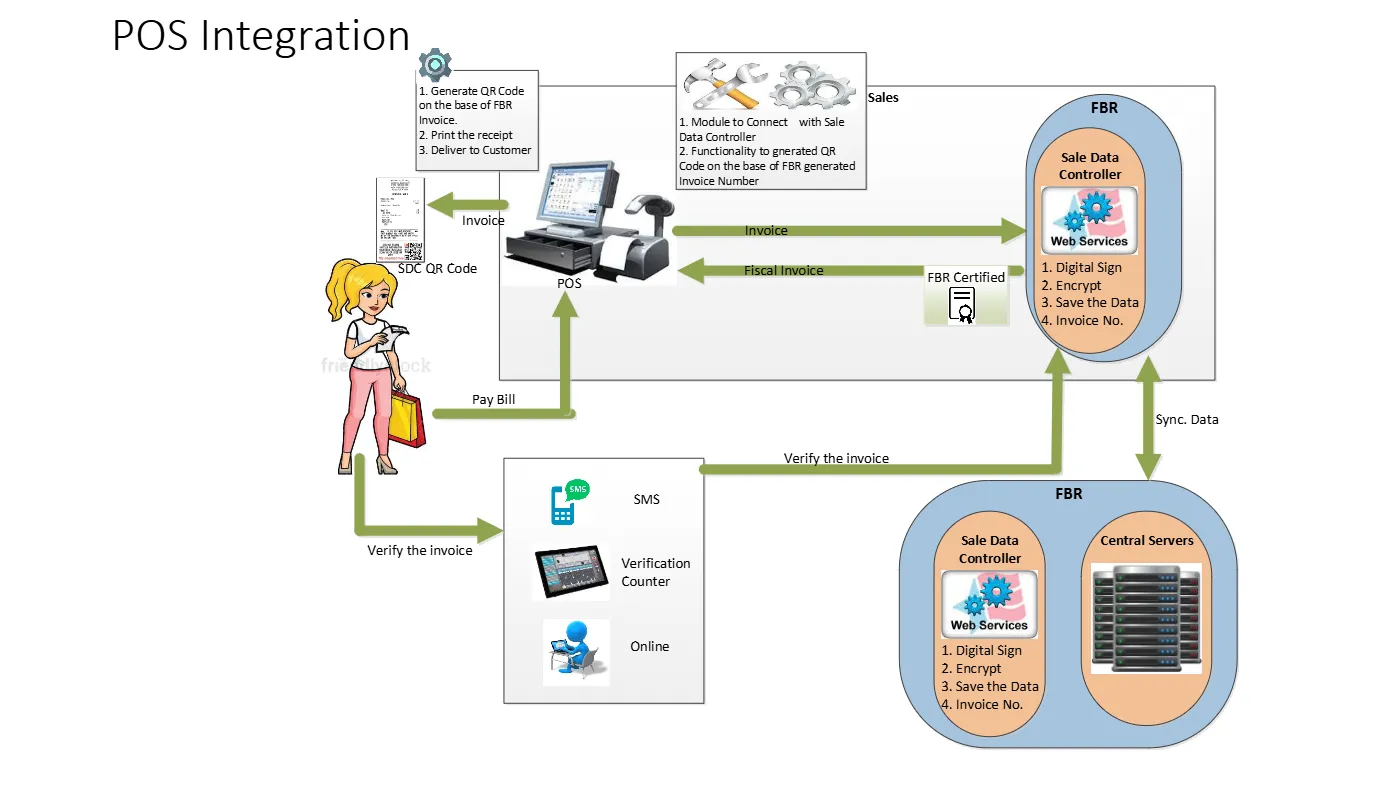
The process has three parts: register, connect and test, then go live and monitor. FBR's own "Fiscalization Solution for Retailers" presentation describes the technical flow; the rules in Chapter XIV of the Sales Tax Rules set the legal requirements.
- Get your registration in order. Make sure your NTN and sales tax registration are active and that every branch address is correct in your IRIS profile (IRIS is FBR's online tax portal). Done looks like: every branch you trade from appears in your profile. Common mistake: opening a new branch and forgetting to add it before it starts billing.
- Choose how you will integrate. The rules say integration must go through a licensed integrator, and PRAL (Pakistan Revenue Automation, FBR's IT company) acts as one free of cost on demand. Many retailers instead use a POS vendor that already supports FBR. Ask the vendor for its FBR-registered POS software number and two live retailers you can call. Common mistake: buying "FBR-ready" software that has never been tested in production.
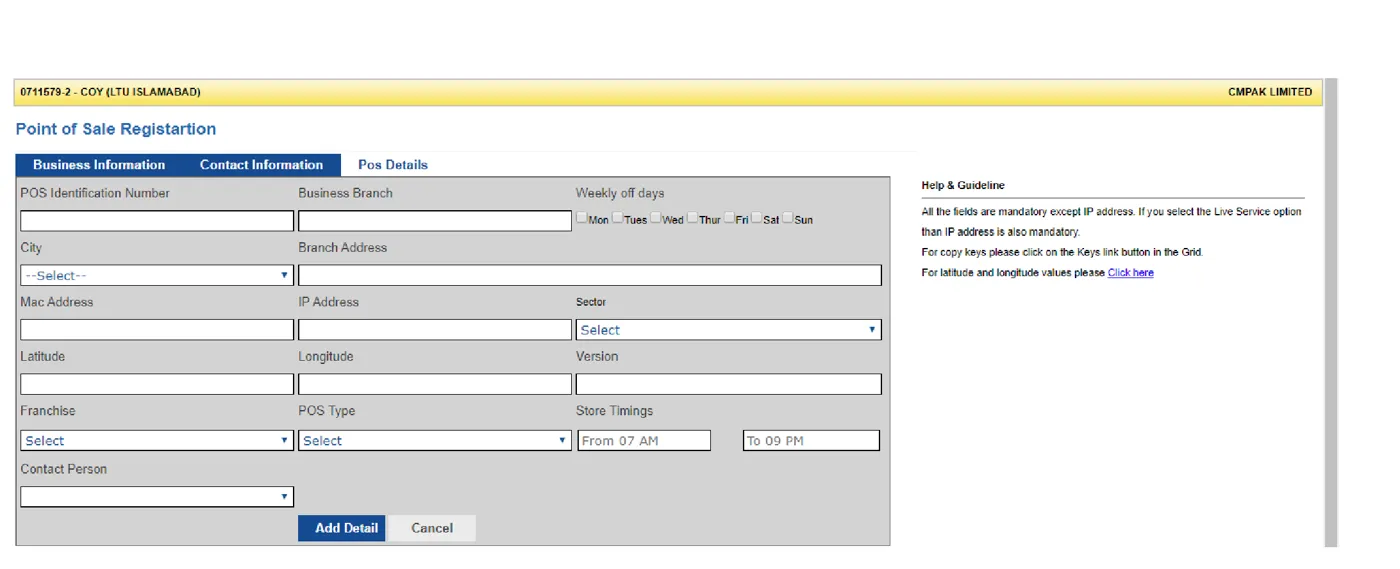
- Register each POS. FBR's registration form asks for a POS identification number, branch and address, city, MAC address, IP address, sector, latitude and longitude, software version, franchise, POS type, store timings and a contact person. The form's own help text says all fields are mandatory except IP address, which becomes mandatory if you choose the live service option. Done looks like: one registered POS ID for every till, including spare ones you switch on during sales.
- Install the fiscal component and connect your software. In FBR's design, a small FBR program (the fiscal data controller, often called the IMS) runs on the POS computer or local network. Your POS sends each invoice to it, it signs, encrypts and stores the data, returns an FBR invoice number, and syncs with FBR's central servers. Your software then prints the number, the QR code and the FBR logo.
- Test before you go live. FBR's presentation separates a test environment (register for test, install the controller, call the web service) from production. Test a normal sale, a sale with discount, a return or exchange, a credit card sale, a cancelled bill and an exempt item. Done looks like: each test receipt prints an FBR number and QR code that verify correctly.
- Go live branch by branch. Switch on one branch, verify receipts from every counter on day one, then move to the next. If you need more time, the Commissioner can allow extensions of up to 60 days in total, in 15-day steps, and you keep issuing paper invoices meanwhile.
- Put up the signboard and train staff. Display the "Integrated with FBR" board with the FBR logo and your POS software registration number. Train cashiers never to hand-write a bill and to report any "offline" warning to the manager immediately.
- Monitor every day. Check that each POS is connected at opening and closing, upload any offline invoices, and run the day-end closing. The rules require day, week and month closings and a log of every adjustment, change or cancellation.
Claim the POS tax credit
Section 64D of the Income Tax Ordinance gives a person who must integrate a tax credit for money spent on a POS machine: the lower of the amount invested or Rs 150,000 per machine, in the year it is installed and integrated. Keep the purchase invoices and ask your adviser to claim it.
What must FBR POS integration software do?
Your FBR POS integration software must do much more than print a QR code. Rule 150R of the Sales Tax Rules lists the functions, and the receipt must carry set details. Use this table when you assess a vendor or your own developer.
| Requirement (Sales Tax Rules, Chapter XIV) | What to check in your POS |
|---|---|
| Generate, record and store invoice data; issue invoices in the set format with a digital signature | Every bill, including returns and exchanges, goes through the system; no "manual bill" button |
| Send invoice data securely to FBR and receive the unique FBR invoice number | The number prints on every receipt and is saved against the bill in your database |
| Print a QR code based on the FBR invoice number | Customers can scan it in Tax Asaan and get "verified" |
| Encrypt and keep reported data so it cannot be changed | Old bills cannot be edited; corrections go through credit or debit notes |
| Close the day, week and month; log every change, cancellation and system event | An audit log you can export when the tax office asks |
| Send alerts to FBR about malpractice or errors | The vendor can explain what alerts its software sends |
| Mark offline invoices and upload them within 24 hours of restoration | A clear offline flag, a queue screen and automatic upload |
| Keep invoice records for six years | Backups and a retention plan, not just the cloud vendor's word |
| Online sales registered and invoiced automatically | Your website or app also gets FBR invoice numbers |
If your developer is building the FBR POS integration API connection in-house, get the current technical documentation from PRAL or your licensed integrator, not old forum posts; versions and endpoints change.
Budget for running costs too. FBR's booklet still lists S.R.O. 1279(I)/2021, a service charge of Re 1 per invoice issued through an integrated POS, collected from the customer and paid with the return. The retailer bears the cost of equipment and software, and FBR may require card or QR payment acceptance and CCTV at each counter, with recordings kept for at least a month.
What should I do when the internet or the FBR server is down?
Keep selling, but keep the evidence. Rule 150XC says invoices issued during any failure of the software, the internet or the power supply must be clearly marked as issued in offline mode and uploaded within 24 hours of the connection coming back.
- Use the POS offline mode, not paper. A good POS queues invoices locally and uploads them automatically when the link returns. Hand-written bills are much harder to defend.
- Report long failures within 24 hours. Rule 150XA requires you to tell FBR and your Commissioner within 24 hours of any operational failure, damage, disruption or tampering, and to report inoperative hardware or software with reasons and documentary evidence.
- Watch the 48-hour line. Under the 2025 sealing procedure, a branch that stays disconnected for more than 48 hours can be sealed. Keep a backup internet line (a 4G device is enough for a small shop) and a UPS for the POS computer and router.
- Write a one-page outage drill. Who checks the link, who calls the vendor, who emails the tax office, and where screenshots of error messages are saved.
Do not "pause" integration during rush hours
Some shops switch to offline mode on busy days to bill faster. Sales that never reach FBR are unreported sales: the tax officer can compute and recover the tax on them, plus penalties.
How does FBR POS invoice verification work for customers?
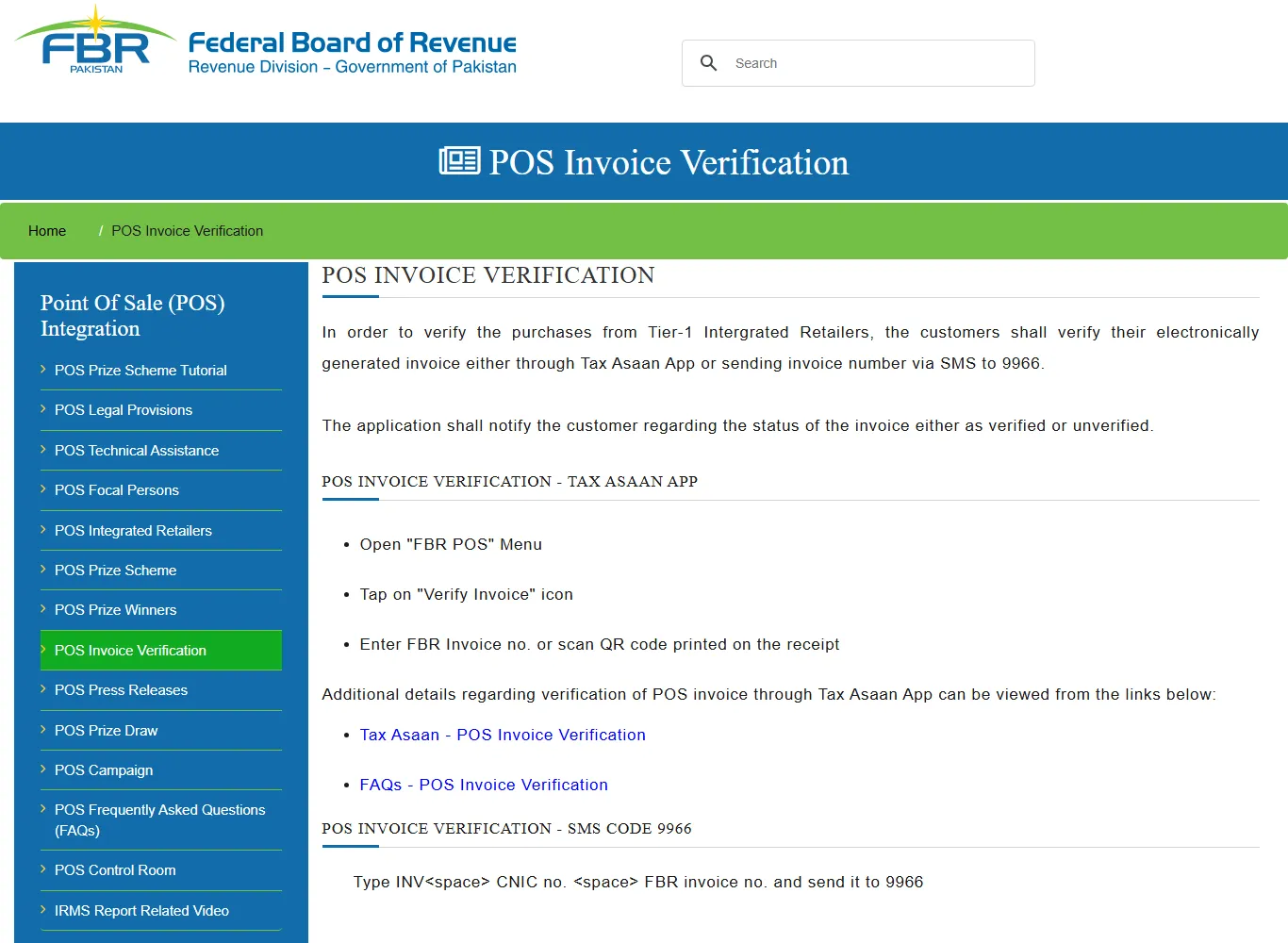
Customers can check any Tier-1 receipt in seconds, and FBR uses those checks to catch problem branches. According to FBR's verification page, a buyer can:
- open the Tax Asaan app, go to the FBR POS menu, tap Verify Invoice, then type the FBR invoice number or scan the QR code; or
- send an SMS to 9966 in the form
INV CNIC FBR-invoice-number(with spaces).
The app answers "verified" or "unverified". Under rule 150ZEL, a customer who gets an unverified result can report it with their CNIC, mobile number, IBAN, proof of digital payment, a photo of the receipt and a GPS-tagged photo of the shop. That report creates an alert in the Commissioner's IRIS login, and the customer may be entitled to a prize decided by FBR. FBR can also send mystery shoppers to buy from Tier-1 retailers and check their invoices. FBR has changed its prize scheme several times since 2021, so check the FBR POS pages for the current terms.
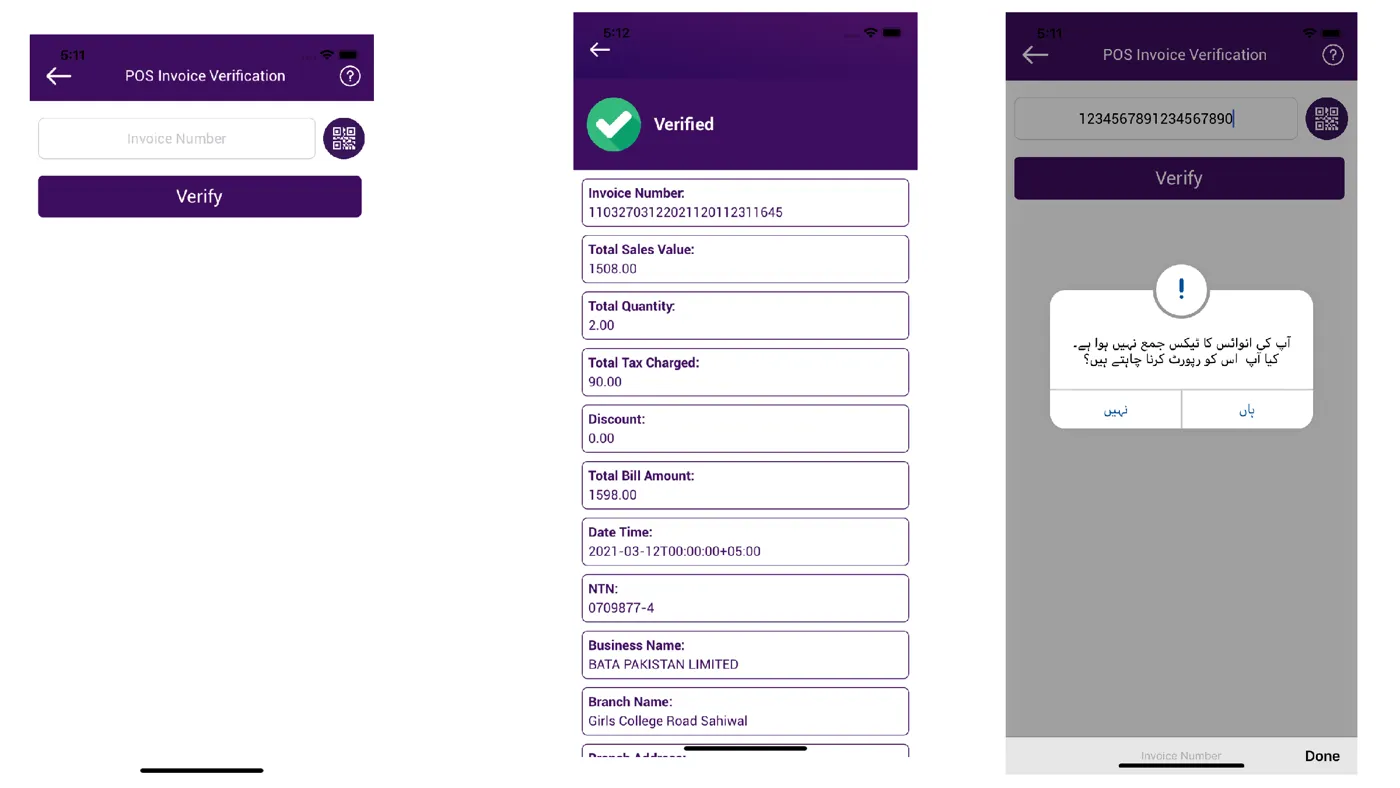
For you as the retailer, this means every unverified receipt is a complaint waiting to happen. Verify a sample of receipts from each counter every week, and fix any mismatch the same day.
Do restaurants and service businesses report to FBR or the provinces?
Often both. Sales tax on goods is federal, but sales tax on services such as restaurants is collected by the provinces, and each runs its own POS or e-invoicing system. A restaurant chain may need to connect to a provincial system for sales tax and, once the income tax rules are final, to FBR as well.
- Punjab (PRA): restaurants integrate with PRA's electronic invoice monitoring system (e-IMS). PRA said about 2,500 restaurants had registered by December 2024, Dawn reported.
- Sindh (SRB): SRB has its own POS integration rules for restaurants and other services.
- Khyber Pakhtunkhwa (KPRA): restaurants connect to the Restaurant Invoice Monitoring System (RIMS) using a Windows utility or a live API.
- Balochistan (BRA): BRA has said some services must already integrate their POS with its system under its 2022 rules.
- Islamabad: services in the capital territory fall under FBR, not a province.
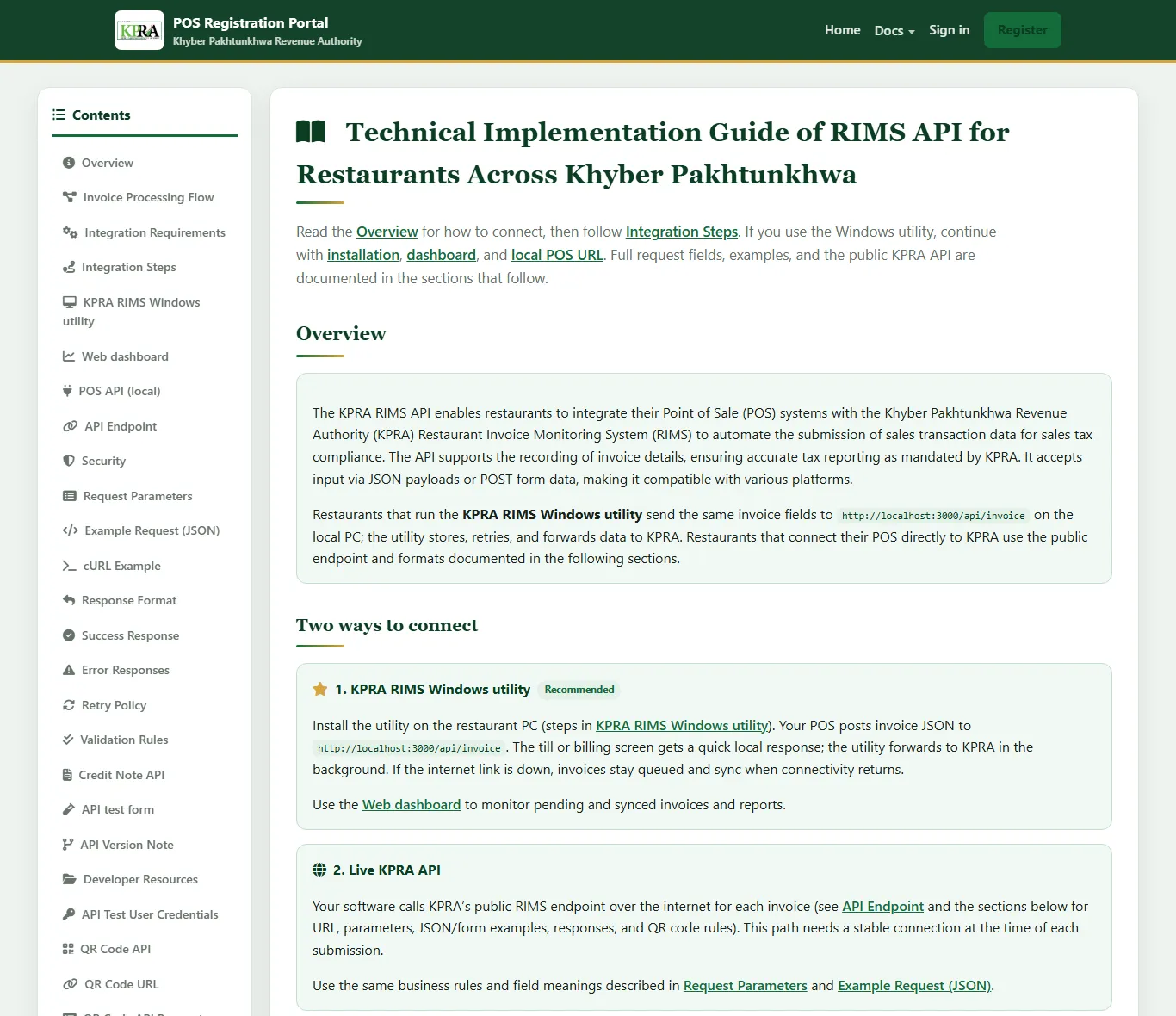
If you run restaurants in more than one province, choose a POS system in Pakistan that already supports each authority you deal with, and confirm the current rules with each authority. Our restaurant technology page explains how we approach multi-branch setups.
Mistakes to avoid and a 30-day plan
Mistakes we see most often
- Integrating the main counter but not the spare till, the handheld used during sales, or the website.
- Letting a branch stay offline over a long weekend and crossing the 48-hour line.
- Editing or deleting old bills instead of issuing a credit note for a return.
- Buying cheap software from a vendor who cannot name a licensed integrator or show its FBR-registered software number.
- Assuming FBR integration covers provincial sales tax on services, or the other way round.
Your 30-day plan
- Days 1-3: Confirm Tier-1 status for each branch with your adviser. List every billing point, including online.
- Days 4-7: Verify one receipt per counter in Tax Asaan. Pull 3 months of Annex-C and compare with POS sales.
- Days 8-12: Shortlist vendors or PRAL; ask for live references and their offline-mode demo.
- Days 13-18: Register missing POS machines, install the fiscal component, test the eight scenarios from the steps above.
- Days 19-24: Go live branch by branch; put up signboards; train cashiers.
- Days 25-30: Add a backup internet line and UPS, write the outage drill, set a weekly receipt-verification check and file your first return with matching Annex-C.
If your stock and accounts still live in Excel, integration is also a good moment to fix that. Our guide to moving from Excel to ERP covers it, and if you also sell to other businesses, read our FBR digital invoicing guide. For background on choosing between the two systems, see POS vs ERP.
Tax rules change every budget. Treat this guide as a map, not legal advice, and confirm your obligations with FBR or your tax adviser.
How Digitt Hype can help
Digitt Hype builds and connects POS and ERP systems for Pakistani retailers and restaurants. We can review your current setup against the checklist above, connect your POS or online store through PRAL or a licensed integrator, and set up offline handling and daily monitoring. See our POS and ERP service, or contact us with the number of branches and tills you run.
Frequently asked questions
Is FBR POS integration mandatory for small shops?
Only if the shop falls in the Tier-1 retailer definition or another class FBR notifies. That includes chain outlets, shops in air-conditioned malls, retailers whose electricity bills topped Rs 1.2 million in the last 12 months, bulk-importing wholesaler-cum-retailers and, after the Finance Act 2026, larger turnover thresholds. Confirm your status with your tax adviser.
How do I verify an FBR POS invoice?
Open the Tax Asaan app, go to the FBR POS menu, tap Verify Invoice and type the FBR invoice number or scan the QR code on the receipt. You can also SMS INV, your CNIC and the FBR invoice number, separated by spaces, to 9966. The reply shows whether the invoice is verified or unverified.
What happens if my POS goes offline?
You may keep billing in offline mode, but those invoices must be clearly marked as offline and uploaded within 24 hours of the connection returning. Report long failures to FBR and your Commissioner within 24 hours. Under the 2025 sealing rules, a branch disconnected for more than 48 hours can be sealed.
What is the penalty for not integrating with FBR POS?
As explained in FBR's Sales Tax Circular No. 1 of 2026, a person who fails to integrate faces up to Rs 1 million, then up to Rs 5 million if the failure continues a month later, plus possible sealing. A non-integrated Tier-1 retailer also loses 60% of adjustable input tax. Check the current law with your adviser.
Can I integrate my POS with FBR for free?
PRAL, FBR's IT company, acts as a licensed integrator and must provide integration services free of cost on demand under rule 150XF. You still pay for your own hardware, software and internet, and private POS vendors or other licensed integrators may charge fees within limits set by FBR.
Do restaurants need FBR POS integration or PRA integration?
Restaurant sales tax is a provincial matter, so restaurants usually integrate with PRA, SRB, KPRA or BRA depending on the province, while Islamabad falls under FBR. FBR's draft income tax rules of February 2026 would also bring restaurants into FBR integration once finalised.
Sources 10
- FBR: POS Booklet, Sales Tax Act and Rules provisions (May 2025)
- FBR: POS Invoice Verification
- FBR: Fiscalization Solution for Retailers (presentation)
- FBR: Draft S.R.O. 288(I)/2026, online integration of businesses (Income Tax Rules)
- Profit: FBR expands POS network, nearly 36,000 outlets linked (April 2026)
- Business Recorder: FBR explains higher penalties for digital non-compliance (June 2026)
- Customs Today: FBR tightens POS rules to seal Tier-1 retailer outlets (S.R.O. 164(I)/2025)
- PkRevenue: Sales Tax Circular No. 1 of 2026 penalties
- Business Recorder: Provinces ask FBR to hold SRO 288 (March 2026)
- KPRA: Technical Implementation Guide of RIMS API
Numbers not matching your dashboard?
That gap is worth an hour of someone’s time. Tell us what you see and we will look at it with you.