Quick answer
You can run a Shopify store in Pakistan: sign up, set PKR as store currency, add products and switch on cash on delivery under Settings, Payments. Shopify Payments is not available to Pakistani businesses, so card, wallet and Raast payments need a third-party provider. Shopify plans are billed in US dollars.
Key takeaways
- A Shopify store in Pakistan is possible, but Shopify Payments is not, so you need COD plus a local third-party gateway for online payment.
- Shopify plans are priced in US dollars, so expect a card payment abroad, which attracts advance tax under Section 236Y.
- Without Shopify Payments, customers can only check out in your store currency, so set PKR as the store currency and show other currencies for display only.
- Manual payment methods such as COD carry no Shopify transaction fee, but third-party gateways do, so add that fee to your margin maths.
- Pick Shopify, WooCommerce or a custom build by who will maintain the store, not by who has the loudest fans.
Can you run a Shopify store in Pakistan?
Yes, you can run a Shopify store in Pakistan, but with one big catch: the built-in payment system, Shopify Payments, does not support Pakistani businesses. You sell on Shopify's platform, take cash on delivery (COD) through Shopify's manual payment feature, and connect a separate local provider if you want cards, wallets or bank payments online.
That catch shapes every decision in this guide. A seller in the United States turns on Shopify Payments in two clicks. A seller in Lahore must choose a gateway, apply to it, test it and keep its fees in the price. Many first-time store owners discover this only after they have paid for a theme and a logo.
This guide follows the order in which you will meet the problems: the platform and plan, the payment gap, COD, currency, tax, and the choice between Shopify, WooCommerce and a custom ecommerce website in Pakistan. Every price and rule comes from a page we opened on 17 November 2026, with a link. Where we could not confirm a number, we say so instead of guessing.
If you are still deciding whether to sell online at all, read our e-commerce survival plan first. If you already know you want a store, keep reading.
How much does Shopify cost in Pakistan?
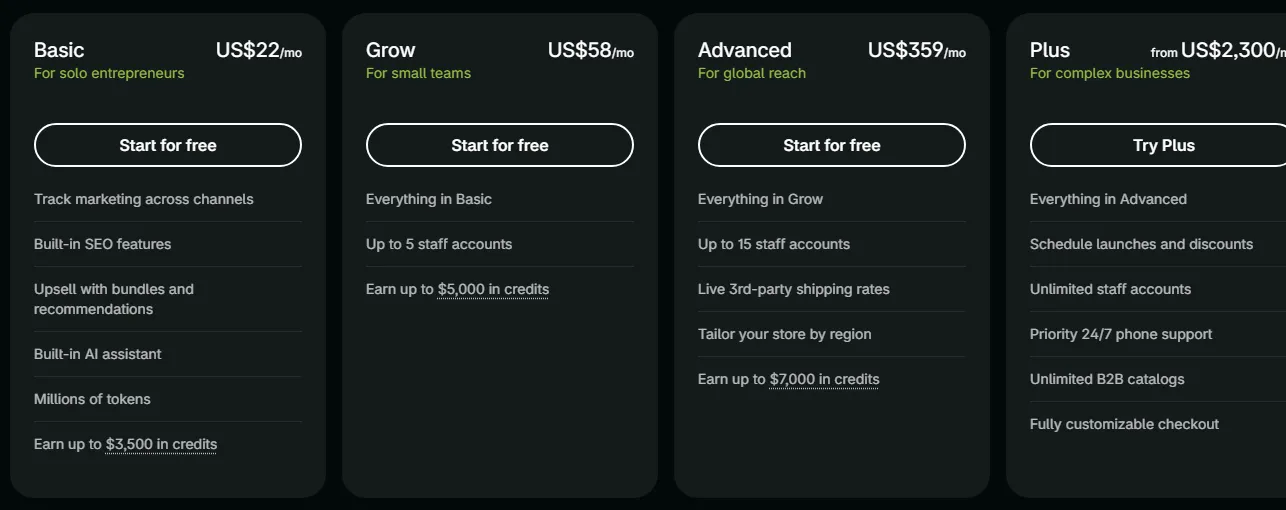
Shopify prices its plans in US dollars, and on 17 November 2026 its pricing page showed the Basic plan at US$22 a month when paid yearly, Grow at US$58 and Advanced at US$359, with Plus from US$2,300 a month. New stores were offered "3 days free, then US$1/month for 3 months".
Prices change by page and by day
When we read the same pricing page through a second tool, it returned different figures (US$19, US$49 and US$299 a month when paid yearly). Shopify can show different prices by region and test version. Open the pricing page yourself, tick monthly or yearly billing, and use the number your own checkout shows. Treat the table below as a guide to the plan ladder, not a quote.
Shopify's help centre says it offers local pricing for subscription plans "in some regions", and its page does not name Pakistan or the rupee. So assume you will be charged in US dollars on a card, and confirm that on the billing screen before you enter card details.
| Cost line | What you pay | What to check |
|---|---|---|
| Shopify plan | US dollars per month (see the pricing page) | Monthly or yearly billing, and what your bank turns it into in rupees |
| Theme | Free themes exist; paid themes are one-off or app-style purchases | Mobile speed on a 4G phone, not the demo on your laptop |
| Apps | Many are free to install with extra charges, some are monthly | Add up monthly app fees before installing; they stack |
| Payment gateway | The provider's MDR (the percentage it keeps per payment) | Plus Shopify's third-party transaction fee for your plan |
| Domain | Yearly fee to the domain seller | Shopify says you still renew a third-party domain with that seller |
| Design, setup and photos | Agency or freelancer fee | A scope list, not a one-line quote |
What about Shopify website development cost in Pakistan for the build itself? We cannot give you an honest average, because quotes depend on how many products you load, how much custom design you want, which apps you connect and how many payment and courier flows you need. Ask each developer for hours per task. Our guide to custom website cost in Pakistan and the website cost calculator show how to compare scopes.
Is Shopify Payments available in Pakistan?
No. Shopify's list of supported countries for Shopify Payments does not include Pakistan, and the page says that if your country is not listed you need a third-party payment provider. As of 17 November 2026 the list runs from Norway to Poland with nothing in between.
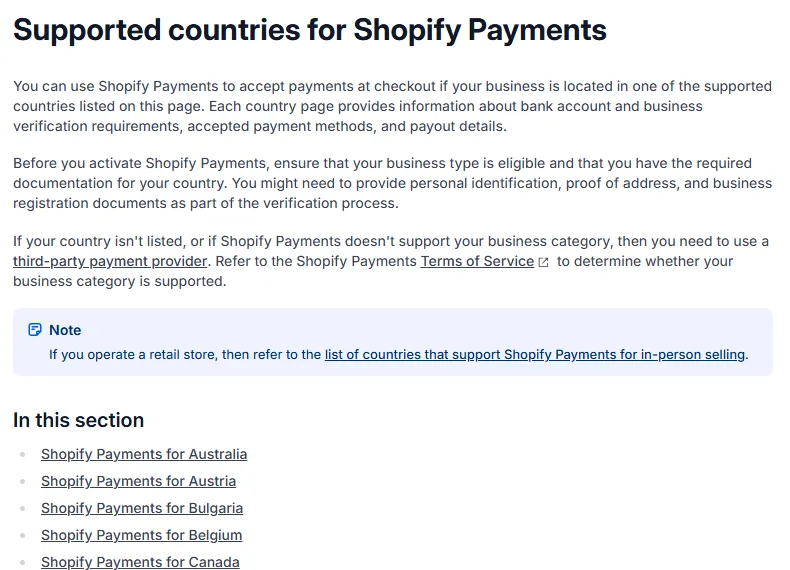
You may read blog posts or forum threads that say you can enable Shopify Payments by entering a US address. Do not do this. Shopify's help page on local pricing says it requires your store location to match your current jurisdiction, as stated in its Terms of Service. A false address puts your store and any payouts at risk of being closed, and you would find out at the worst possible time.
The same applies to Stripe. Its country list does not include Pakistan either, as we noted in our payment gateway guide for Pakistan. So the working setup is: Shopify as the store, a Pakistani provider as the payment layer.
Which payment gateway can you use with Shopify in Pakistan?
You can add a third-party payment provider from Shopify's Settings, then Payments page, and Pakistani sellers use providers that publish a Shopify integration. Check each provider's own page for Shopify support before you apply, because wallet brands and banks differ in what they offer.
What we could confirm on 17 November 2026:
- Safepay. Its website lists "Shopify hosted checkout" and "Shopify onsite checkout" among its e-commerce integrations, and shows Visa, Mastercard, Raast, Easypaisa, JazzCash and PayPak among accepted methods. Its pricing page publishes card, wallet and Raast rates (we list them in our payment gateway guide).
- PayFast. The Shopify App Store has at least one PayFast gateway listing, free to install with "additional charges may apply". We saw two PayFast listings with different developer names, so read the developer details on the app page before installing.
- JazzCash and Easypaisa. We could not confirm an official Shopify app for either. Some third-party vendors sell custom-built connectors. Ask the wallet company in writing whether it supports your store setup and who maintains the connector.
An aggregator (a licensed company that gives you one integration for cards, wallets and bank payments) is usually the simplest route for a new store. The State Bank of Pakistan publishes the list of authorised payment system operators, and our gateway guide shows which providers appear on it. Whatever you pick, ask four questions: what is the MDR for each method, is tax included, how many days until settlement, and what does a refund or dispute cost.
Add Shopify's own fee to the maths
Shopify says third-party transaction fees apply to payments processed through outside gateways. The help pages we opened did not state the percentage, so open the pricing page for your plan and write the number next to the gateway's MDR. Your real fee is the sum of both.
How do you set up cash on delivery on Shopify in Pakistan?
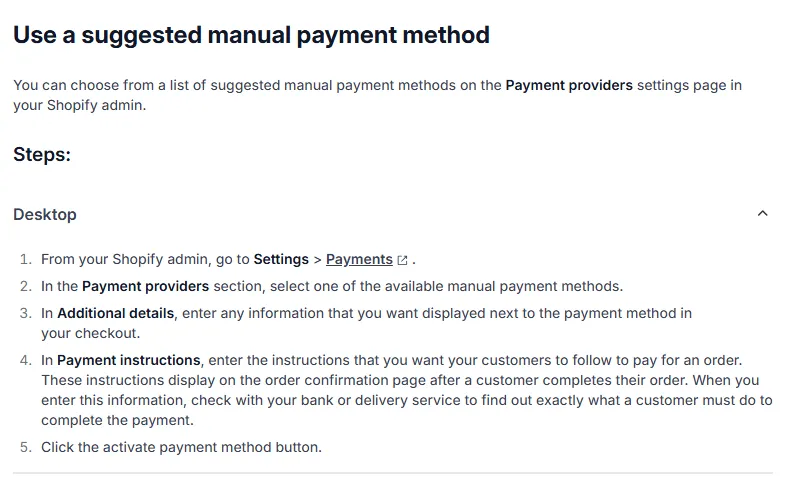
Go to Settings, then Payments, and add a manual payment method. Shopify lists cash on delivery as a common manual method, charges no third-party transaction fee on it, and marks every COD order as unpaid until you confirm the money arrived.
That is the whole of cash on delivery Shopify Pakistan setup from Shopify's side. The real work is what happens around it:
- Activate the method. In Shopify admin go to Settings → Payments. In the Payment providers section pick the suggested cash on delivery method, or use Manual payment methods → Create custom payment method. Note that Shopify reserves names such as "Cash on Delivery (COD)" for its own suggested method, so a custom one needs a different name such as "Pay when parcel arrives". Done looks like: the method appears at checkout. Common mistake: typing instructions only in English.
- Write short payment instructions in Roman Urdu and English. Shopify shows the instructions on the order confirmation page. Tell the buyer to keep the exact amount ready, to answer your confirmation call, and what happens if they refuse the parcel.
- Confirm every COD order before dispatch. Call or send a WhatsApp message. Orders that the buyer never confirms are the main source of refused parcels. Our guide on fake COD orders and Conversions API explains how to stop them polluting your ad data.
- Mark orders as paid only when the courier remits. Open the order, choose the option to mark it as paid after you receive the money, then fulfil it. Do not mark it paid at dispatch, or your reports will show cash you do not hold.
- Offer a prepaid option above COD. Once your gateway works, list wallet, Raast or card payment first and COD last, with a small prepaid incentive such as free delivery.
One tax detail matters for your margins. Dawn reported in August 2025 that couriers deduct 2% on COD payments before remitting them, while payment intermediaries withhold 1% on digitally paid e-commerce orders. Confirm the current position and how it appears in your tax return with a tax adviser or FBR.
How do you set up PKR currency on a Shopify store?
Open Settings, then General, and under Store defaults choose Change store currency. Shopify's help page says that without Shopify Payments, customers can check out only in the currency you set there, so a Pakistani store that sells in rupees should make PKR the store currency from day one.
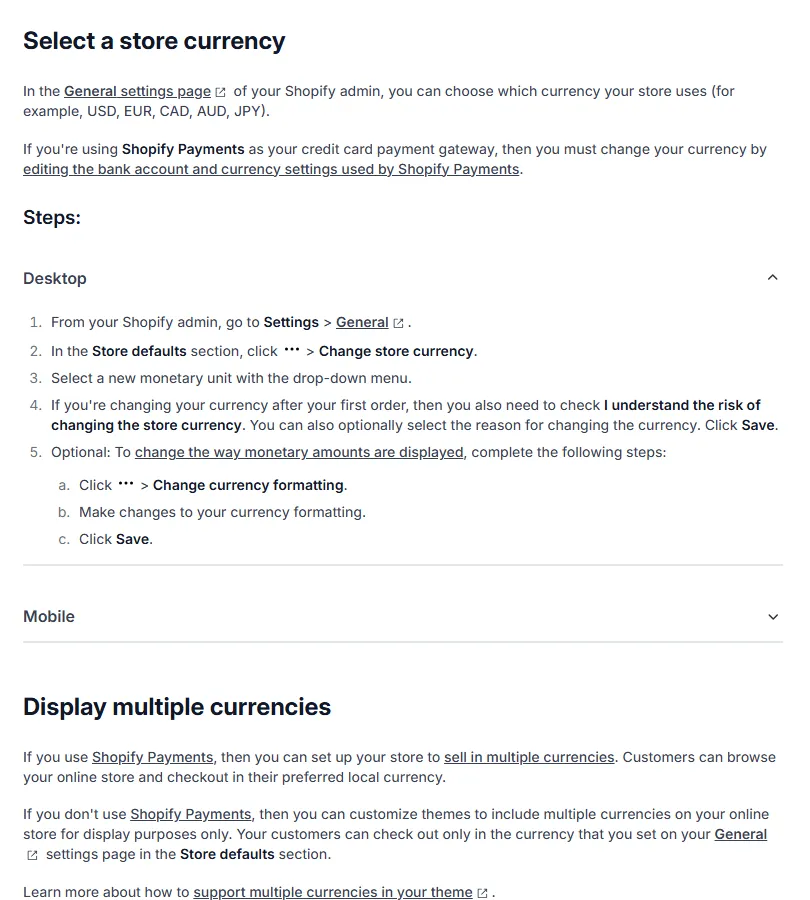
Two practical points follow:
- Set the currency before your first order. If you change it after the first order, Shopify makes you tick a box that says you understand the risk of changing the store currency.
- Selling to Pakistanis abroad is harder. A theme can show dollars or pounds for display, but the buyer still pays in rupees. If overseas customers are your main market, you need a gateway that accepts international cards and settles into a rupee account, and you should ask the provider how it handles currency conversion.
Also use this moment to fill in your legal business name and address, store time zone, weight unit and store password. Shopify's help page lists them as the details to add before you start building.
What taxes apply to a Shopify store in Pakistan?
Several taxes can touch an online store, and they depend on your registration, your province and how you are paid. We describe the ones we could source; confirm every point with FBR, your provincial revenue authority or a tax adviser, because this is not tax advice.
- Advance tax on your Shopify subscription (Section 236Y). Shopify bills in US dollars, so paying it with a local card is a card payment abroad. FBR's rate card for tax year 2027 lists Section 236Y at 0.5% for people on the Active Taxpayers List and 1% for others, after the Finance Act 2026 cut the rates from 5% and 10%. Our guide on paying for Facebook ads from Pakistan explains the same rule with a worked example. Your bank's own cross-border fee is often larger than the tax.
- Withholding on online sales. As noted above, Dawn reported 1% on digitally paid e-commerce payments and 2% on COD remittances. Keep your gateway and courier statements.
- Registration. Our gateway guide notes that online sellers now need income tax and sales tax registration. Ask an accountant whether your turnover and province require registration, and which authority collects sales tax on your goods.
- Tax shown to customers. Decide whether your PKR prices include sales tax and say so on product pages, in a policy page and on invoices.
The lesson is simple: put these lines into your margin sheet before you set prices. A COD deduction plus a gateway fee can turn a thin margin into a loss.
Shopify vs WooCommerce vs custom: which is right for your store?
Choose Shopify if you want a hosted store that you can run without a developer, WooCommerce if you want full control on your own hosting, and a custom build if your business has unusual rules. In Pakistan the deciding factors are payments, local couriers and who will fix things at 10 pm.
| Question | Shopify | WooCommerce | Custom build |
|---|---|---|---|
| What is it? | Hosted store platform billed monthly in USD | Open-source plugin on WordPress; core is free to download | Software written for your business |
| Who looks after hosting and security? | Shopify | You or your host | You or your developer |
| Local payments (wallets, Raast) | Third-party apps or providers | Provider plugins, check update dates | Direct API integration |
| Monthly cost pattern | Plan fee plus app fees plus gateway fee | Hosting, domain, paid extensions, gateway fee | Build cost, hosting and support contract |
| Best for | New brands, fast launch, small teams | Sellers who know WordPress or want low platform fees | Marketplaces, subscriptions, custom pricing or ERP links |
| Main risk | Dollar billing; app fees stack up | Outdated plugins and slow hosting | Depends on one developer unless documented |
WooCommerce's own page describes it as an open-source platform powered by WordPress with no monthly platform fee, while it also sells paid extensions and points merchants to hosting. So "free" means the software, not the store. Our custom website cost guide covers the third column.
If you also sell on a marketplace, read our comparison of a Daraz seller account versus your own online store before you decide how much to put into any single channel.
How do you launch a Shopify store in Pakistan, step by step?
Launch in this order: account and business details, currency, products, policies, COD, a local gateway, shipping, domain and a test order. Skipping the order is what causes most failed launches.
- Create the account. Start from Shopify's sign-up page. Shopify says that to open an account you must give your full legal name, business address, an active phone number and a valid email address, and that it may ask for more to verify identity. Done looks like: you can log in to Shopify admin and see your
myshopify.comaddress. Common mistake: not recording that address; Shopify says to keep it safe because support and apps use it. - Set store defaults. In Settings → General enter the business name and address, time zone and currency (PKR). Do this before adding products.
- Add products with real photos. Write titles customers search for, add sizes and colours as variants, and add the weight so shipping rates work. Compress images so pages open fast on 4G.
- Publish your policies. Write returns, refunds, delivery times and privacy pages. A payment provider will check for them before approving your account.
- Turn on COD. Follow the steps in the COD section above.
- Apply to a gateway. Prepare CNICs, NTN or company registration, a business bank account and your live store. Allow weeks, not days. Install the provider's Shopify app only after approval, and test in the provider's sandbox (a test mode that uses fake money) first.
- Set shipping. In Settings → Shipping and delivery add rates by city or weight, and agree COD handling, return charges and remittance days with your courier in writing.
- Connect your domain. If you buy a domain elsewhere, Shopify says you update the DNS records at that provider, changes usually take effect within two hours but can take up to two days, and you keep renewing the domain with the seller. Done looks like: your own address loads the store with a padlock.
- Place test orders. Order one COD item, one prepaid item and one refund. Check the emails, the order status and what the courier receives.
- Install tracking last. Add the Meta Pixel and server-side events only after checkout works, so test orders do not teach your ads the wrong thing.
What mistakes should you avoid with a Shopify store in Pakistan?
Most losses come from five avoidable mistakes: assuming Shopify Payments will work, choosing a gateway by headline rate, leaving COD unconfirmed, ignoring tax lines and stacking apps. Each is cheap to fix before launch.
- Buying a premium theme before checking payments. Prove that a gateway will approve your business first.
- Using a false US address to unlock Shopify Payments. It conflicts with Shopify's location rule and puts the store at risk.
- Making COD the default for everything. Customers pick the first option shown. Put prepaid first.
- Installing ten apps on the free trial. Each can add a monthly fee and slow the store. Keep only apps that solve a problem you can name.
- Ignoring Urdu and Roman Urdu. Many buyers type addresses and questions in Roman Urdu. Make the address field forgiving and answer messages in the buyer's language.
- Skipping order confirmation. Unconfirmed COD parcels are refused more often and cost you the courier fee both ways.
Shopify store launch checklist you can copy
Copy this list into a spreadsheet and tick it off over 30 days. Week one is decisions, week two is build, week three is payments and week four is testing.
- Week 1: choose Shopify, WooCommerce or custom, and write a one-page scope.
- Week 1: confirm the Shopify plan price on the live pricing page and the card you will pay with.
- Week 1: gather CNICs, NTN or company papers and a business bank account.
- Week 2: set PKR as store currency before any order.
- Week 2: add 10 to 20 products with real photos, weights and variants.
- Week 2: publish returns, refund, delivery and privacy pages.
- Week 3: activate COD with Roman Urdu and English instructions.
- Week 3: apply to two payment providers, compare MDR, tax, settlement days and refund fees in writing.
- Week 3: agree courier COD terms and remittance days.
- Week 4: connect your domain and check the padlock.
- Week 4: run test orders: COD, prepaid, failed payment, refund.
- Week 4: set up Pixel and server-side events, then a small ad test.
- Ongoing: reconcile gateway and courier statements weekly, and keep a margin sheet with all fees and tax lines.
How Digitt Hype can help
Digitt Hype is a web development company in Pakistan that builds and fixes online stores on Shopify, WooCommerce and custom code. We can scope your store, connect a local payment gateway, set up COD confirmation and tracking, and document the setup so you are not tied to one developer. See our e-commerce industry page for what we do for online sellers, then contact us with your product list and target launch date for a scope and quote.
Frequently asked questions
Is Shopify available in Pakistan?
Yes, you can open and run a Shopify store from Pakistan. What is not available is Shopify Payments, because Pakistan is not on its supported-country list as of 17 November 2026. You take COD through manual payments and connect a third-party provider for online payments.
Which payment gateway works with Shopify in Pakistan?
Providers that publish a Shopify integration. As of 17 November 2026, Safepay lists Shopify hosted and onsite checkout, and the Shopify App Store has PayFast gateway listings. Confirm methods, fees and settlement time with the provider before applying, and check its app developer details.
How do I enable cash on delivery on Shopify in Pakistan?
In Shopify admin go to Settings, then Payments. Pick the suggested cash on delivery method under Payment providers, or create a custom manual method, add instructions and activate it. Orders show as unpaid until you mark them paid after the courier remits the cash.
How much does a Shopify store cost in Pakistan?
Shopify plans are billed in US dollars; its pricing page showed Basic at US$22 a month on yearly billing on 17 November 2026, but figures can vary by region. Add theme, apps, gateway fees, domain and build costs. Ask developers for hours per task, not one lump sum.
Can I use PKR as my Shopify store currency?
Yes, you can set the store currency under Settings, General, Change store currency. Without Shopify Payments, customers can check out only in that currency, and other currencies are display only. Set it before your first order, because changing it later carries a risk warning.
Is Shopify better than WooCommerce in Pakistan?
Neither is better for everyone. Shopify is hosted and quicker to launch but bills in dollars and adds app fees. WooCommerce has no monthly platform fee but needs hosting, updates and paid extensions. Choose by who will maintain the store and which local payment plugin you need.
Do I pay tax on my Shopify subscription from Pakistan?
Paying Shopify with a local card is a card payment abroad, which attracts advance tax under Section 236Y. FBR lists 0.5% for active taxpayers and 1% for others for tax year 2027. Your bank may add its own fee. Confirm your position with FBR or a tax adviser.
Sources 12
- Shopify: Pricing plans (captured 17 November 2026)
- Shopify Help Center: Supported countries for Shopify Payments
- Shopify Help Center: Manual payment methods
- Shopify Help Center: Third-party payment providers
- Shopify Help Center: Adding business settings for your store
- Shopify Help Center: Local pricing for your Shopify subscription plan
- Shopify Help Center: Connecting a third-party domain
- Safepay: payment gateway for Pakistan
- Shopify App Store: PayFast Gateway App
- WooCommerce: About WooCommerce
- FBR: Withholding tax regime rates card (tax year 2027)
- Dawn: Procedures notified for collection of tax on digital transactions (5 Aug 2025)
Numbers not matching your dashboard?
That gap is worth an hour of someone’s time. Tell us what you see and we will look at it with you.